Reforge has joined Miro ↗
In the September edition of Inside Reforge, we introduce some awesome new features like in-line suggestions, document drafting, listening mode, upcoming events, and more.
Welcome to the September edition of Inside Reforge, a monthly product update roundup designed to inform members about updates and teach you about our product development process.
This month’s updates are all about getting you the expertise you need, when you need it. When time is short, and you need immediate solutions, these updates provide expert-backed advice to help you tackle problems quickly and navigate Reforge more efficiently.
You can read this article, or watch the video below to see our team demo the new features. Let’s dive in.
In-Line Suggestions Powered by the Extension (In Notion, Google Docs, and Microsoft Word)
What It Is
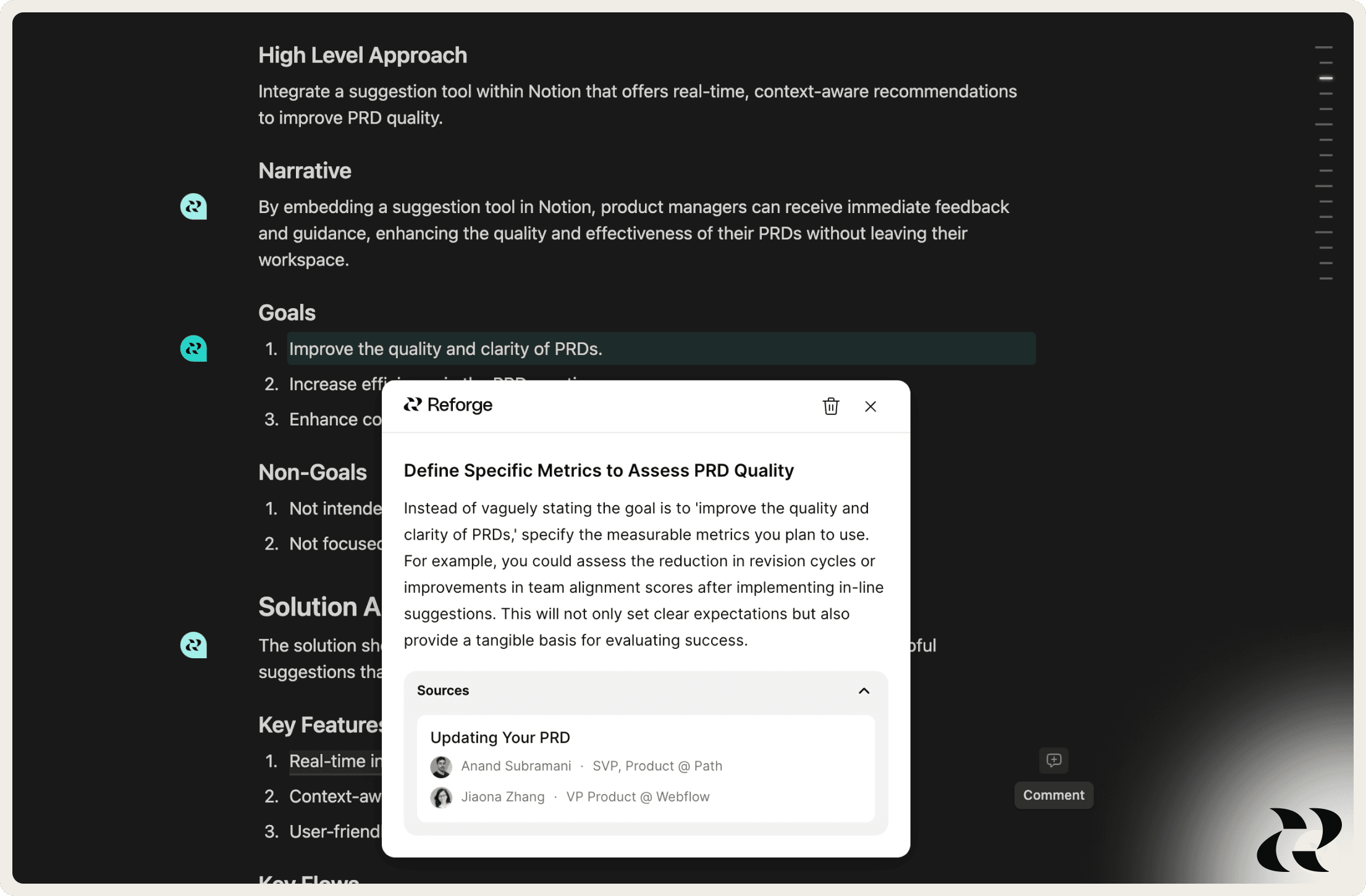
The Reforge Extension will now give you in-line suggestions on select types of documents and will soon be available for all documents.
Why We Built It
In-line suggestions help users focus on refining the most impactful parts of their documents. We don’t just highlight areas for improvement; we offer expert-backed ideas to consider implementing.
How We Built It
The Extension reads and classifies the document type, referencing top Reforge materials from guides, artifacts, and courses. It conducts a holistic analysis of the document for context, then assigns targeted feedback to specific sections. A pop-up window appears adjacent to the content, offering LLM-driven feedback with direct links to relevant Reforge materials for deeper insights.
Who Built It
Hat tip to Vlad, Dan, Archie, Eddie & Ben.
Draft Documents, Get Strategic Advice, or Get Course Suggestions — All from Your Homepage
What It Is
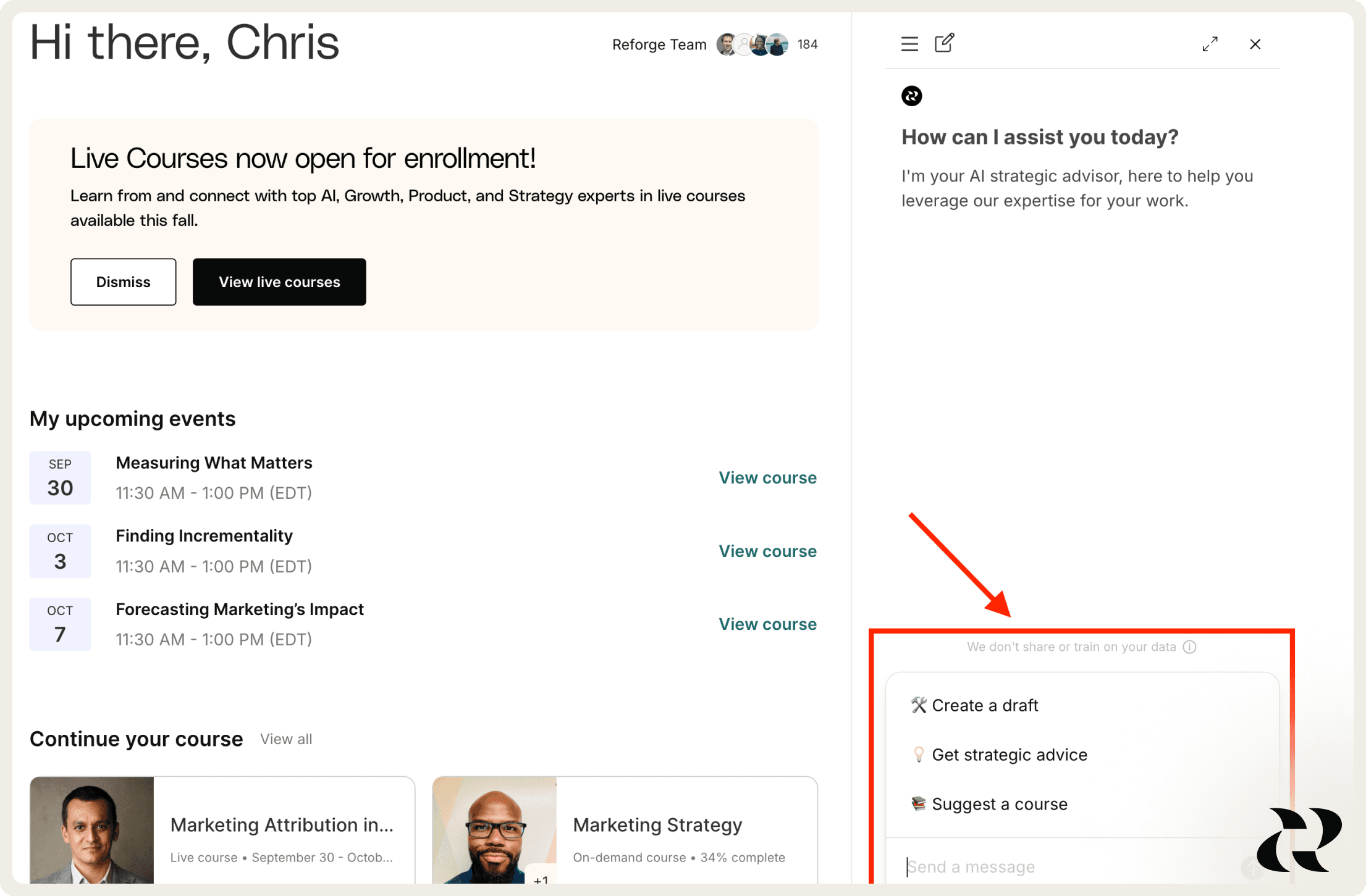
We’re making it even easier for you to use Reforge to produce higher-quality work daily. When you log in to your homepage, you can draft your work deliverables fast with up to 12 document types to choose from, find the right course, or get instant strategic advice to help you make more informed decisions. Soon, you'll be able to draft up to 30 different types of documents.
Why We Built It
Our goal is simple: to make your homepage incredibly useful. Now, it’s easier than ever to leverage our AI for faster, smarter decisions and seamless navigation. As one user put it, “Having current courses, recently viewed content, and the AI bot all in one screen is great—no scrolling needed.
How We Built It
We leverage LLMs that along with custom system prompts, can parse Reforge’s entire knowledge base to tailor documents and advice based on you and your unique context. We created the collapsible side panel on your homepage so that it can be a place where you immediately jump into whatever you’re working on, whether to take a course, find inspiration, or use Reforge to advise you on your day-to-day work.
Who Built It
Hat tip to Gianna, Jacob, Hogan, Shir, and Ali A.
Listening Mode is now Live in Select Courses and Guides
What It Is
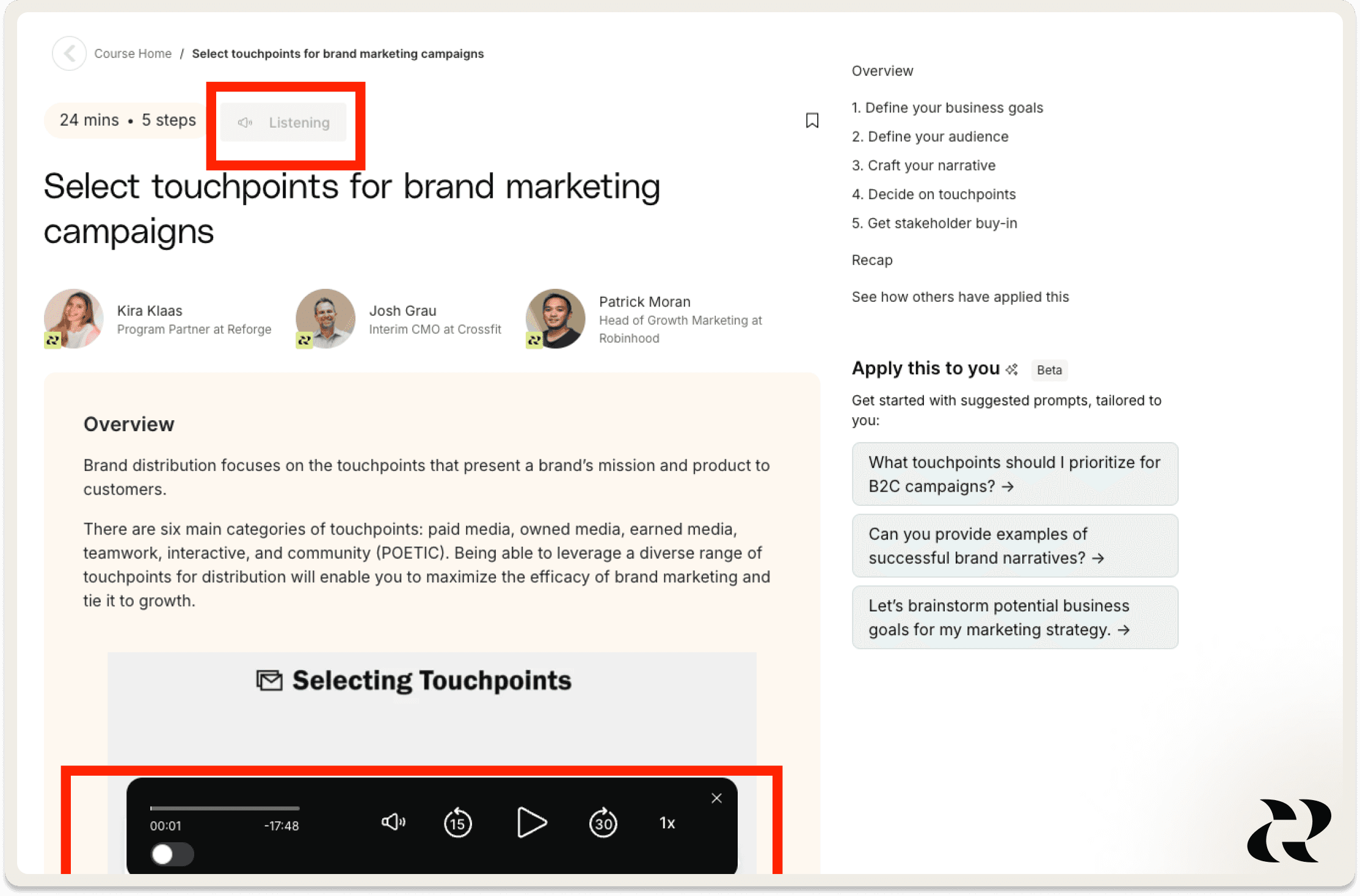
We are rolling out the ability to “listen” to our courses and guides so you can fit learning into your schedule whether you’re driving the kids to school, walking the dog, or getting some exercise.
Why We Built It
This has been a feature that members have asked for for a long time. Reforge courses are packed with great insights, but our members don’t want to have to sit in front of a computer each time they want to learn. But with listening mode, which works on desktop and mobile, you can make progress on your course no matter where you are.
Guides that have listening mode will have a play icon at the top of the page. To start listening, simply click the icon.
How We Built It
We take the content from each guide to generate a script, which we then feed into a third party tool to generate an audio file.
Who Built It
Gwen, Angela, Lori, Tess
The Reforge Extension Now Works in Microsoft Word Online
What It Is
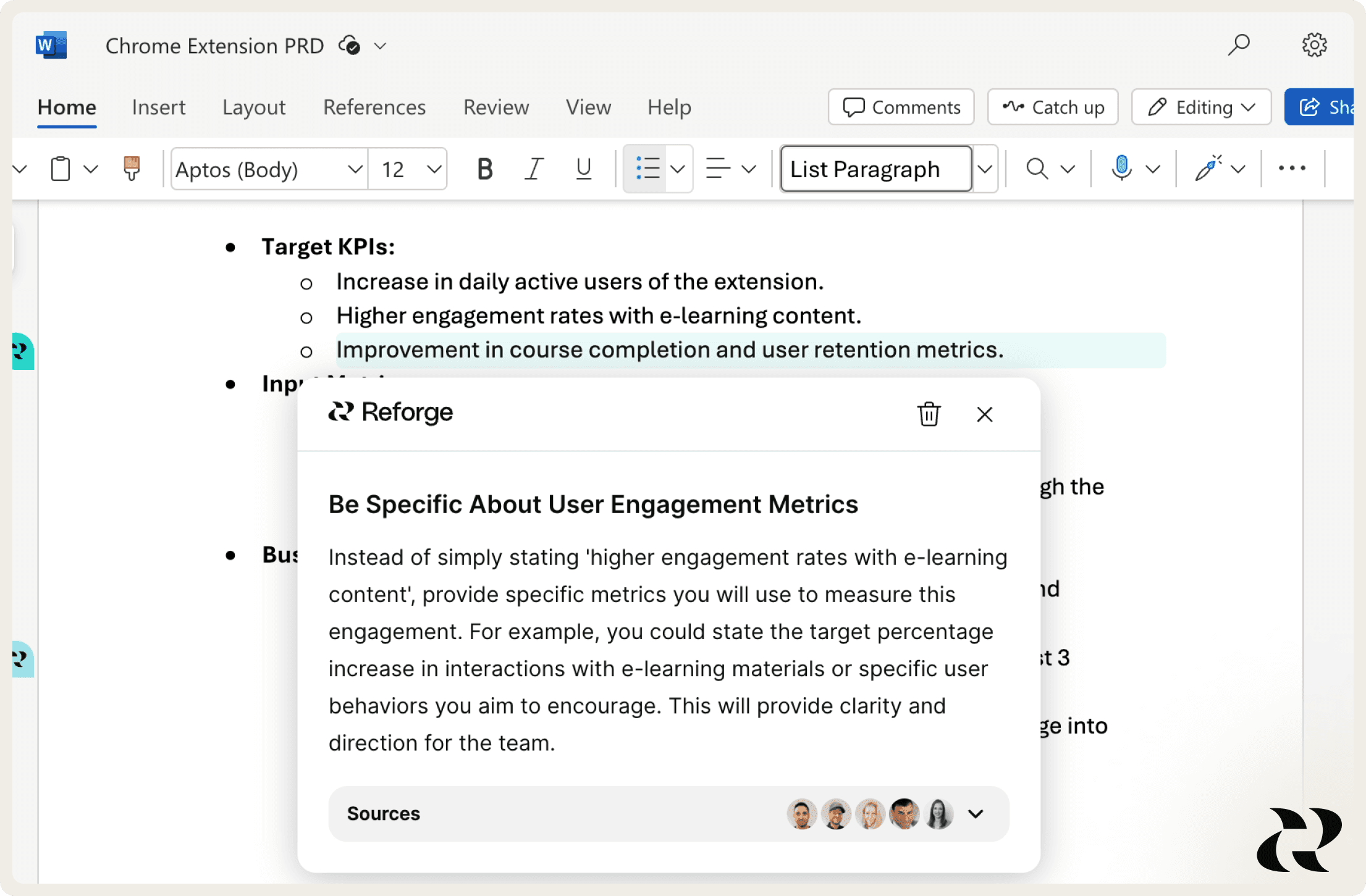
The Reforge Extension is now available in Microsoft Word online.
Why We Built It
Our users work in various tools, with Microsoft Word being one of the most common. Now, they can access the power of the extension right where they draft their documents.
How We Built It
We've brought the Extension you love from Google Docs, Notion, and more to Microsoft Word’s browser application. Now, you can draft documents, receive strategic and tactical feedback, and draw inspiration from the work of top operators—all within Word. For more on how we built the Extension, click here!
Who Built It
Hat tip to Vlad, Dan, Archie, Ben, and Eddie.
Allowing Multiple Administrators for Our Larger Team Plans
What It Is
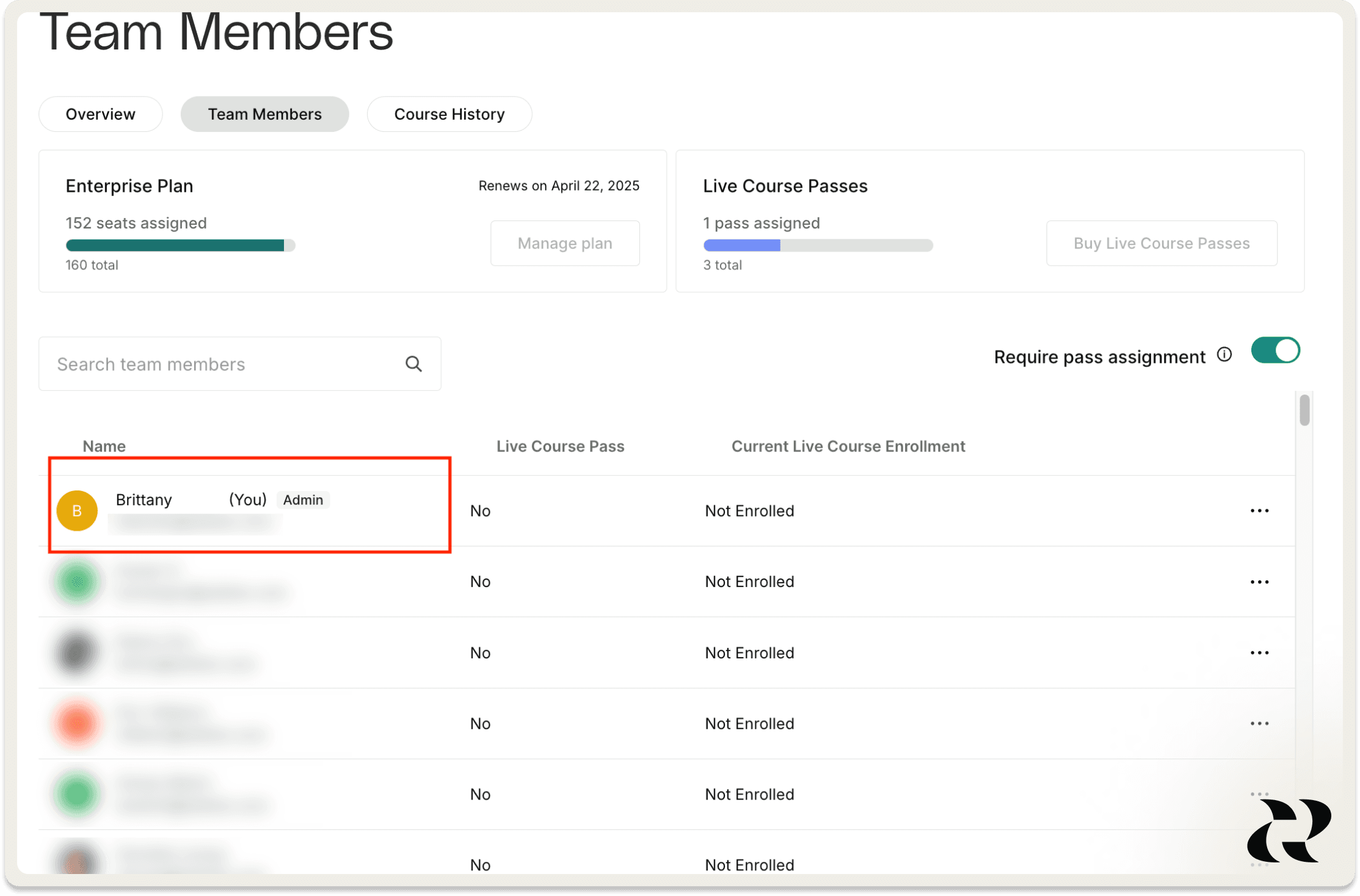
We introduced the ability to enable multiple admins on our larger team subscriptions to make it easier for our customers to manage.
Why We Built It
Managing all seats was a challenge for Team Subscription owners, especially with larger subscriptions, often causing delays in assigning seats or course passes. Allowing multiple admins simplifies team management and reduces bottlenecks.
How We Built It
We enabled additional permission capabilities onto existing roles, instead of adding new roles, to allow us to move quickly (allowing us to avoid any impacts to the various analytics/automations set up with the existing roles). A more thorough evaluation of our roles/permissioning will be something to tackle in the future to allow for more fine-grained controls for our team owners.
Who Built It
Hat tip to Adam, Tara, and Ian.
Upcoming Events On Your Homepage
What Is It
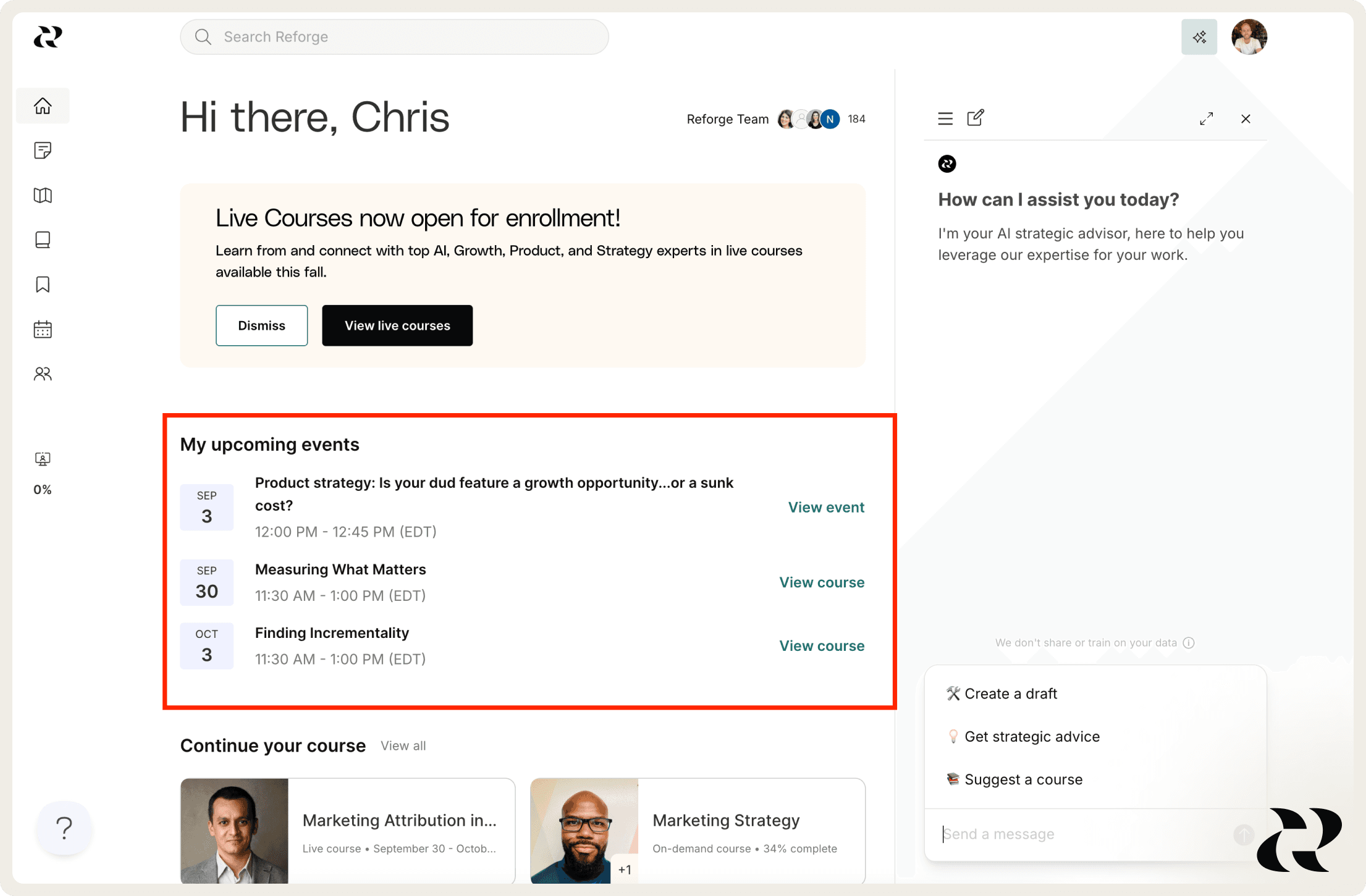
We’ve added an 'Upcoming Events' section to your homepage, showcasing the next three events you’ve registered for.
Why We Built It
Our goal is to make your homepage incredibly useful. Now, your registered events—whether part of a live course or standalone—will be front and center on your homepage to make it easier to keep an eye on what’s coming up.
Who Built It
Hat tip to Bogdan, Wendy, Aaron, Jesse, Ashlee, Alexis, and Heather.
Deeper Personalization on the Extension for Better Results
What It Is
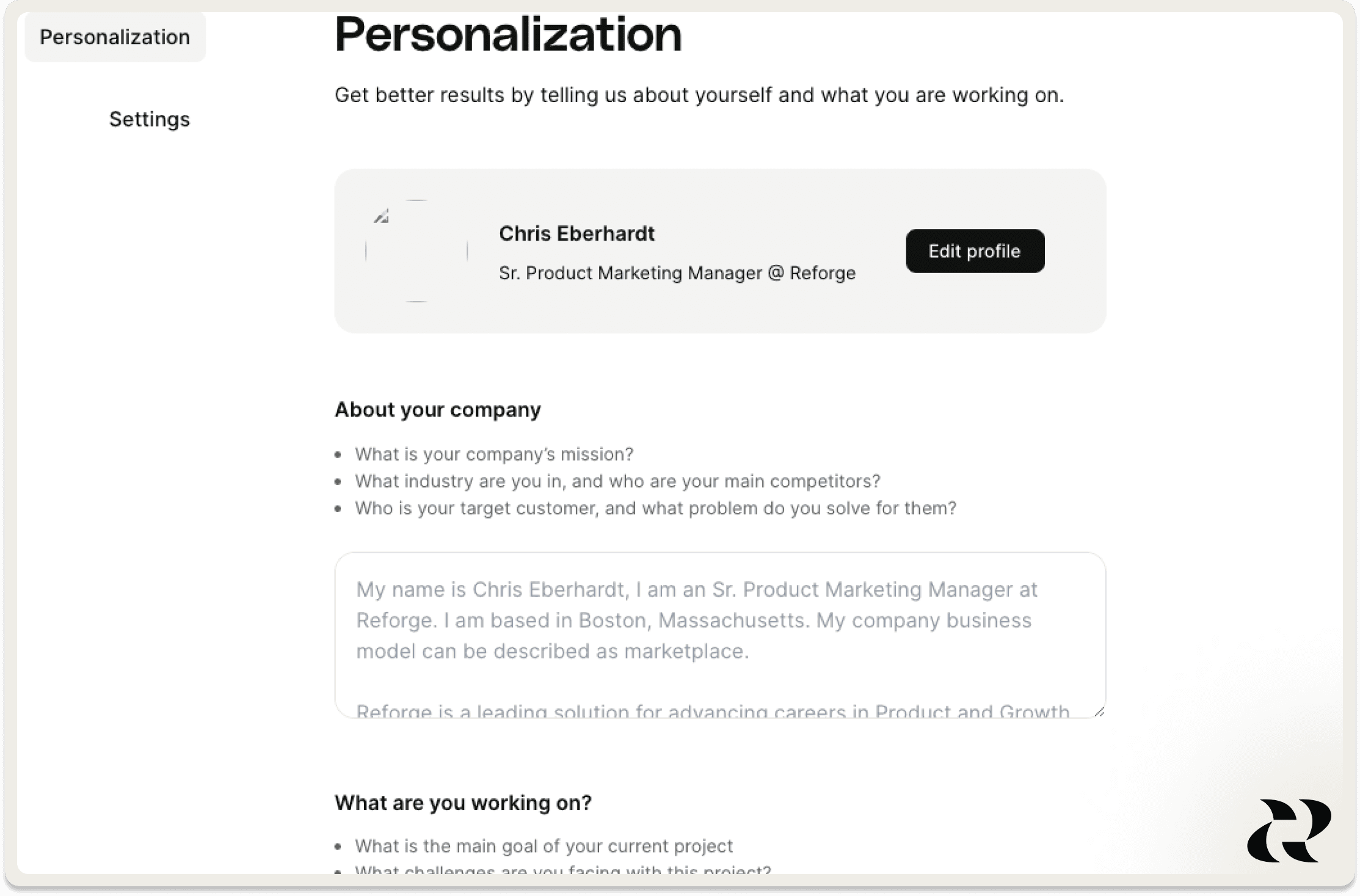
We’ve introduced deeper personalization capabilities on the Extension. Let us know what you’re working on, and we’ll tailor our drafts, feedback and suggestions to your specific use-case. Simply open the extension in any platform and click the Reforge logo to update your settings.
Why We Built It
When you receive feedback from colleagues or managers, they bring valuable context about the project, scope-of-work, and strategic goals. By providing us with similar context, we can offer feedback that's even more tailored and effective!
How We Built It
Using Adaline, we tested how various variables influence the quality of our feedback. A key factor was whether the LLM had context on your work, similar to how an advisor or senior leader would understand the background before giving feedback. We've now incorporated this as a new input form, feeding the data into the LLM as part of requests to the LLM. Each time we run the prompt, we gather whatever the latest information is there so be sure to keep it up to date as you embark on new projects. This is not stored on our servers - it is only stored locally in your extension, so feel free to include sensitive information.
Who Built It
Hat tip to Dan, Ben, Archie, Vlad, and Eddie.
New Account Menu Dropdown
What It Is
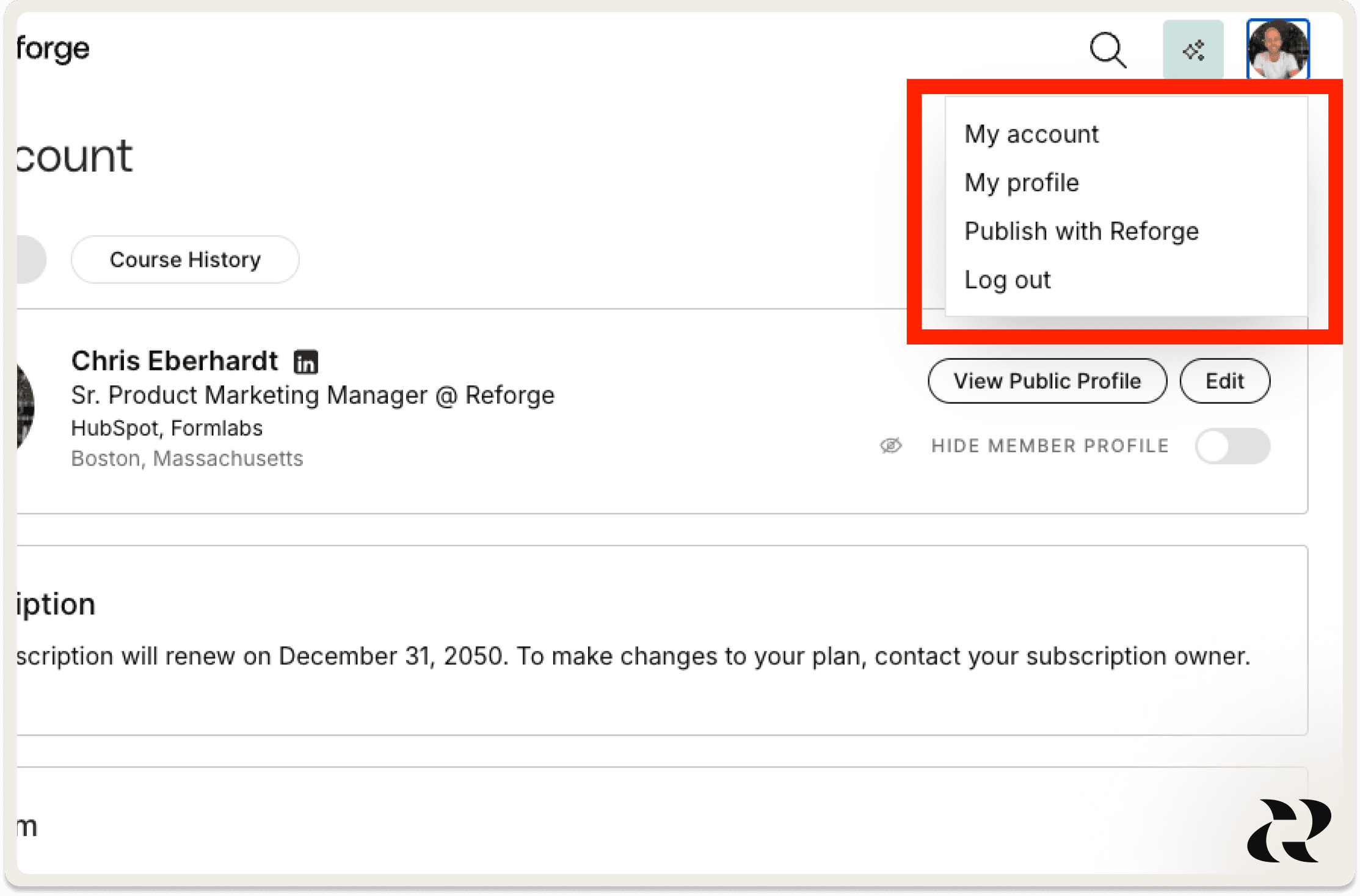
We’ve simplified your account dropdown to make it easier to log out, publish your work with us, and edit your profile.
Why We Built It
To declutter your top navigation and move key actions into a new account menu dropdown for quick and easy access.
Who Built It
Hat tip to Gianna, Jacob, Hogan, Shir, and Ali A.
Coming Soon: A New “Explore” Page, Organized by Topic
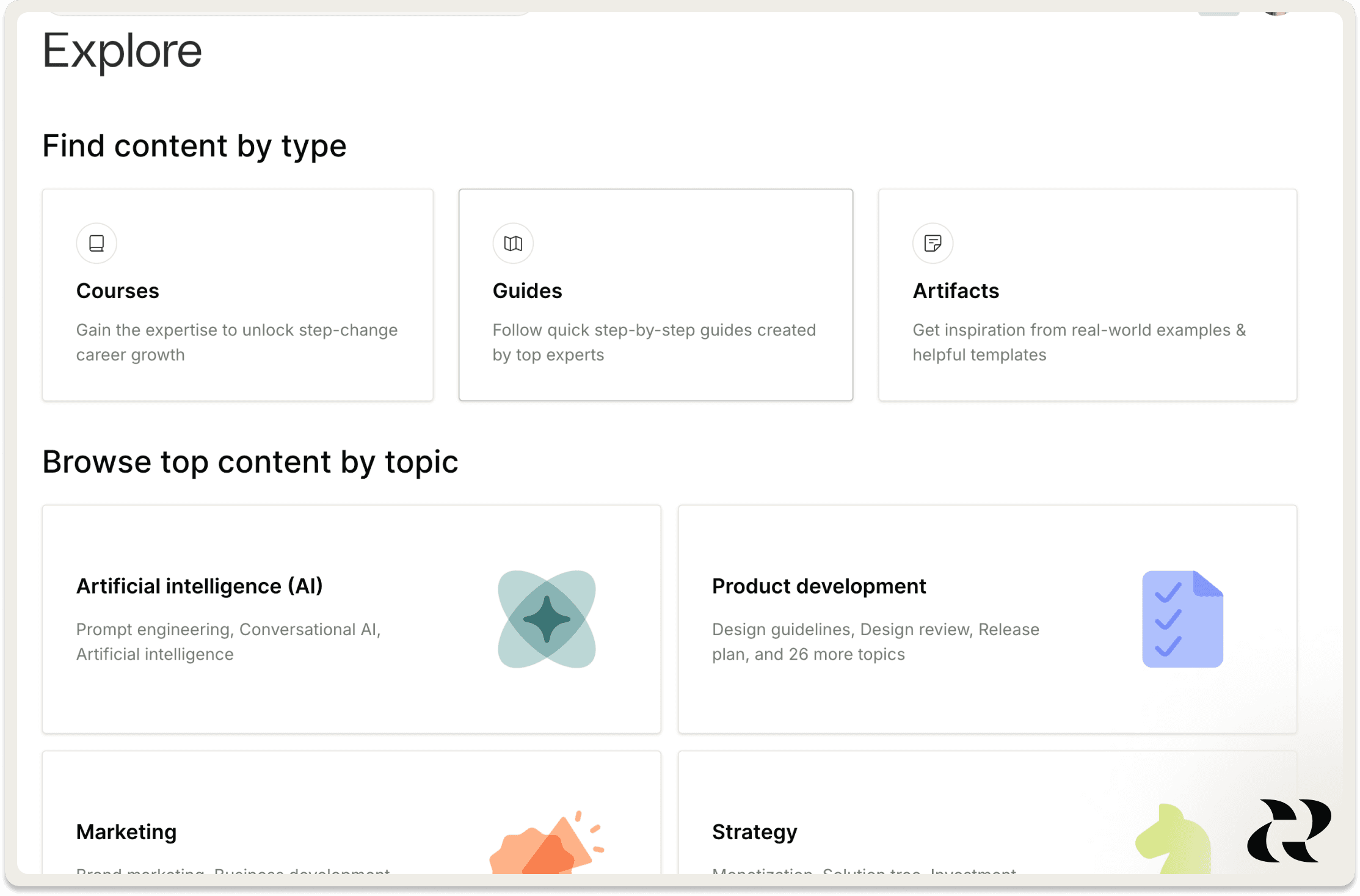
What It Is
We are creating a new Explore page that makes it super simple to find top content on topics you’re interested in.
Why We Built It
We've heard it's challenging to find all the Reforge content on a specific topic, like AI, product management, and growth. This update gives you the flexibility to browse by topic or format — whatever way you discover best.
How We Built It
After getting feedback on early designs from our members, we created a UI to showcase our top-performing content under each topic and subtopic. Our team also manually reviewed and tagged content in our library to ensure it showed up under the right topics.
Who Built It
Hat tip to Ginny, Ali R., Will M., Tracy, Alexis, Anne, and Andrew.
That's it for the September edition of Inside Reforge. You can keep track of these chronological updates here, and we'll be back next month.
Not a member? Explore membership options here.
In the September edition of Inside Reforge, we introduce some awesome new features like in-line suggestions, document drafting, listening mode, upcoming events, and more.
Welcome to the September edition of Inside Reforge, a monthly product update roundup designed to inform members about updates and teach you about our product development process.
This month’s updates are all about getting you the expertise you need, when you need it. When time is short, and you need immediate solutions, these updates provide expert-backed advice to help you tackle problems quickly and navigate Reforge more efficiently.
You can read this article, or watch the video below to see our team demo the new features. Let’s dive in.
In-Line Suggestions Powered by the Extension (In Notion, Google Docs, and Microsoft Word)
What It Is
The Reforge Extension will now give you in-line suggestions on select types of documents and will soon be available for all documents.
Why We Built It
In-line suggestions help users focus on refining the most impactful parts of their documents. We don’t just highlight areas for improvement; we offer expert-backed ideas to consider implementing.
How We Built It
The Extension reads and classifies the document type, referencing top Reforge materials from guides, artifacts, and courses. It conducts a holistic analysis of the document for context, then assigns targeted feedback to specific sections. A pop-up window appears adjacent to the content, offering LLM-driven feedback with direct links to relevant Reforge materials for deeper insights.
Who Built It
Hat tip to Vlad, Dan, Archie, Eddie & Ben.
Draft Documents, Get Strategic Advice, or Get Course Suggestions — All from Your Homepage
What It Is
We’re making it even easier for you to use Reforge to produce higher-quality work daily. When you log in to your homepage, you can draft your work deliverables fast with up to 12 document types to choose from, find the right course, or get instant strategic advice to help you make more informed decisions. Soon, you'll be able to draft up to 30 different types of documents.
Why We Built It
Our goal is simple: to make your homepage incredibly useful. Now, it’s easier than ever to leverage our AI for faster, smarter decisions and seamless navigation. As one user put it, “Having current courses, recently viewed content, and the AI bot all in one screen is great—no scrolling needed.
How We Built It
We leverage LLMs that along with custom system prompts, can parse Reforge’s entire knowledge base to tailor documents and advice based on you and your unique context. We created the collapsible side panel on your homepage so that it can be a place where you immediately jump into whatever you’re working on, whether to take a course, find inspiration, or use Reforge to advise you on your day-to-day work.
Who Built It
Hat tip to Gianna, Jacob, Hogan, Shir, and Ali A.
Listening Mode is now Live in Select Courses and Guides
What It Is
We are rolling out the ability to “listen” to our courses and guides so you can fit learning into your schedule whether you’re driving the kids to school, walking the dog, or getting some exercise.
Why We Built It
This has been a feature that members have asked for for a long time. Reforge courses are packed with great insights, but our members don’t want to have to sit in front of a computer each time they want to learn. But with listening mode, which works on desktop and mobile, you can make progress on your course no matter where you are.
Guides that have listening mode will have a play icon at the top of the page. To start listening, simply click the icon.
How We Built It
We take the content from each guide to generate a script, which we then feed into a third party tool to generate an audio file.
Who Built It
Gwen, Angela, Lori, Tess
The Reforge Extension Now Works in Microsoft Word Online
What It Is
The Reforge Extension is now available in Microsoft Word online.
Why We Built It
Our users work in various tools, with Microsoft Word being one of the most common. Now, they can access the power of the extension right where they draft their documents.
How We Built It
We've brought the Extension you love from Google Docs, Notion, and more to Microsoft Word’s browser application. Now, you can draft documents, receive strategic and tactical feedback, and draw inspiration from the work of top operators—all within Word. For more on how we built the Extension, click here!
Who Built It
Hat tip to Vlad, Dan, Archie, Ben, and Eddie.
Allowing Multiple Administrators for Our Larger Team Plans
What It Is
We introduced the ability to enable multiple admins on our larger team subscriptions to make it easier for our customers to manage.
Why We Built It
Managing all seats was a challenge for Team Subscription owners, especially with larger subscriptions, often causing delays in assigning seats or course passes. Allowing multiple admins simplifies team management and reduces bottlenecks.
How We Built It
We enabled additional permission capabilities onto existing roles, instead of adding new roles, to allow us to move quickly (allowing us to avoid any impacts to the various analytics/automations set up with the existing roles). A more thorough evaluation of our roles/permissioning will be something to tackle in the future to allow for more fine-grained controls for our team owners.
Who Built It
Hat tip to Adam, Tara, and Ian.
Upcoming Events On Your Homepage
What Is It
We’ve added an 'Upcoming Events' section to your homepage, showcasing the next three events you’ve registered for.
Why We Built It
Our goal is to make your homepage incredibly useful. Now, your registered events—whether part of a live course or standalone—will be front and center on your homepage to make it easier to keep an eye on what’s coming up.
Who Built It
Hat tip to Bogdan, Wendy, Aaron, Jesse, Ashlee, Alexis, and Heather.
Deeper Personalization on the Extension for Better Results
What It Is
We’ve introduced deeper personalization capabilities on the Extension. Let us know what you’re working on, and we’ll tailor our drafts, feedback and suggestions to your specific use-case. Simply open the extension in any platform and click the Reforge logo to update your settings.
Why We Built It
When you receive feedback from colleagues or managers, they bring valuable context about the project, scope-of-work, and strategic goals. By providing us with similar context, we can offer feedback that's even more tailored and effective!
How We Built It
Using Adaline, we tested how various variables influence the quality of our feedback. A key factor was whether the LLM had context on your work, similar to how an advisor or senior leader would understand the background before giving feedback. We've now incorporated this as a new input form, feeding the data into the LLM as part of requests to the LLM. Each time we run the prompt, we gather whatever the latest information is there so be sure to keep it up to date as you embark on new projects. This is not stored on our servers - it is only stored locally in your extension, so feel free to include sensitive information.
Who Built It
Hat tip to Dan, Ben, Archie, Vlad, and Eddie.
New Account Menu Dropdown
What It Is
We’ve simplified your account dropdown to make it easier to log out, publish your work with us, and edit your profile.
Why We Built It
To declutter your top navigation and move key actions into a new account menu dropdown for quick and easy access.
Who Built It
Hat tip to Gianna, Jacob, Hogan, Shir, and Ali A.
Coming Soon: A New “Explore” Page, Organized by Topic
What It Is
We are creating a new Explore page that makes it super simple to find top content on topics you’re interested in.
Why We Built It
We've heard it's challenging to find all the Reforge content on a specific topic, like AI, product management, and growth. This update gives you the flexibility to browse by topic or format — whatever way you discover best.
How We Built It
After getting feedback on early designs from our members, we created a UI to showcase our top-performing content under each topic and subtopic. Our team also manually reviewed and tagged content in our library to ensure it showed up under the right topics.
Who Built It
Hat tip to Ginny, Ali R., Will M., Tracy, Alexis, Anne, and Andrew.
That's it for the September edition of Inside Reforge. You can keep track of these chronological updates here, and we'll be back next month.
Not a member? Explore membership options here.