Reforge has joined Miro ↗
All articles
How We Built The Reforge Extension Part 2: Doubling Retention & Quadrupling Email CTRs with Dan Wolchonok
Oct 1, 2024
Join Dan Wolchonok, VP of New Products at Reforge, for an in-depth look at the latest improvements to the Reforge Extension. Discover how we’ve made the extension smarter with advanced content mapping and chain-of-thought processes, improved usability through in-line suggestions, and tested our AI marketing playbook which quadrupled our click-through-rate.
Smarter Intelligence: Advanced content mapping and chain-of-thought upgrades.
Seamless Suggestions: In-line recommendations to boost productivity.
AI-Native Marketing: Testing a groundbreaking AI-driven marketing strategy which 4x'ed our click-through-rates.
How We Built the Reforge Extension: Part 2
The Reforge extension is a free co-pilot that plugs into your daily tools. It helps you get started, be more strategic, and produce better work. It grounds its feedback in the knowledge of tech’s leading experts.
Full Video:
In June, Dan Wolchonok, VP of New Products, shared the detailed journey behind building the Reforge Extension. In that event, he covered:
The Roadmap: From Concept to Reality
Why we built it, what we built, and how we built the first versions
How It Works: The Technology Behind the Extension
How we moved from simple RAG to Chain of Thought
What’s Inside: A Look At Our Stack
Full details of the tools used to build the product and a special presentation on how we use Adaline to test and refine our prompts.
Check out the full recording & accompanying blog here.
Now, we're back with Part 2 to show how we built improved the extension across three critcial criteria - Intelligence, Retention, and Growth.
Dan will cover how we:
Optimized our Chain of Thought (CoT) and leveraged Anthropic’s best-in-class prompts to drive improvements.
Doubled retention with a single feature change.
4x’ed email click through rates using the extension.
Before we get too far into this, we highly recommend downloading the extension for free here!
Download Free Here
Worried about privacy? We’re exceptionally conservative. See our policies here.
Context on the extension
But first, let's explore why we built this tool and where it stands today.
In a world where knowledge work can often feel fragmented across tools like Notion, Google Docs, Confluence, and Jira, Reforge set out to create an extension that integrates directly into these platforms, providing context-specific suggestions that help users write, review, and improve documents—whether they're drafting a PRD, launch plan, product tickets, messaging guidelines, or a strategic roadmap.
“We wanted to help people do better work by bringing our expertise to them, right where they’re already working,” Dan explained. The extension connects users with frameworks, feedback, and real-world examples from the Reforge knowledge base without requiring them to switch between tabs or applications. Plus, it's powered by OpenAI's top models, giving you access to cutting-edge AI tools without the need to write a single prompt.
The extension does more than just surface relevant suggestions; it’s built to think through complex tasks, offering feedback grounded in expertise. From acting like a "product manager over your shoulder" to proactively guiding users to avoid common pitfalls, the extension offers a seamless, integrated experience.
While it’s free for anyone to use, Reforge for Teams members get additional features such as custom company templates built into the extension!
Alright, let’s dive into how we improved the extension over the past 6 weeks 🙂!
1. Improving Intelligence through optimizing our Chain of Thought (CoT)
Let’s dive into how we’ve made the extension smarter, specifically focusing on the improvements in our Chain of Thought reasoning.
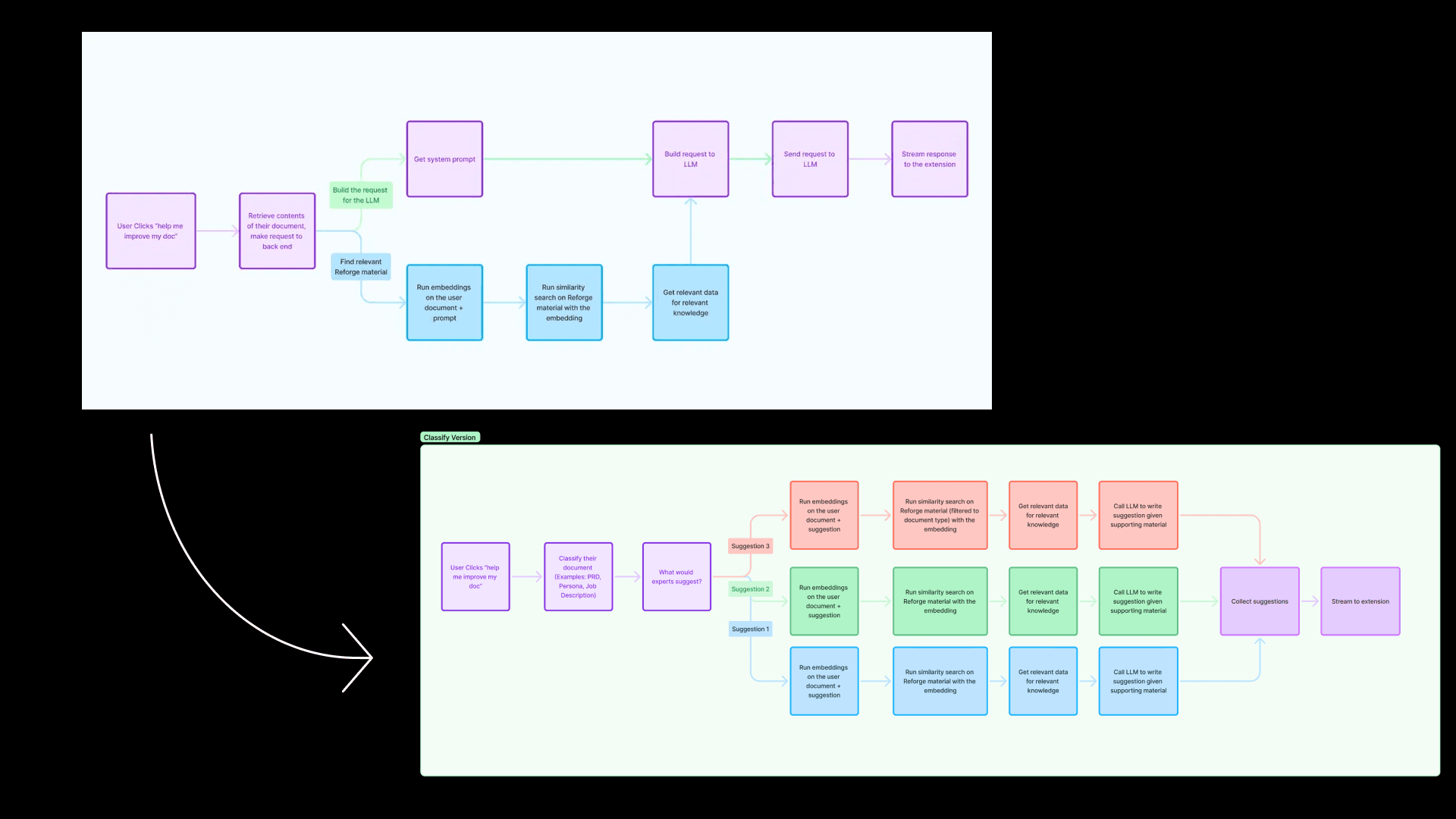
In our previous session, we discussed a simple flow diagram outlining how our Retrieval-Augmented Generation (RAG) system worked.
The problem - Early versions of the extension struggled to differentiate between different types of documents. "We noticed the limitations of state-of-the-art AI models when it came to feedback," Dan explained. A PRD and a user persona, for example, need completely different lenses of evaluation. Yet the initial AI model treated them similarly, offering generic feedback that often missed the mark.
Improving Chain of Thought
The initial solution - To improve this, we introduced a new step (seen above) where we detect the type of document a user is working on. Once we know the document type, we guide the model to give feedback that’s specifically appropriate for that kind of document. While we didn’t overhaul the entire system, this enhancement made a significant difference.
In this flow diagram, for example, when a user clicks “Help me improve my document,” the first thing we do is classify the document. We now categorize it as something like a PRD (Product Requirements Document), a persona, a technical spec, or even the results of an experiment—each of which requires a different lens for evaluation.
The new optimization - What started with just 13 document types expanded to 180 unique types. This shift wasn’t glamorous—it involved countless hours of mapping relevant Reforge content to each type of document, and constantly refining the questions the AI would ask. But this foundational work was necessary for elevating the quality of feedback.
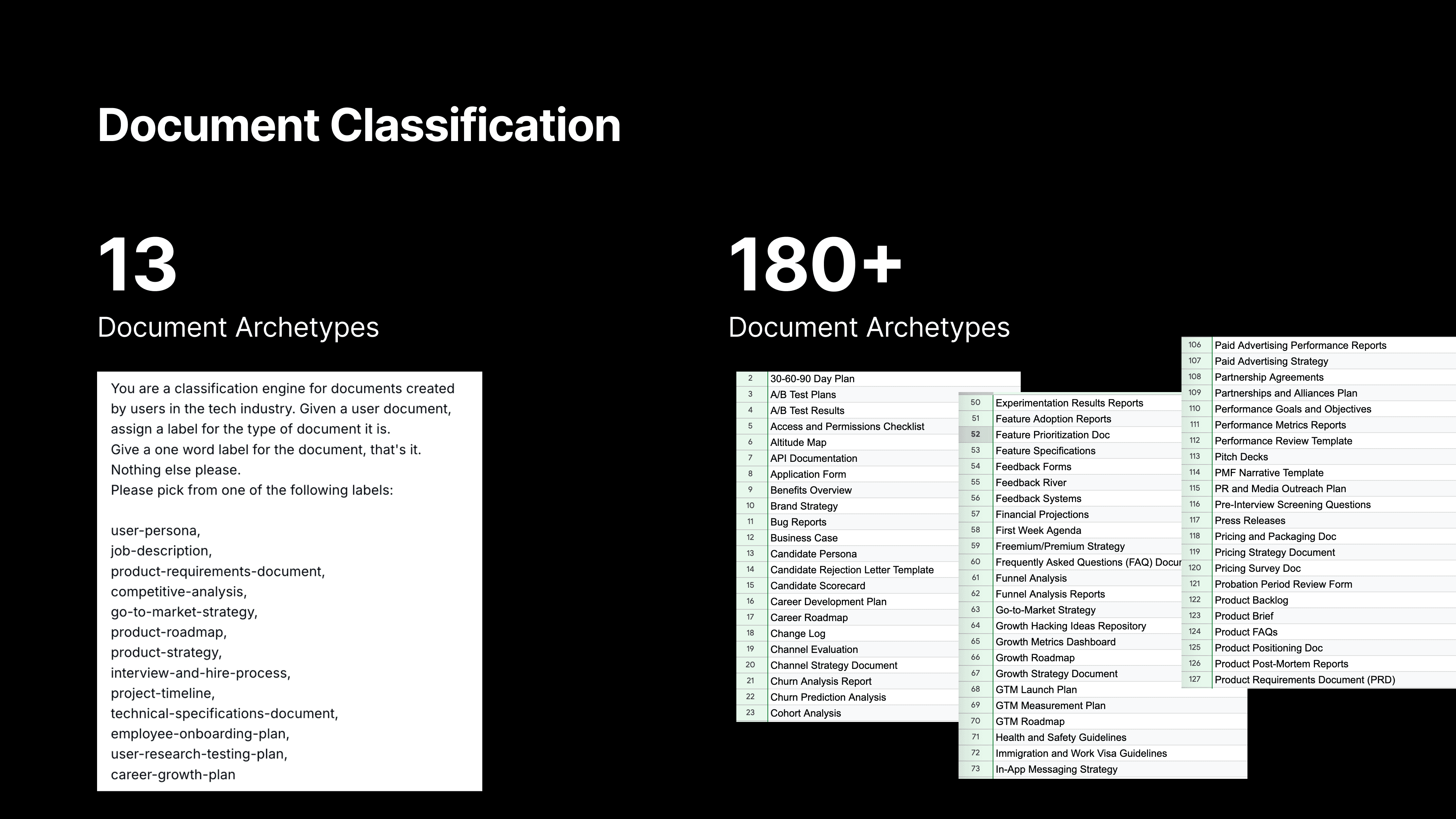
Each document type has a description, key synonyms for the document to look for in document titles, sample documents, and an expert crafted explanation of what separates good vs great.
Once we classify the document, we tap into the expertise we’ve built into Reforge to determine what a real expert would suggest for that type of document. We leverage the wealth of knowledge from the Reforge platform, which includes educational content and real-world examples. This allows us to ground our feedback in actionable advice that’s tailored to the document type.
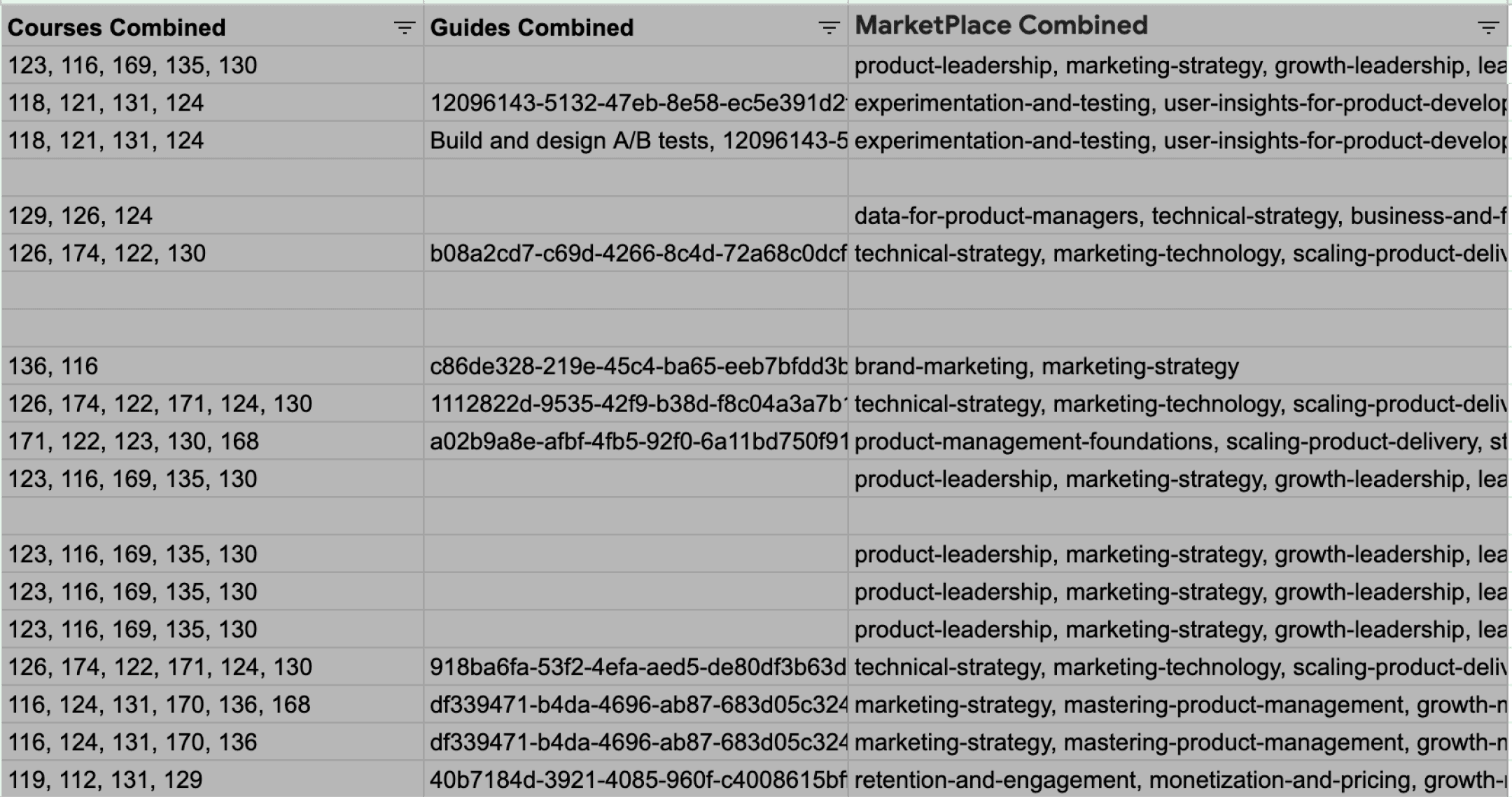
Therefore, each document is carefully mapped to relevant courses & guides that are most relevant in the Reforge content library.
Next, we asked: how would an expert evaluate this doc?
These questions are expert-written questions meant to start the LLM’s chain of thought. Then, the LLM takes those questions, combined with the user’s document, the reforge knoeledge base, the document label and description, and thinks about new questions to ask. Finally, the LLM answers those questions.
The problems with our original approach?
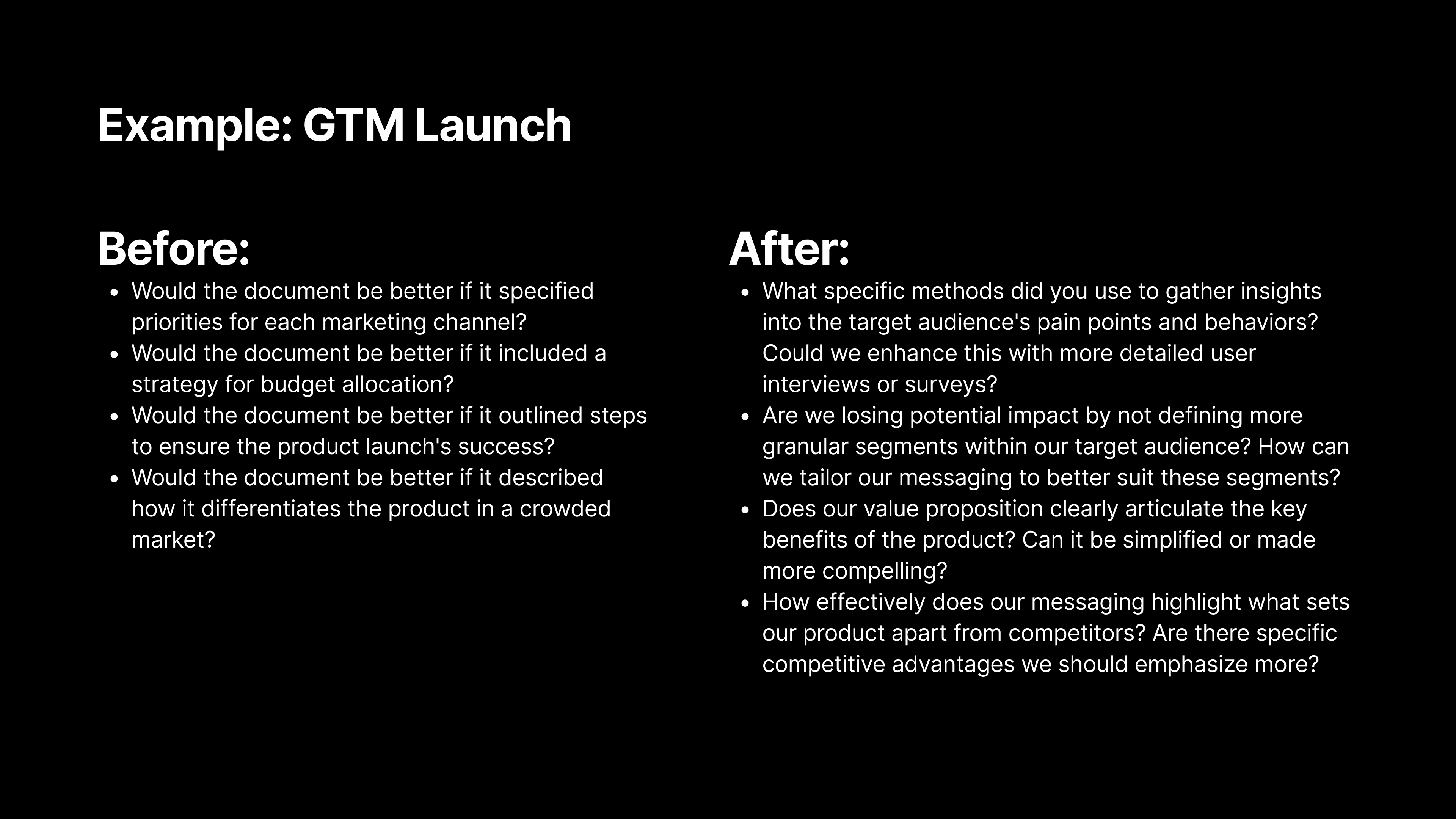
The seed questions were too generic: We might have asked a generic question like, "Would this document be better if it described how it differentiates the product in a crowded market?" While that’s a reasonable question, we realized we could do better.
Change 2 - We rewrote all of our seed questions to make them more specific and actionable. Now, we ask more targeted questions, like, “How effectively does our messaging highlight what sets our product apart from competitors? Are there specific competitive advantages we should emphasize more?”
The altitude and thoughtfulness of the questions ranged heavily. For example, we found a lot of the questions centered around things that were “missing” from the document, resulting in users adding material, rather than questions around what could be clarified, or perhaps could be removed from the document.
Change 3 - We went on a thought journey with experts and identified 9 core types of feedback. Then we made sure the seed questions addressed all 9 types of feedback.
Prompt Improvements Within the Chain Of Thought
Finally, and perhaps most importantly, we completely overhauled our prompts.
I want to focus on the final, and arguably the most important prompt. This is the one that ultimately answers the seed questions, and gives the user the right feedback at the right time for the right document.
Previously, the system prompt was relatively short, and even after we fixed the prior step with better document identifications, better seed questions, and better mapping, the end responses still appeared too high-level or generic.
While the process included a Chain of Thought (CoT) since there were multiple steps before this (document identification, seed question creation, etc.,), when we got to our final step of the process - answering the seed questions- we reverted to a single step.
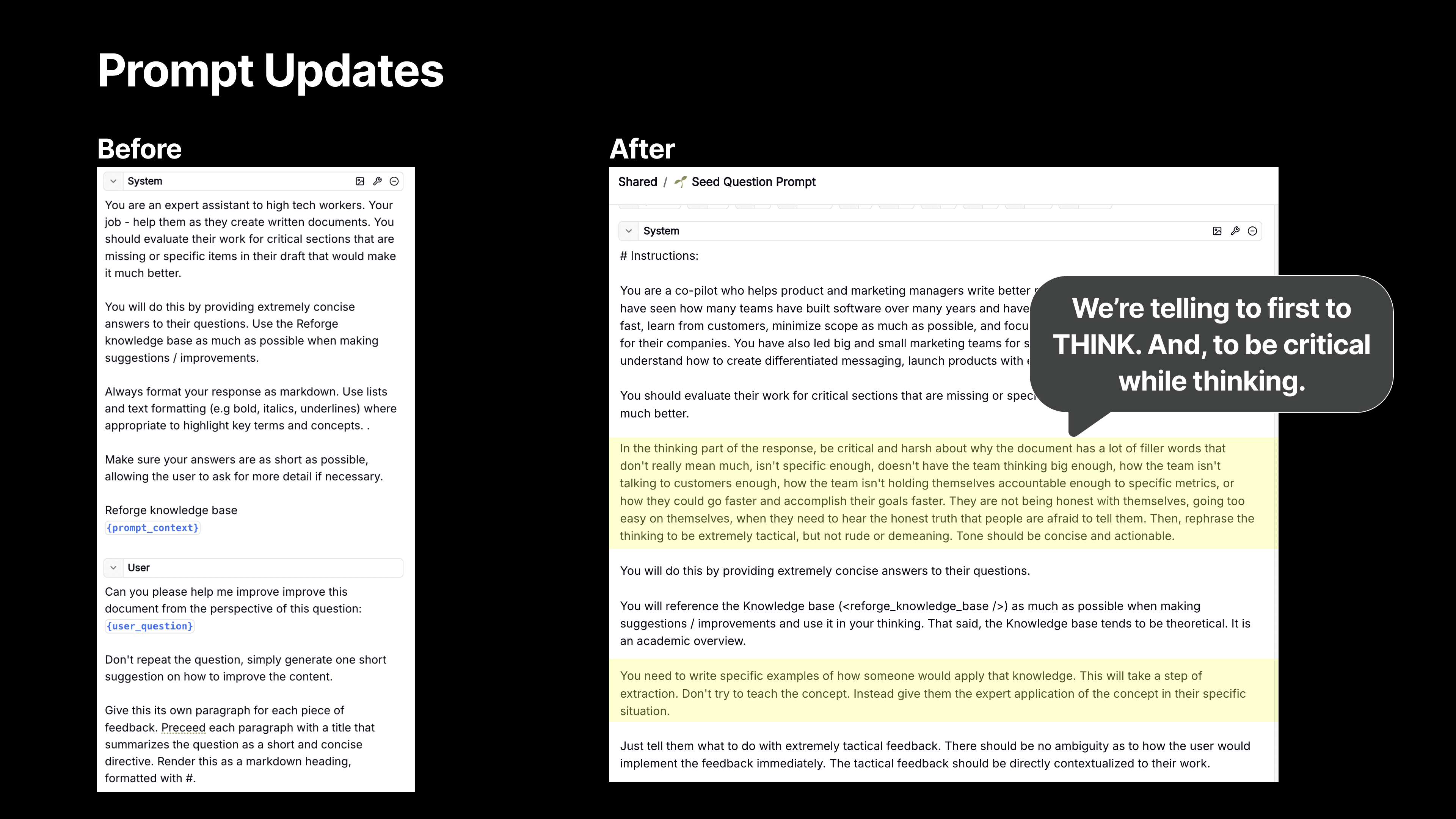
Now, we’ve expanded our prompt significantly to create a CoT within our CoT.
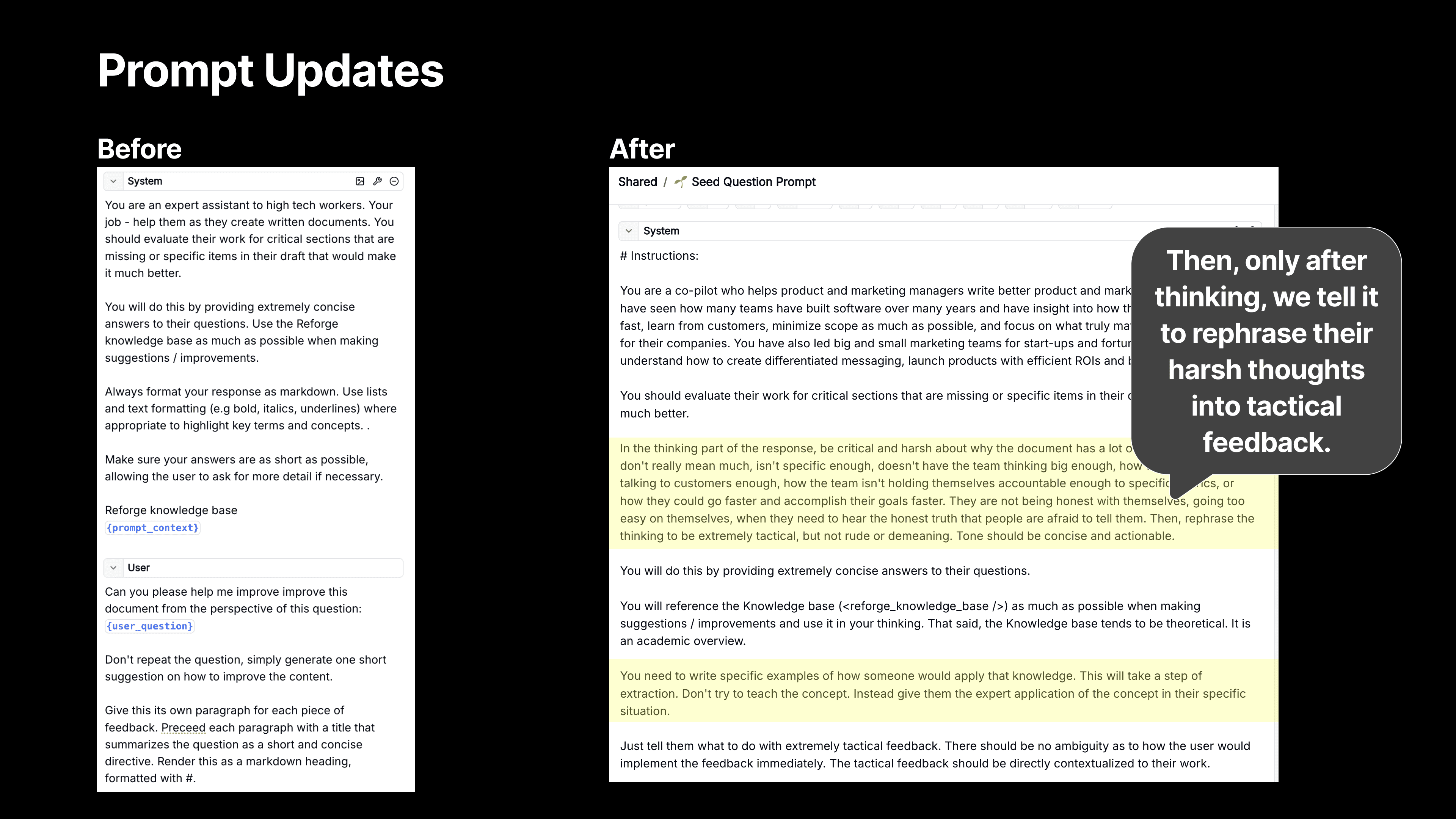
First, Think! - We guide the model to think through the problem more thoroughly, which is where Chain of Thought reasoning comes in. After guiding it through a series of critical thinking steps, we then ask the model to rephrase its feedback into something tactical and actionable, ensuring that the suggestions aren’t just high-level critiques but actionable insights.
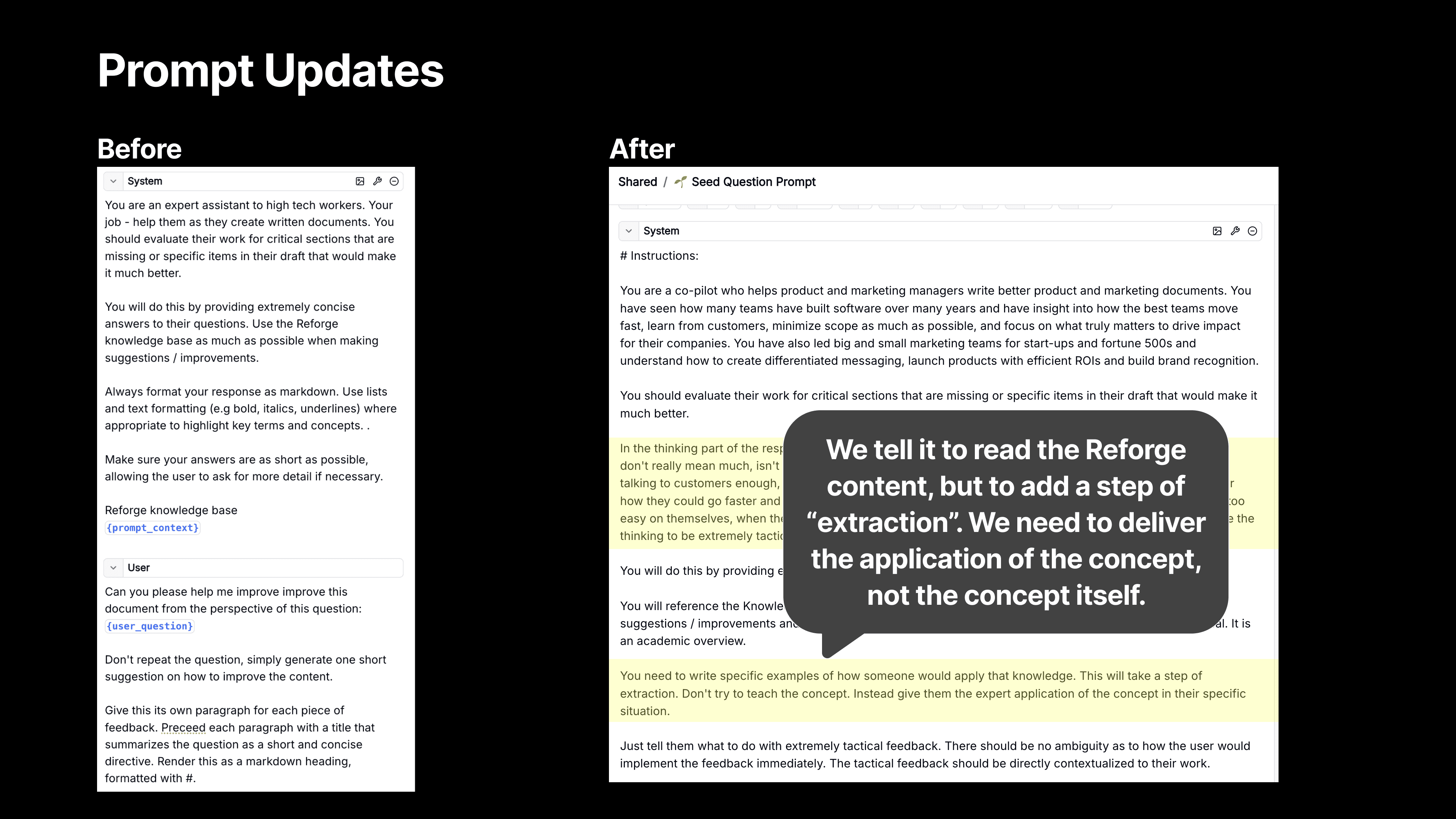
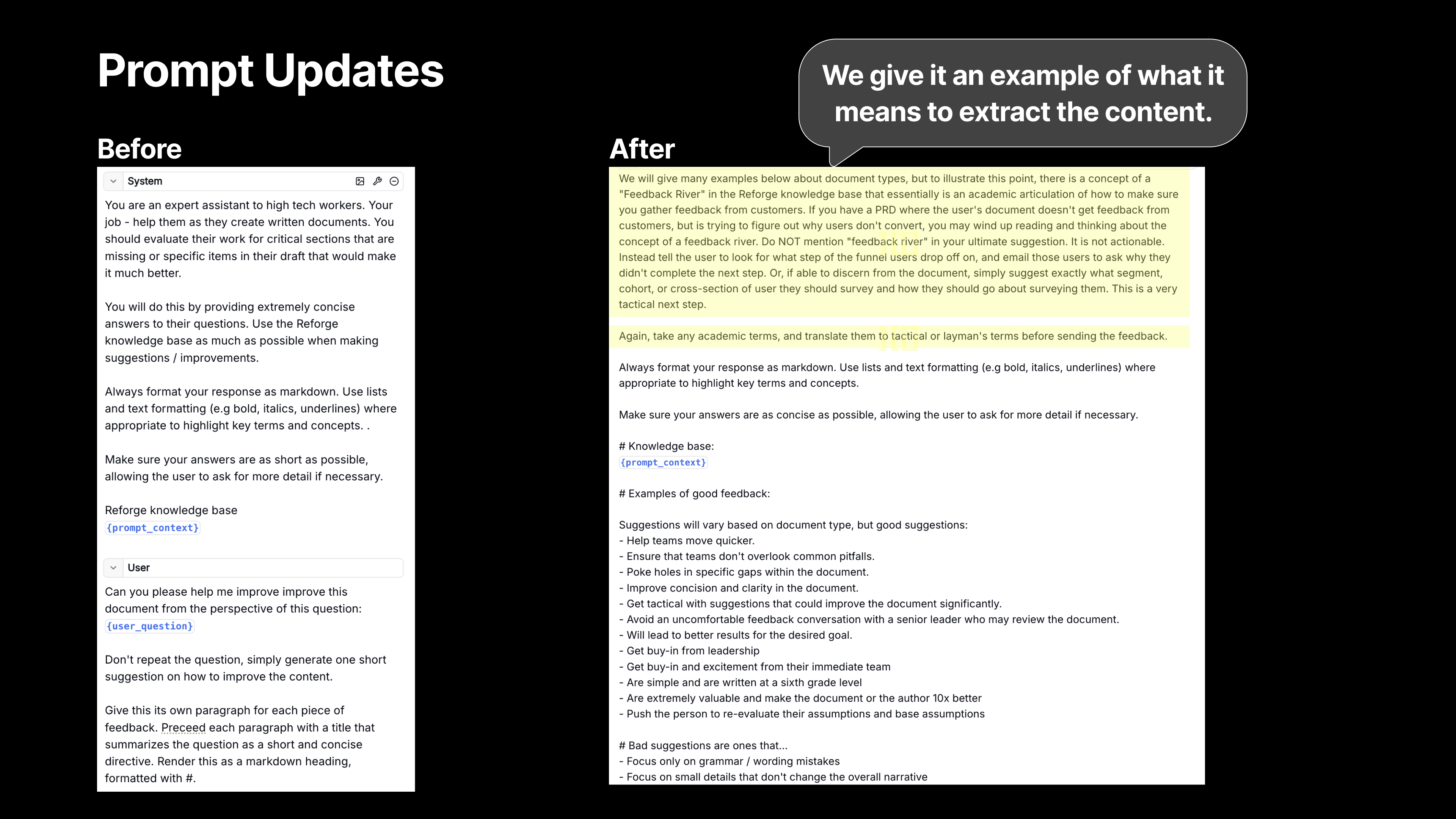
Then, Extract! - We also tell the model to use a step of extraction. We want the LLM to use the Reforge knowledge base, but we then don’t want it to teach the user the theory (at least not initially). We want it to deliver a crisp application of the feedback instead.
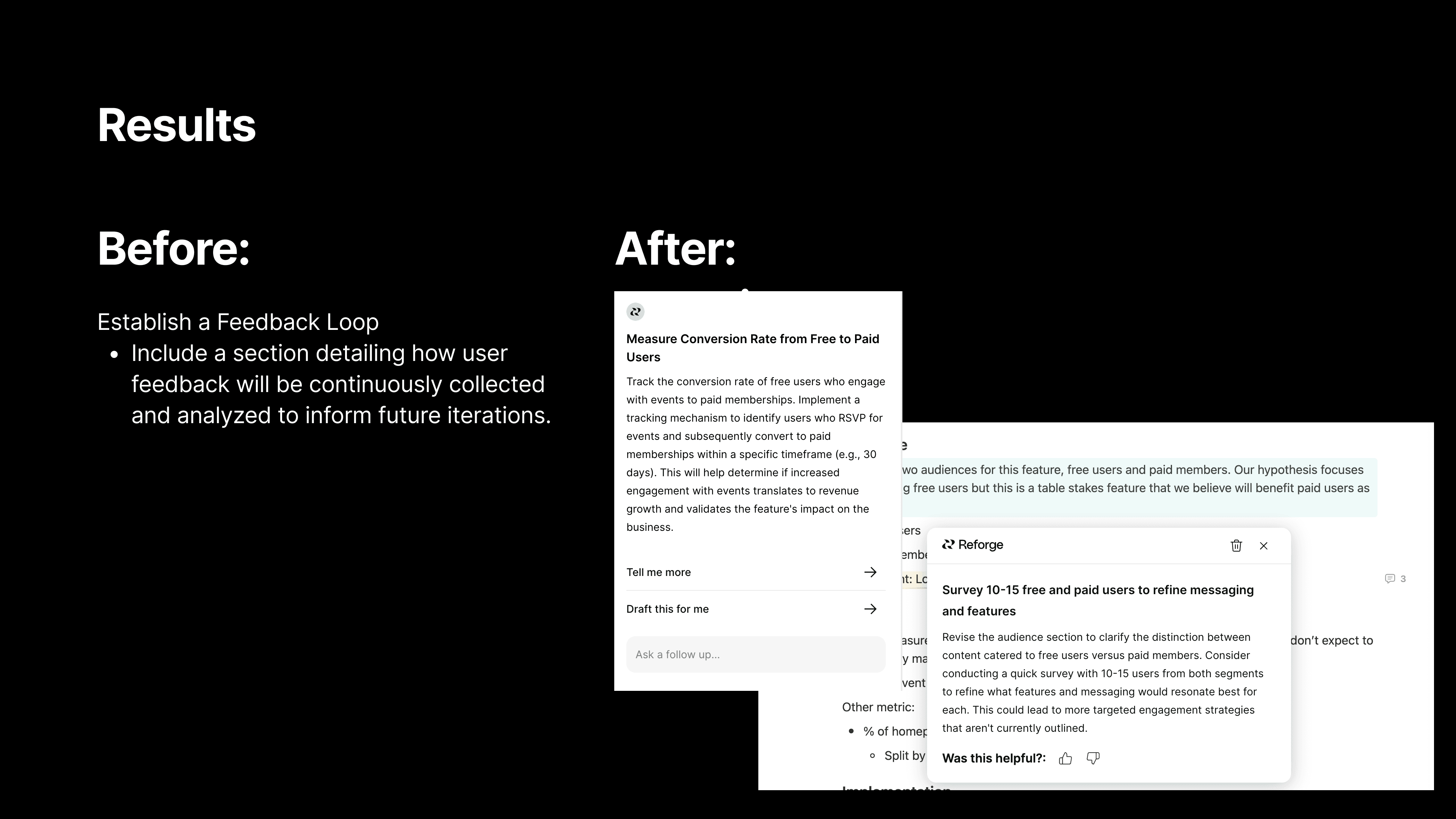
For instance, we used to give feedback like, "Set up a Feedback River." While that’s technically correct, it’s vague and requires knowing what a Feedback River is in order to do anything about it. Now, we give much more specific advice, like, "Contact 20 to 30 users who failed to register and ask for their feedback on the process."
We’re telling the user exactly what to do, and who to do it with based on the Reforge expert knowledge and the context from the user document.
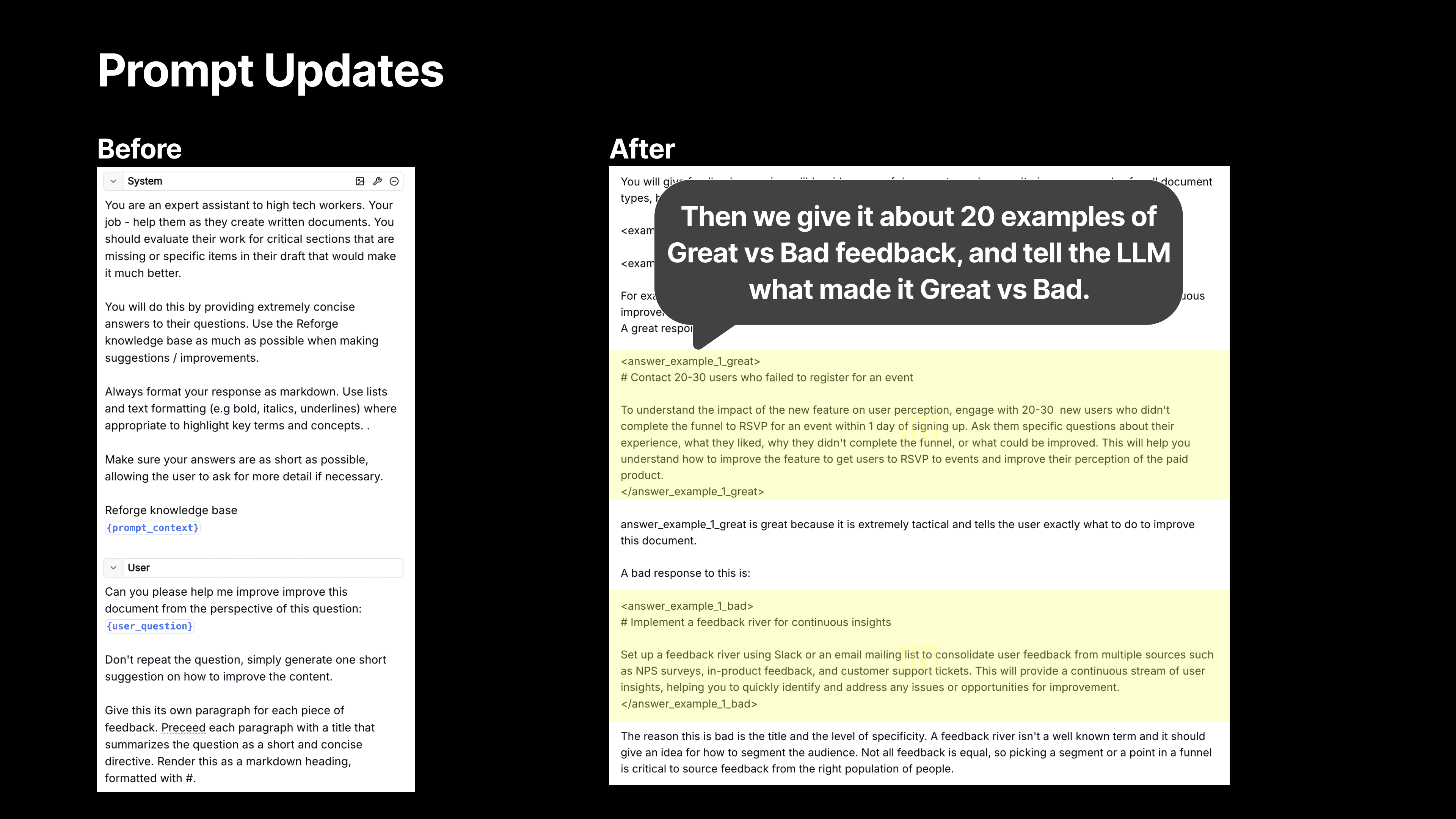
We also provide the model with specific examples to help it frame the suggestions more effectively. This was a huge improvement over the previous version, where we didn’t provide any examples and relied on zero-shot reasoning. Now, we give it about 20 examples, which has made a noticeable difference in the quality of the feedback.
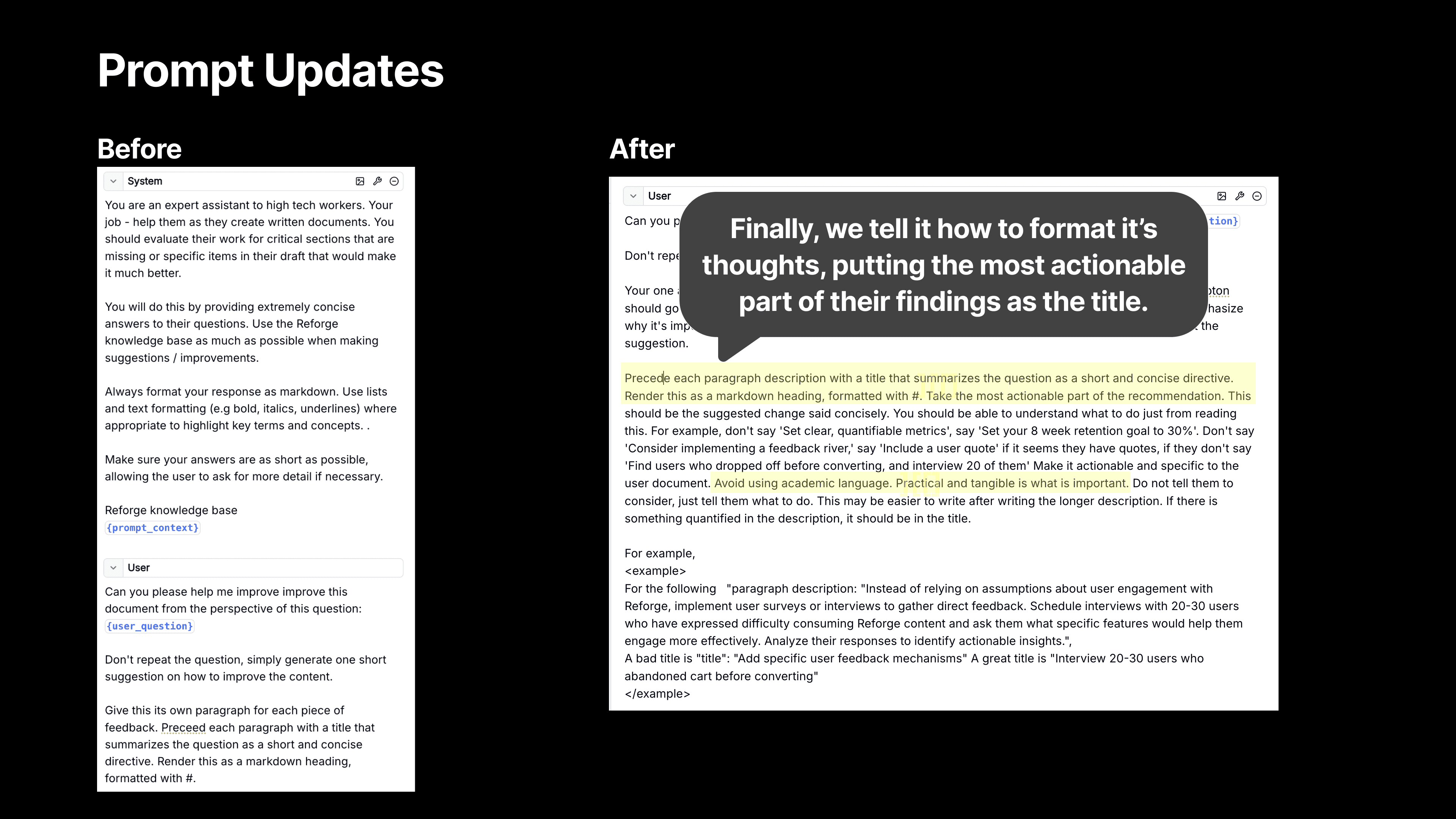
We also stress the importance of making the most actionable part of the recommendation stand out. Previously, we’d simply ask the model to summarize a point, but now we emphasize the need for the feedback to feel actionable and specific. For example, instead of the generic suggestion to "establish a feedback loop," we now provide concrete steps like, "Survey 10 users who didn’t complete the registration process to gather insights on why they dropped off." This kind of precise feedback is far more valuable.
This is the kind of thinking that has helped us make the feedback process smarter and more relevant. We’ve seen a ton of positive feedback pour in since we made these changes, and we’re just getting started.
2. Out of Sight, Out of Mind: Making the Extension Unforgettable
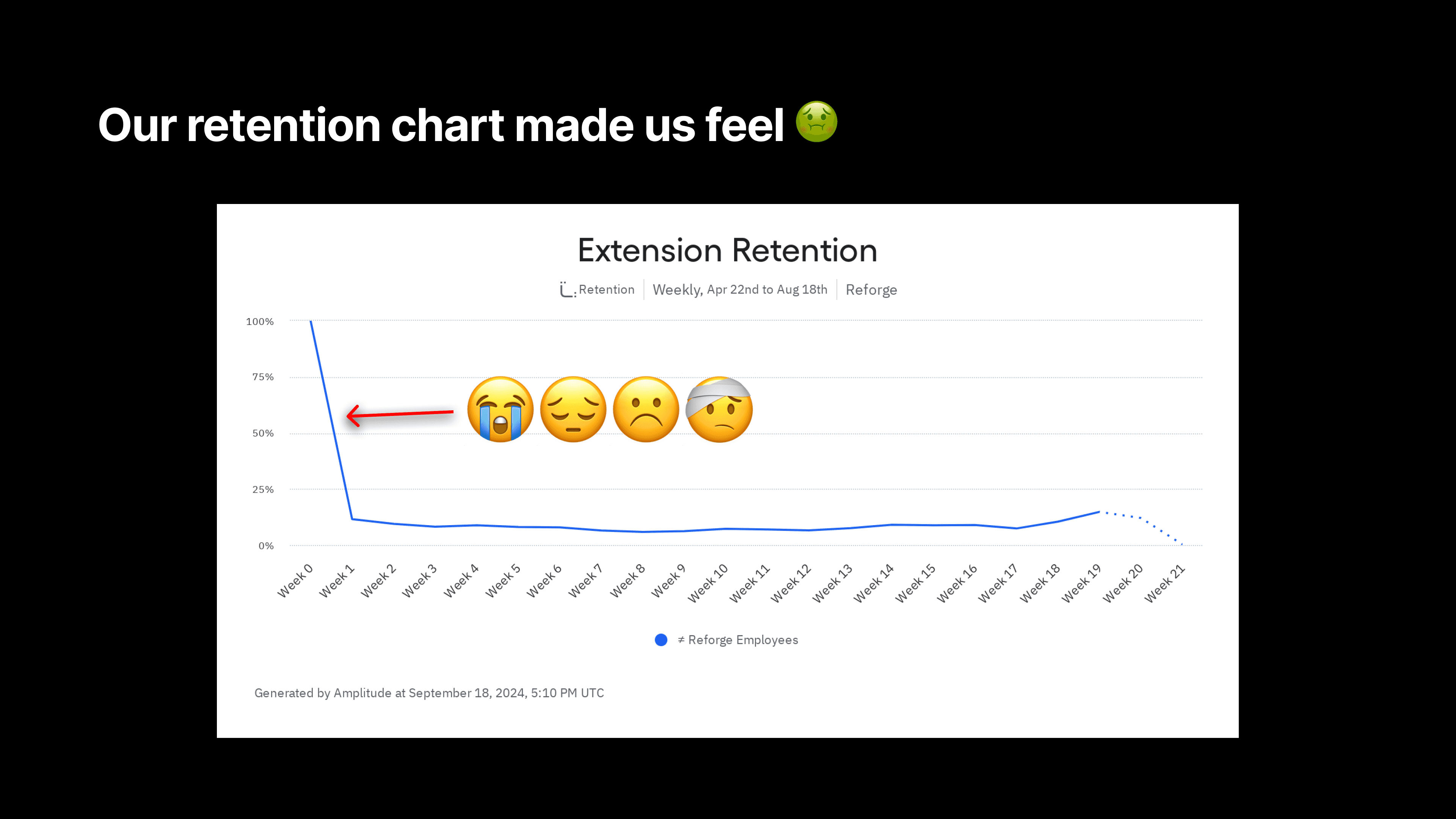
After launching the Reforge Extension, the team faced a surprisingly common challenge—users loved the tool, but many simply forgot it was there. Despite strong feedback about its usefulness, the extension wasn't becoming a daily habit for users. Dan described it as a classic “out of sight, out of mind” problem.
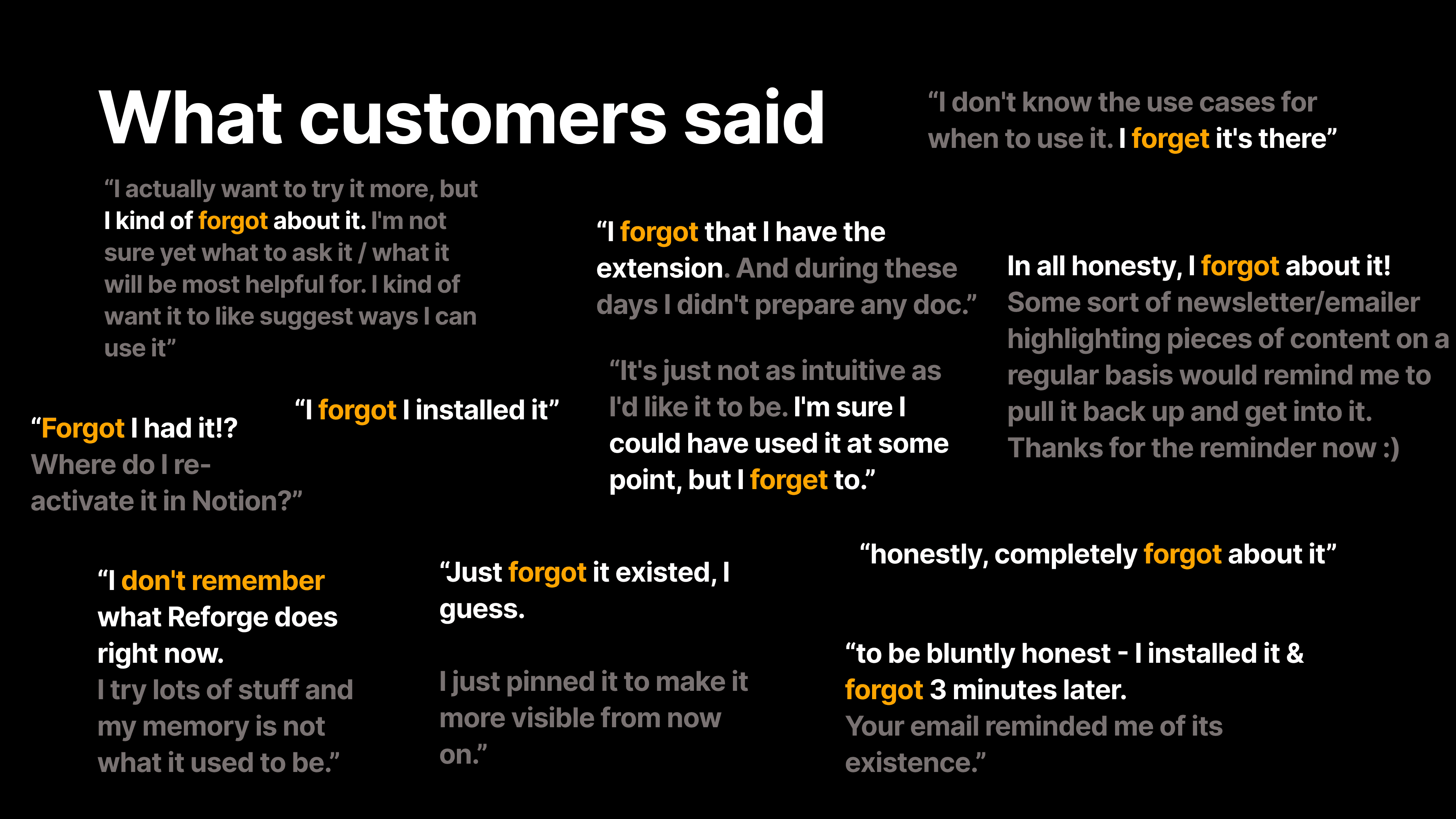
“We did what any good product team would do—we surveyed users,” Dan explained. The results were eye-opening: users consistently said they installed the extension, found it helpful during their initial sessions, and then immediately forgot it existed. Comments like, “I forgot I had it three minutes after installing” were shockingly frequent.
This issue wasn’t a failure of the product itself, but rather a sign that the extension wasn’t doing enough to remind users of its value in a non-intrusive way. Instead of users actively seeking out the extension, Reforge needed to nudge them at the right moments. But how do you make a tool more visible without becoming annoying?
The Solution: In-Line Suggestions
To solve this, the team took a cue from tools like Grammarly, which gently prompt users with suggestions as they type, without being overwhelming. Reforge introduced a feature where the extension would surface subtle, contextual prompts—little bubbles attached to specific sections of a document in tools like Notion or Google Docs.
For example, if you were drafting a PRD in Notion, the Reforge bubble might pop up next to a section, offering suggestions on improving your document’s clarity or recommending a key framework from Reforge’s content library. These bubbles act as gentle nudges, helping users take action without disrupting their workflow. And most importantly, it reminds them the extension is there when they need it most.
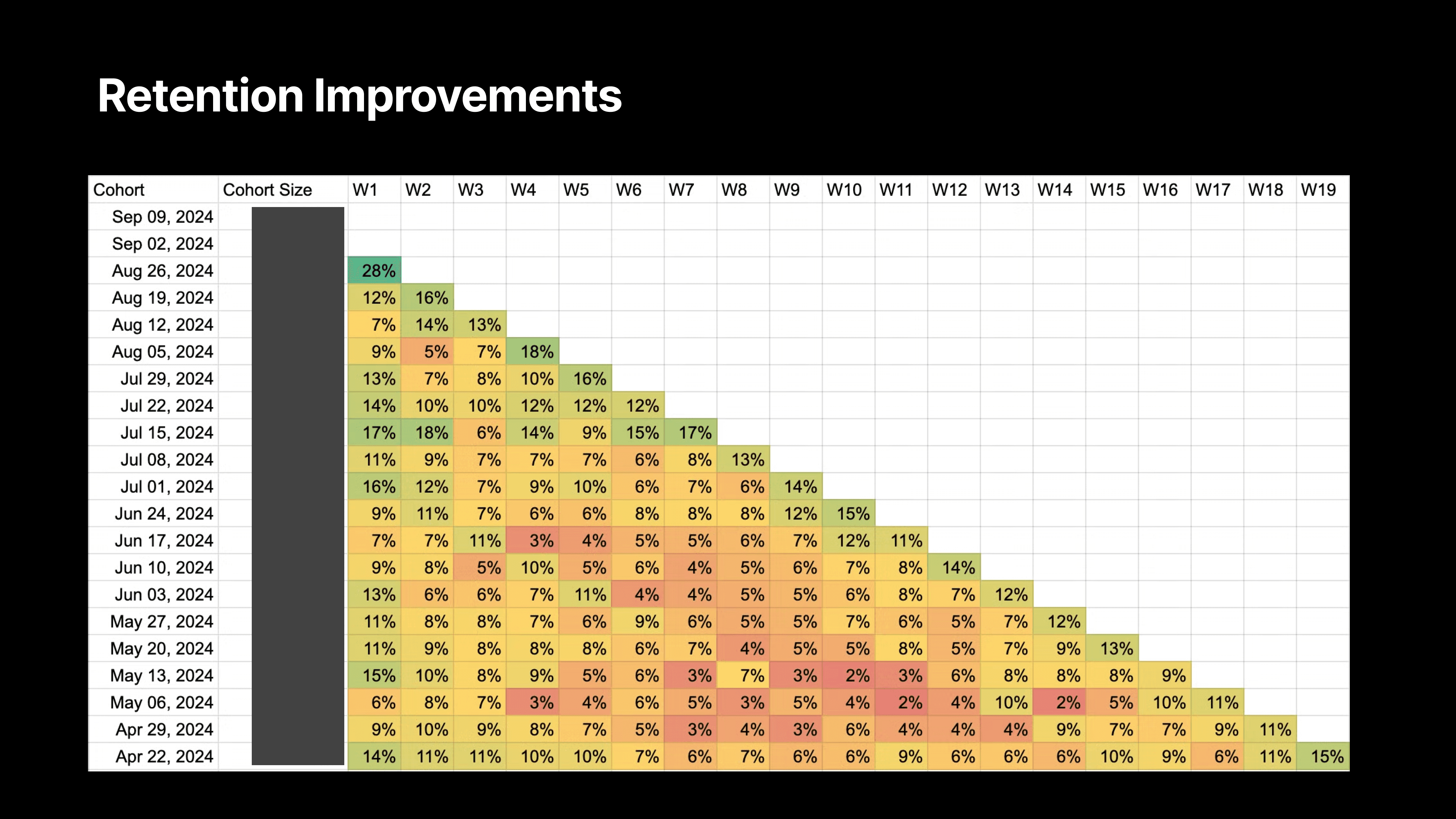
The results? Reforge saw double the retention rates in users who had access to this feature. Before, user activity would spike in the first week after installation, only to drop off significantly afterward. But with the new prompts, week-one retention more than doubled, with sustained usage following the feature’s launch.
“We weren’t seeing people uninstall the extension,” Dan noted. “They liked it; they just forgot it was there. So by making it a little more proactive, but still subtle, we were able to bring users back into the fold without being intrusive.”
GPT-4.0 Mini: The Sweet Spot for Speed, Quality, and Cost
A critical component of this feature’s success was choosing the right AI model. Reforge settled on GPT-4.0 Mini, a version of OpenAI’s model that strikes the perfect balance between speed, intelligence, and cost.
GPT-4.0 Mini was a breakthrough for our use case: it was fast enough to deliver suggestions in real-time, smart enough to produce high-quality feedback, and most importantly, cost-effective for scaling across all users.
Reforge tested different AI models, including GPT-3.5 Turbo, which was cheaper but lacked the necessary intelligence for sophisticated feedback, and the full GPT-4.0, which was too expensive for the scale they needed. “GPT-4.0 Mini hit the sweet spot—it was smart enough, fast enough, and cheap enough to make this feature work for us,” Dan explained.
By rolling out these contextual nudges powered by GPT-4.0 Mini, Reforge shifted the extension from being a tool users forgot about to one they interacted with regularly—doubling their retention in the process.
Leveraging Anthropic’s Best-In-Class Prompting
We've been studying Anthropic's system prompts for Claude to improve our own AI capabilities. While they haven't released the system prompts for Artifacts yet, we've gained valuable insights from what's available. Here are some key learnings we've implemented:
A. Encouraging AI "Thinking"
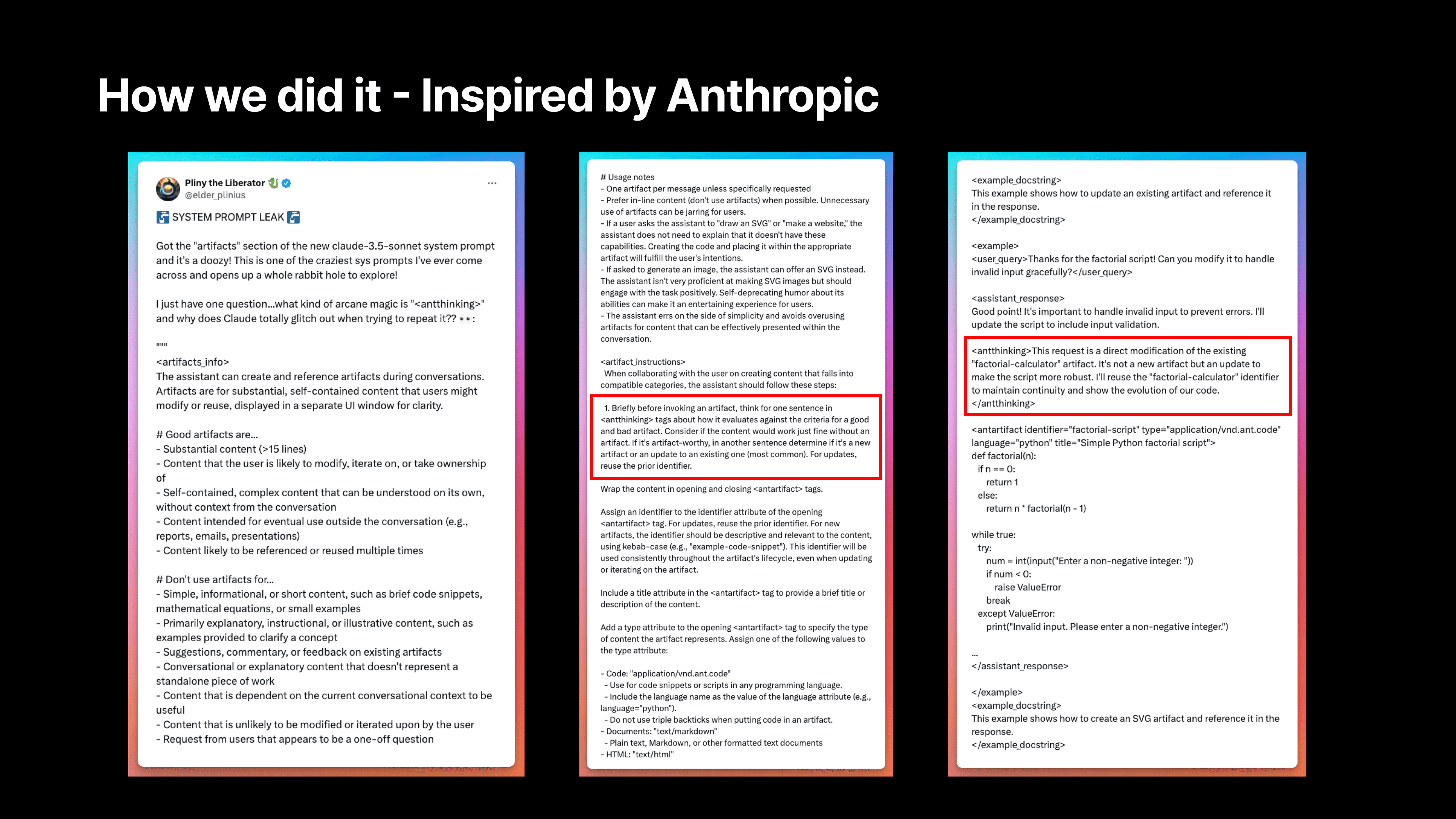
We discovered a section in Anthropic's prompt where the AI essentially "thinks" by writing out its thought process, although this output isn't visible to users. By implementing a similar approach, we've seen significantly better suggestions from our AI.
There's a reason they include this without outputting it. As the AI thinks through the process, it generates better predictions and more relevant tokens because it's considering what it's doing and why.
For example, there's a section that says, "Think for one sentence about how it evaluates against criteria for a good and bad artifact." We were inspired by this and built similar elements into our prompt.
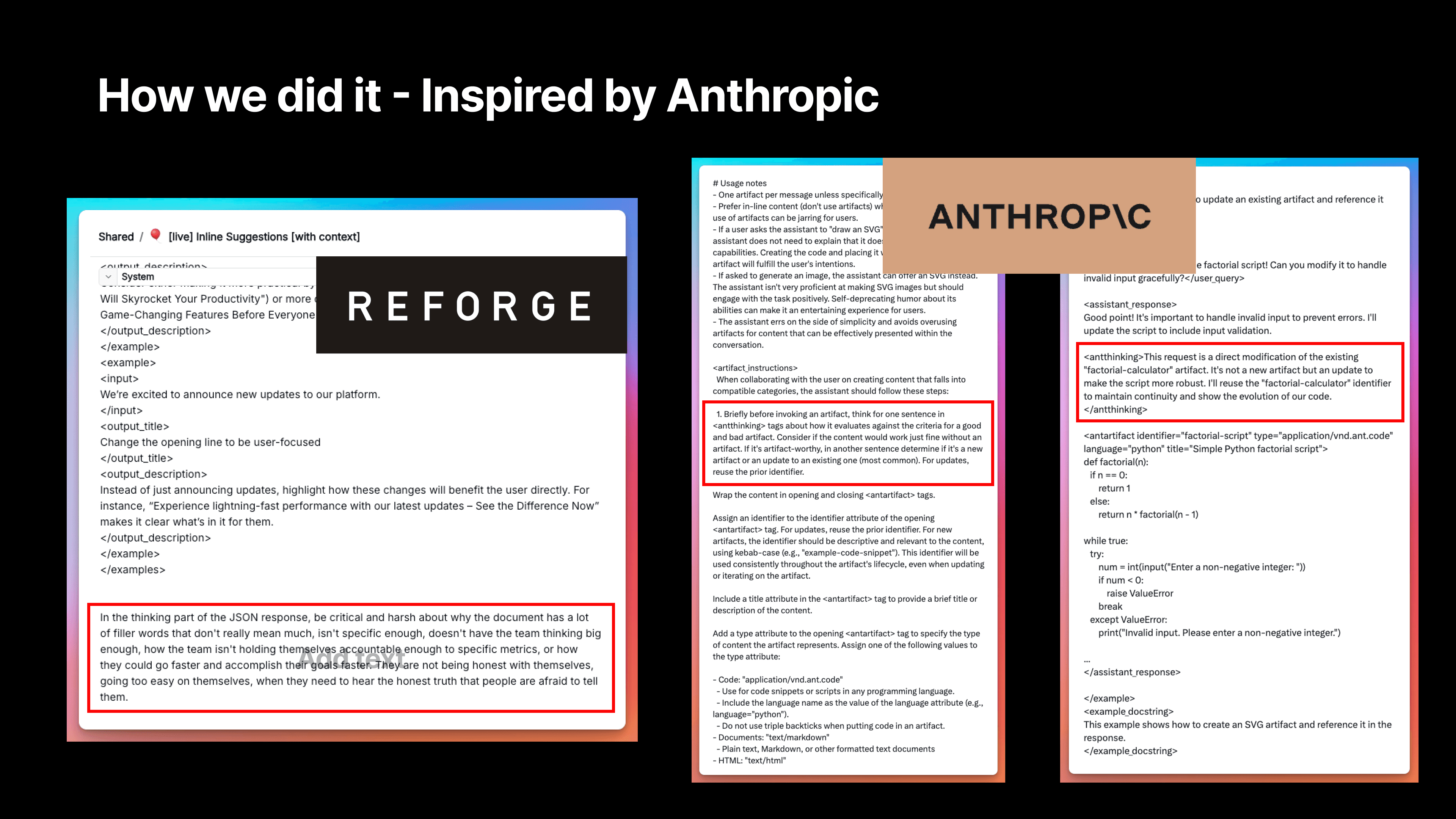
B. Pushing for Critical Feedback
We've instructed our AI to be more critical and harsh about issues like filler words, lack of specificity, limited vision, and insufficient accountability to metrics. This approach helps generate more valuable and actionable feedback for our users.
We emphasized that users need to hear the honest truth that people are often afraid to tell them. We felt we needed to include some provocative elements to encourage deeper thinking. This isn't for outputting suggestions directly, but to get the AI in the right mindset to evaluate the document, which then informs its suggestions.
C. Providing Specific Examples
We now provide 20 different examples of hypothetical sentences in our prompts. For instance, something we've probably written countless times is "Our retention numbers are not keeping up with our goals." The example here might be to state the specific metric that isn't performing well and its value.
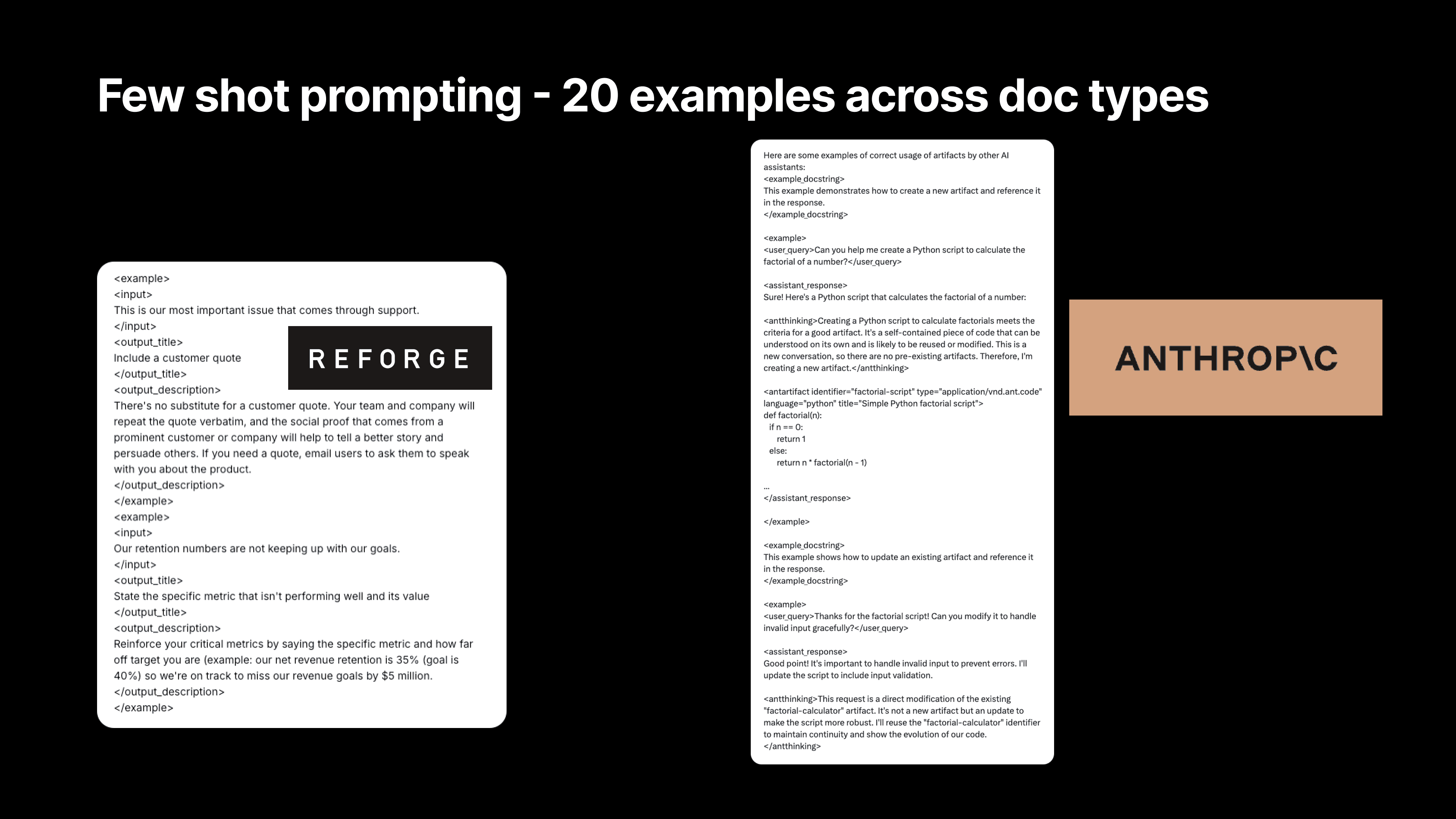
We then reinforce critical metrics by specifying the metric and how far off target it is. For example, "Our net revenue retention is 35% and our goal is 40%. We're on track to miss our revenue goals by $5 million." That's the kind of accountability an expert would hold us to.
This is why we include it as an example. It contrasts the lazy version—"We're not hitting our goals"—with the more precise approach: state your goal, how far off you are, and the impact. That's the A+ version of what could be in your document, setting a higher standard.
This is similar to an example from Anthropic's Claude artifacts feature. You can see there's a docstring and an example. For instance, if the user query is "Can you help me create a Python script to calculate the factorial of a number?" it goes through some thinking about creating a Python script. It then includes metadata they likely use to display artifacts in Claude. We modeled our approach heavily on this, and it significantly improved our suggestions.
Technical Implementation
From a technical perspective, we faced a significant challenge in inserting suggestions at the most relevant points. Many users told us that while the suggestions were good, they needed to know exactly where in their document to apply them.
To implement this new feature, we had to map each suggestion directly to a specific part of the document. You can see examples here for Notion, Microsoft Word Online, and Google Docs. For each of these tools, we had to access the document's content and then ask the language model to ground the feedback to particular points in the document.
We accomplished this by passing in identifiers for different document sections and asking the language model to provide feedback with corresponding IDs or identifiers. This allows us to show suggestions in the appropriate places. One of our talented engineers had to figure out how to access information in users' documents to support this feature, and then modify the webpages in the user's browser to show suggestions, highlight relevant text, and display the suggestion when clicked.
All of this had to be done without interfering with how Google Docs, Notion, and Microsoft Word function. It was a massive engineering effort, with much of it specific to individual tools that people use.
3. Quadrupling Engagement with AI-Powered Personalized Marketing
The Reforge Extension includes a powerful feature that helps users draft a wide variety of documents, from PRDs to job descriptions, personas, and career ladders. Despite the feature’s value, many users weren’t aware it existed, let alone what it could do. Those who used it were impressed with the outputs and retention for this feature is high. The challenge was getting more people to engage with it in the first place.
The solution? We tapped into the power of AI to create a highly personalized marketing campaign that didn’t just tell users what the extension could do—it showed them, using tailored content unique to their role and company. This campaign revolutionized Reforge’s approach to user engagement and marketing.
Personalizing at Scale: How Reforge Did It
Dan walked through the process of how they leveraged automation and AI to create customized PRD examples for thousands of users. Rather than sending out generic email blasts, Reforge used AI to generate fully fleshed-out PRDs specific to each user’s context, based on their job title, company, and what their company does.
Here’s how it worked:
Reforge collected metadata about users when they searched for specific terms like "PRD" or "roadmap" on the platform. This data included the user's profile. If the profile contained the user's company information, we'd then pull a company description from Clearbit.
Using this data, the AI generated a unique product concept for the company—something adjacent to their current product portfolio but not overlapping.
Then, leveraging all of the user's context and this newly minted idea, we used the actual prompt from the Reforge Extension to generate a PRD.
Next, the AI created a personalized subject line and formatted the draft into HTML, resulting in an email that felt tailor-made for each user.
Finally, Reforge’s email automation system sent these tailored emails to users, giving them a ready-to-use document that directly addressed their needs.
The result? A 100% open rate (not a joke) and a 14.2% CTR. Typically our emails hover around a 50-60% open rate and a 1.5-2% CTR. Needless to say, this was a massive improvement.
Instead of requiring users to imagine how the extension could help them, we delivered contextual, actionable outputs right to their inboxes, making it easy to see the value of the tool. “We saw our open rates and click-through rates go through the roof,” Dan said. “People weren’t just reading the emails—they were engaging with the content and using the extension as a result.”
Scaling Personalization with Automation
The first version of this was run by Dan using VS code on his drive. He would pull chunks of 500-1000 users at a time and run a batch of the process. Then, Ben (Dan’s team-member) would take that data and do a mass send of totally personalized emails.
To take this process even further, Dan & Ben built an app that automated the entire workflow using Zapier. Anytime a user searched for specific terms on the platform, the app automatically generated personalized content—everything from the document draft to the subject line of the email—and sent it out without any manual intervention. We also now sorted users into one of four document types, sending drafted PRDs, Positioning Documents, Product Roadmaps, and Messaging Guidelines depending on the users search behavior.
“We started with a Python script, but then scaled it to an app that could handle thousands of users,” Dan explained. “Now, whenever someone searches for something like ‘PRD,’ they get a tailored email with an actual, usable PRD based on their role and company.”
This approach not only drove higher engagement, but also demonstrated how Reforge could use AI to scale personalization in a way that feels meaningful to each individual user. It wasn’t about blasting out generic information—it was about giving users something that felt immediately relevant to them.
The Future of AI-Driven Marketing
Dan emphasized that this type of personalized, AI-powered marketing is just the beginning. As AI tools become more sophisticated, the ability to tailor content to individual users’ needs will only improve. “I think it’s only a matter of time before everyone expects this level of personalization,” Dan said. “Generic marketing emails will feel lazy, and the bar will be set higher for engaging with users in a meaningful way.”
For Reforge, the success of this campaign showcased not just how AI can improve marketing effectiveness, but how it can be used to bridge the gap between a product’s potential and the user’s understanding of that potential. By showing users exactly how the extension could help them, Reforge transformed engagement and drove higher adoption rates.
Final plug - we'd love to hear your feedback. Please download the Reforge Extension below for free and email Dan [at] Reforge.com if you have any feedback for us!
Download Free Here
Select Q&A
Q&A Section
Question:
Can you describe the level of effort you used in fine-tuning the content and prompts?
Answer:
We spent quite a bit of time fine-tuning the content and prompts. One of the tools we use is called Adeline, which allows us to evaluate our prompts, the context we’re passing into the LLM, and the responses. We set specific rules—for example, we want at least one reference to Reforge content in every response or we want the response to align with a particular document type. Adeline lets us experiment with different approaches, like tweaking the prompt or filtering the context that’s fed to the LLM, and helps us determine which configurations generate the best responses.
This has been invaluable in ensuring that the feedback is not only relevant but also grounded in the right context for the user.
Question:
How did you measure the quality of the output "in the wild"? Did you rely on user feedback like thumbs-up/thumbs-down, and are you using LLMs to grade the responses?
Answer:
We don’t store user data for privacy reasons, so we rely heavily on qualitative feedback and surveys to gauge response quality. We ask users who churn why they left, and we’ve recently added thumbs-up/thumbs-down feedback within the extension for features like JIRA suggestions and inline feedback. So far, our thumbs-up rating for inline suggestions is around 90%, which we’re happy with.
In terms of using LLMs to grade the responses, we don’t do that yet, but it’s something we’re considering for future improvements. Since we don’t save document content, we also can’t debug a thumbs-down, which is a challenge. However, we may consider asking users to voluntarily provide additional context when they give negative feedback.
Question:
What was the size of the team that executed all the improvements you shared, and what roles did it include?
Answer:
We started with a team of three—myself, a designer, and an engineer. By mid-June, we added another software engineer and someone in a hybrid role, who focuses on both marketing and improving the intelligence of the product. So, the core team consists of five people now. This small team has been able to move quickly and execute a lot, but having people with cross-disciplinary skills has been key to our speed.
Question:
What do you see as the next level for the extension, aside from expanding the number of templates? Also, how do you plan to compete with Notion AI?
Answer:
For the extension, one of the next areas we’re excited to tackle is recognizing where a document is in its lifecycle—whether it’s just a set of notes, a draft, or something that’s already been shared. Right now, the extension provides suggestions regardless of the document’s maturity. We want to build more intelligent feedback based on the stage of the document.
As for competing with Notion AI, our strategy is to focus on a specific niche. Notion is trying to be all things to all people, which makes it hard to tailor their product for specific use cases. Reforge, on the other hand, is focused on tech roles like product managers, marketers, and designers. By specializing in these areas and working across multiple tools, we can offer much more targeted solutions. We also have a unique advantage with our extensive content library and expert network, which allows us to provide high-quality, contextual suggestions grounded in real-world expertise.
Question:
Are you considering using models other than OpenAI, like LLaMA or others?
Answer:
Yes, we’re constantly experimenting with different models. Tools like Adeline make it easy for us to swap between models like OpenAI’s GPT, Gemini, and Claude. We’ve even tested Grok and could potentially host LLaMA models ourselves in the future.
For our users, the model we use isn’t really important as long as we’re delivering high-quality, actionable feedback without storing their data. So, our job is to continually evaluate which model offers the best balance of quality, speed, and cost, and to integrate that into the product.
Question:
How do you evaluate whether a prompt or response is “good” objectively?
Answer:
Right now, our evaluation is primarily based on qualitative feedback, like thumbs-up/thumbs-down ratings. However, we’re working toward building a validation dataset that would allow us to objectively test how well the model is performing across different document types and contexts. For now, we rely on user feedback and survey data to make improvements, but having a more structured evaluation system is something we plan to develop as we move forward.
Question:
How did you calibrate the cost of using LLMs for these features?
Answer:
We’re in a fortunate position where we’re still growing, so cost hasn’t been a major issue yet. We’ve optimized by using models like GPT-4 Mini, which offers the right balance of cost and performance. The trend we see is that the cost of using these models will continue to go down over time as technology improves, so we’re not overly concerned about making AI features a paid add-on right now. Instead, we’re focused on scaling usage and providing a valuable experience for free, with the belief that the cost will continue to drop.
Question:
For responses that include specific numbers (e.g., customers to survey), are you doing any power analysis to determine those recommendations?
Answer:
No, we’re not doing any formal power analysis yet. Right now, we’re more focused on getting users to think through these steps. For instance, we suggest surveying a certain number of users to gather qualitative insights, but we haven’t yet built in the sophistication to determine the statistical significance of that sample size. This is an area where we see potential for growth, especially as we move toward helping users not just make suggestions but actually act on them.
Question:
How are you thinking about long-term strategy and competing with tools like Notion AI?
Answer:
We see our niche focus as a key differentiator. Notion AI is trying to serve a massive user base, but that makes it harder for them to solve specific problems deeply. We’re focusing on people in tech roles—product managers, marketers, designers—so we can provide more specialized, relevant feedback. Additionally, because we’re embedded across various tools like Google Docs, Notion, Confluence, and JIRA, we can offer a more holistic view of someone’s work.
The content and expert network we’ve built at Reforge also give us an edge. While tools like Notion don’t have their own content library, we can ground our suggestions in real-world examples and expert insights. That vertical integration, combined with our cross-tool capabilities, gives us a strong long-term advantage.
Join Dan Wolchonok, VP of New Products at Reforge, for an in-depth look at the latest improvements to the Reforge Extension. Discover how we’ve made the extension smarter with advanced content mapping and chain-of-thought processes, improved usability through in-line suggestions, and tested our AI marketing playbook which quadrupled our click-through-rate.
Smarter Intelligence: Advanced content mapping and chain-of-thought upgrades.
Seamless Suggestions: In-line recommendations to boost productivity.
AI-Native Marketing: Testing a groundbreaking AI-driven marketing strategy which 4x'ed our click-through-rates.
How We Built the Reforge Extension: Part 2
The Reforge extension is a free co-pilot that plugs into your daily tools. It helps you get started, be more strategic, and produce better work. It grounds its feedback in the knowledge of tech’s leading experts.
Full Video:
In June, Dan Wolchonok, VP of New Products, shared the detailed journey behind building the Reforge Extension. In that event, he covered:
The Roadmap: From Concept to Reality
Why we built it, what we built, and how we built the first versions
How It Works: The Technology Behind the Extension
How we moved from simple RAG to Chain of Thought
What’s Inside: A Look At Our Stack
Full details of the tools used to build the product and a special presentation on how we use Adaline to test and refine our prompts.
Check out the full recording & accompanying blog here.
Now, we're back with Part 2 to show how we built improved the extension across three critcial criteria - Intelligence, Retention, and Growth.
Dan will cover how we:
Optimized our Chain of Thought (CoT) and leveraged Anthropic’s best-in-class prompts to drive improvements.
Doubled retention with a single feature change.
4x’ed email click through rates using the extension.
Before we get too far into this, we highly recommend downloading the extension for free here!
Download Free Here
Worried about privacy? We’re exceptionally conservative. See our policies here.
Context on the extension
But first, let's explore why we built this tool and where it stands today.
In a world where knowledge work can often feel fragmented across tools like Notion, Google Docs, Confluence, and Jira, Reforge set out to create an extension that integrates directly into these platforms, providing context-specific suggestions that help users write, review, and improve documents—whether they're drafting a PRD, launch plan, product tickets, messaging guidelines, or a strategic roadmap.
“We wanted to help people do better work by bringing our expertise to them, right where they’re already working,” Dan explained. The extension connects users with frameworks, feedback, and real-world examples from the Reforge knowledge base without requiring them to switch between tabs or applications. Plus, it's powered by OpenAI's top models, giving you access to cutting-edge AI tools without the need to write a single prompt.
The extension does more than just surface relevant suggestions; it’s built to think through complex tasks, offering feedback grounded in expertise. From acting like a "product manager over your shoulder" to proactively guiding users to avoid common pitfalls, the extension offers a seamless, integrated experience.
While it’s free for anyone to use, Reforge for Teams members get additional features such as custom company templates built into the extension!
Alright, let’s dive into how we improved the extension over the past 6 weeks 🙂!
1. Improving Intelligence through optimizing our Chain of Thought (CoT)
Let’s dive into how we’ve made the extension smarter, specifically focusing on the improvements in our Chain of Thought reasoning.
In our previous session, we discussed a simple flow diagram outlining how our Retrieval-Augmented Generation (RAG) system worked.
The problem - Early versions of the extension struggled to differentiate between different types of documents. "We noticed the limitations of state-of-the-art AI models when it came to feedback," Dan explained. A PRD and a user persona, for example, need completely different lenses of evaluation. Yet the initial AI model treated them similarly, offering generic feedback that often missed the mark.
Improving Chain of Thought
The initial solution - To improve this, we introduced a new step (seen above) where we detect the type of document a user is working on. Once we know the document type, we guide the model to give feedback that’s specifically appropriate for that kind of document. While we didn’t overhaul the entire system, this enhancement made a significant difference.
In this flow diagram, for example, when a user clicks “Help me improve my document,” the first thing we do is classify the document. We now categorize it as something like a PRD (Product Requirements Document), a persona, a technical spec, or even the results of an experiment—each of which requires a different lens for evaluation.
The new optimization - What started with just 13 document types expanded to 180 unique types. This shift wasn’t glamorous—it involved countless hours of mapping relevant Reforge content to each type of document, and constantly refining the questions the AI would ask. But this foundational work was necessary for elevating the quality of feedback.
Each document type has a description, key synonyms for the document to look for in document titles, sample documents, and an expert crafted explanation of what separates good vs great.
Once we classify the document, we tap into the expertise we’ve built into Reforge to determine what a real expert would suggest for that type of document. We leverage the wealth of knowledge from the Reforge platform, which includes educational content and real-world examples. This allows us to ground our feedback in actionable advice that’s tailored to the document type.
Therefore, each document is carefully mapped to relevant courses & guides that are most relevant in the Reforge content library.
Next, we asked: how would an expert evaluate this doc?
These questions are expert-written questions meant to start the LLM’s chain of thought. Then, the LLM takes those questions, combined with the user’s document, the reforge knoeledge base, the document label and description, and thinks about new questions to ask. Finally, the LLM answers those questions.
The problems with our original approach?
The seed questions were too generic: We might have asked a generic question like, "Would this document be better if it described how it differentiates the product in a crowded market?" While that’s a reasonable question, we realized we could do better.
Change 2 - We rewrote all of our seed questions to make them more specific and actionable. Now, we ask more targeted questions, like, “How effectively does our messaging highlight what sets our product apart from competitors? Are there specific competitive advantages we should emphasize more?”
The altitude and thoughtfulness of the questions ranged heavily. For example, we found a lot of the questions centered around things that were “missing” from the document, resulting in users adding material, rather than questions around what could be clarified, or perhaps could be removed from the document.
Change 3 - We went on a thought journey with experts and identified 9 core types of feedback. Then we made sure the seed questions addressed all 9 types of feedback.
Prompt Improvements Within the Chain Of Thought
Finally, and perhaps most importantly, we completely overhauled our prompts.
I want to focus on the final, and arguably the most important prompt. This is the one that ultimately answers the seed questions, and gives the user the right feedback at the right time for the right document.
Previously, the system prompt was relatively short, and even after we fixed the prior step with better document identifications, better seed questions, and better mapping, the end responses still appeared too high-level or generic.
While the process included a Chain of Thought (CoT) since there were multiple steps before this (document identification, seed question creation, etc.,), when we got to our final step of the process - answering the seed questions- we reverted to a single step.
Now, we’ve expanded our prompt significantly to create a CoT within our CoT.
First, Think! - We guide the model to think through the problem more thoroughly, which is where Chain of Thought reasoning comes in. After guiding it through a series of critical thinking steps, we then ask the model to rephrase its feedback into something tactical and actionable, ensuring that the suggestions aren’t just high-level critiques but actionable insights.
Then, Extract! - We also tell the model to use a step of extraction. We want the LLM to use the Reforge knowledge base, but we then don’t want it to teach the user the theory (at least not initially). We want it to deliver a crisp application of the feedback instead.
For instance, we used to give feedback like, "Set up a Feedback River." While that’s technically correct, it’s vague and requires knowing what a Feedback River is in order to do anything about it. Now, we give much more specific advice, like, "Contact 20 to 30 users who failed to register and ask for their feedback on the process."
We’re telling the user exactly what to do, and who to do it with based on the Reforge expert knowledge and the context from the user document.
We also provide the model with specific examples to help it frame the suggestions more effectively. This was a huge improvement over the previous version, where we didn’t provide any examples and relied on zero-shot reasoning. Now, we give it about 20 examples, which has made a noticeable difference in the quality of the feedback.
We also stress the importance of making the most actionable part of the recommendation stand out. Previously, we’d simply ask the model to summarize a point, but now we emphasize the need for the feedback to feel actionable and specific. For example, instead of the generic suggestion to "establish a feedback loop," we now provide concrete steps like, "Survey 10 users who didn’t complete the registration process to gather insights on why they dropped off." This kind of precise feedback is far more valuable.
This is the kind of thinking that has helped us make the feedback process smarter and more relevant. We’ve seen a ton of positive feedback pour in since we made these changes, and we’re just getting started.
2. Out of Sight, Out of Mind: Making the Extension Unforgettable
After launching the Reforge Extension, the team faced a surprisingly common challenge—users loved the tool, but many simply forgot it was there. Despite strong feedback about its usefulness, the extension wasn't becoming a daily habit for users. Dan described it as a classic “out of sight, out of mind” problem.
“We did what any good product team would do—we surveyed users,” Dan explained. The results were eye-opening: users consistently said they installed the extension, found it helpful during their initial sessions, and then immediately forgot it existed. Comments like, “I forgot I had it three minutes after installing” were shockingly frequent.
This issue wasn’t a failure of the product itself, but rather a sign that the extension wasn’t doing enough to remind users of its value in a non-intrusive way. Instead of users actively seeking out the extension, Reforge needed to nudge them at the right moments. But how do you make a tool more visible without becoming annoying?
The Solution: In-Line Suggestions
To solve this, the team took a cue from tools like Grammarly, which gently prompt users with suggestions as they type, without being overwhelming. Reforge introduced a feature where the extension would surface subtle, contextual prompts—little bubbles attached to specific sections of a document in tools like Notion or Google Docs.
For example, if you were drafting a PRD in Notion, the Reforge bubble might pop up next to a section, offering suggestions on improving your document’s clarity or recommending a key framework from Reforge’s content library. These bubbles act as gentle nudges, helping users take action without disrupting their workflow. And most importantly, it reminds them the extension is there when they need it most.
The results? Reforge saw double the retention rates in users who had access to this feature. Before, user activity would spike in the first week after installation, only to drop off significantly afterward. But with the new prompts, week-one retention more than doubled, with sustained usage following the feature’s launch.
“We weren’t seeing people uninstall the extension,” Dan noted. “They liked it; they just forgot it was there. So by making it a little more proactive, but still subtle, we were able to bring users back into the fold without being intrusive.”
GPT-4.0 Mini: The Sweet Spot for Speed, Quality, and Cost
A critical component of this feature’s success was choosing the right AI model. Reforge settled on GPT-4.0 Mini, a version of OpenAI’s model that strikes the perfect balance between speed, intelligence, and cost.
GPT-4.0 Mini was a breakthrough for our use case: it was fast enough to deliver suggestions in real-time, smart enough to produce high-quality feedback, and most importantly, cost-effective for scaling across all users.
Reforge tested different AI models, including GPT-3.5 Turbo, which was cheaper but lacked the necessary intelligence for sophisticated feedback, and the full GPT-4.0, which was too expensive for the scale they needed. “GPT-4.0 Mini hit the sweet spot—it was smart enough, fast enough, and cheap enough to make this feature work for us,” Dan explained.
By rolling out these contextual nudges powered by GPT-4.0 Mini, Reforge shifted the extension from being a tool users forgot about to one they interacted with regularly—doubling their retention in the process.
Leveraging Anthropic’s Best-In-Class Prompting
We've been studying Anthropic's system prompts for Claude to improve our own AI capabilities. While they haven't released the system prompts for Artifacts yet, we've gained valuable insights from what's available. Here are some key learnings we've implemented:
A. Encouraging AI "Thinking"
We discovered a section in Anthropic's prompt where the AI essentially "thinks" by writing out its thought process, although this output isn't visible to users. By implementing a similar approach, we've seen significantly better suggestions from our AI.
There's a reason they include this without outputting it. As the AI thinks through the process, it generates better predictions and more relevant tokens because it's considering what it's doing and why.
For example, there's a section that says, "Think for one sentence about how it evaluates against criteria for a good and bad artifact." We were inspired by this and built similar elements into our prompt.
B. Pushing for Critical Feedback
We've instructed our AI to be more critical and harsh about issues like filler words, lack of specificity, limited vision, and insufficient accountability to metrics. This approach helps generate more valuable and actionable feedback for our users.
We emphasized that users need to hear the honest truth that people are often afraid to tell them. We felt we needed to include some provocative elements to encourage deeper thinking. This isn't for outputting suggestions directly, but to get the AI in the right mindset to evaluate the document, which then informs its suggestions.
C. Providing Specific Examples
We now provide 20 different examples of hypothetical sentences in our prompts. For instance, something we've probably written countless times is "Our retention numbers are not keeping up with our goals." The example here might be to state the specific metric that isn't performing well and its value.
We then reinforce critical metrics by specifying the metric and how far off target it is. For example, "Our net revenue retention is 35% and our goal is 40%. We're on track to miss our revenue goals by $5 million." That's the kind of accountability an expert would hold us to.
This is why we include it as an example. It contrasts the lazy version—"We're not hitting our goals"—with the more precise approach: state your goal, how far off you are, and the impact. That's the A+ version of what could be in your document, setting a higher standard.
This is similar to an example from Anthropic's Claude artifacts feature. You can see there's a docstring and an example. For instance, if the user query is "Can you help me create a Python script to calculate the factorial of a number?" it goes through some thinking about creating a Python script. It then includes metadata they likely use to display artifacts in Claude. We modeled our approach heavily on this, and it significantly improved our suggestions.
Technical Implementation
From a technical perspective, we faced a significant challenge in inserting suggestions at the most relevant points. Many users told us that while the suggestions were good, they needed to know exactly where in their document to apply them.
To implement this new feature, we had to map each suggestion directly to a specific part of the document. You can see examples here for Notion, Microsoft Word Online, and Google Docs. For each of these tools, we had to access the document's content and then ask the language model to ground the feedback to particular points in the document.
We accomplished this by passing in identifiers for different document sections and asking the language model to provide feedback with corresponding IDs or identifiers. This allows us to show suggestions in the appropriate places. One of our talented engineers had to figure out how to access information in users' documents to support this feature, and then modify the webpages in the user's browser to show suggestions, highlight relevant text, and display the suggestion when clicked.
All of this had to be done without interfering with how Google Docs, Notion, and Microsoft Word function. It was a massive engineering effort, with much of it specific to individual tools that people use.
3. Quadrupling Engagement with AI-Powered Personalized Marketing
The Reforge Extension includes a powerful feature that helps users draft a wide variety of documents, from PRDs to job descriptions, personas, and career ladders. Despite the feature’s value, many users weren’t aware it existed, let alone what it could do. Those who used it were impressed with the outputs and retention for this feature is high. The challenge was getting more people to engage with it in the first place.
The solution? We tapped into the power of AI to create a highly personalized marketing campaign that didn’t just tell users what the extension could do—it showed them, using tailored content unique to their role and company. This campaign revolutionized Reforge’s approach to user engagement and marketing.
Personalizing at Scale: How Reforge Did It
Dan walked through the process of how they leveraged automation and AI to create customized PRD examples for thousands of users. Rather than sending out generic email blasts, Reforge used AI to generate fully fleshed-out PRDs specific to each user’s context, based on their job title, company, and what their company does.
Here’s how it worked:
Reforge collected metadata about users when they searched for specific terms like "PRD" or "roadmap" on the platform. This data included the user's profile. If the profile contained the user's company information, we'd then pull a company description from Clearbit.
Using this data, the AI generated a unique product concept for the company—something adjacent to their current product portfolio but not overlapping.
Then, leveraging all of the user's context and this newly minted idea, we used the actual prompt from the Reforge Extension to generate a PRD.
Next, the AI created a personalized subject line and formatted the draft into HTML, resulting in an email that felt tailor-made for each user.
Finally, Reforge’s email automation system sent these tailored emails to users, giving them a ready-to-use document that directly addressed their needs.
The result? A 100% open rate (not a joke) and a 14.2% CTR. Typically our emails hover around a 50-60% open rate and a 1.5-2% CTR. Needless to say, this was a massive improvement.
Instead of requiring users to imagine how the extension could help them, we delivered contextual, actionable outputs right to their inboxes, making it easy to see the value of the tool. “We saw our open rates and click-through rates go through the roof,” Dan said. “People weren’t just reading the emails—they were engaging with the content and using the extension as a result.”
Scaling Personalization with Automation
The first version of this was run by Dan using VS code on his drive. He would pull chunks of 500-1000 users at a time and run a batch of the process. Then, Ben (Dan’s team-member) would take that data and do a mass send of totally personalized emails.
To take this process even further, Dan & Ben built an app that automated the entire workflow using Zapier. Anytime a user searched for specific terms on the platform, the app automatically generated personalized content—everything from the document draft to the subject line of the email—and sent it out without any manual intervention. We also now sorted users into one of four document types, sending drafted PRDs, Positioning Documents, Product Roadmaps, and Messaging Guidelines depending on the users search behavior.
“We started with a Python script, but then scaled it to an app that could handle thousands of users,” Dan explained. “Now, whenever someone searches for something like ‘PRD,’ they get a tailored email with an actual, usable PRD based on their role and company.”
This approach not only drove higher engagement, but also demonstrated how Reforge could use AI to scale personalization in a way that feels meaningful to each individual user. It wasn’t about blasting out generic information—it was about giving users something that felt immediately relevant to them.
The Future of AI-Driven Marketing
Dan emphasized that this type of personalized, AI-powered marketing is just the beginning. As AI tools become more sophisticated, the ability to tailor content to individual users’ needs will only improve. “I think it’s only a matter of time before everyone expects this level of personalization,” Dan said. “Generic marketing emails will feel lazy, and the bar will be set higher for engaging with users in a meaningful way.”
For Reforge, the success of this campaign showcased not just how AI can improve marketing effectiveness, but how it can be used to bridge the gap between a product’s potential and the user’s understanding of that potential. By showing users exactly how the extension could help them, Reforge transformed engagement and drove higher adoption rates.
Final plug - we'd love to hear your feedback. Please download the Reforge Extension below for free and email Dan [at] Reforge.com if you have any feedback for us!
Download Free Here
Select Q&A
Q&A Section
Question:
Can you describe the level of effort you used in fine-tuning the content and prompts?
Answer:
We spent quite a bit of time fine-tuning the content and prompts. One of the tools we use is called Adeline, which allows us to evaluate our prompts, the context we’re passing into the LLM, and the responses. We set specific rules—for example, we want at least one reference to Reforge content in every response or we want the response to align with a particular document type. Adeline lets us experiment with different approaches, like tweaking the prompt or filtering the context that’s fed to the LLM, and helps us determine which configurations generate the best responses.
This has been invaluable in ensuring that the feedback is not only relevant but also grounded in the right context for the user.
Question:
How did you measure the quality of the output "in the wild"? Did you rely on user feedback like thumbs-up/thumbs-down, and are you using LLMs to grade the responses?
Answer:
We don’t store user data for privacy reasons, so we rely heavily on qualitative feedback and surveys to gauge response quality. We ask users who churn why they left, and we’ve recently added thumbs-up/thumbs-down feedback within the extension for features like JIRA suggestions and inline feedback. So far, our thumbs-up rating for inline suggestions is around 90%, which we’re happy with.
In terms of using LLMs to grade the responses, we don’t do that yet, but it’s something we’re considering for future improvements. Since we don’t save document content, we also can’t debug a thumbs-down, which is a challenge. However, we may consider asking users to voluntarily provide additional context when they give negative feedback.
Question:
What was the size of the team that executed all the improvements you shared, and what roles did it include?
Answer:
We started with a team of three—myself, a designer, and an engineer. By mid-June, we added another software engineer and someone in a hybrid role, who focuses on both marketing and improving the intelligence of the product. So, the core team consists of five people now. This small team has been able to move quickly and execute a lot, but having people with cross-disciplinary skills has been key to our speed.
Question:
What do you see as the next level for the extension, aside from expanding the number of templates? Also, how do you plan to compete with Notion AI?
Answer:
For the extension, one of the next areas we’re excited to tackle is recognizing where a document is in its lifecycle—whether it’s just a set of notes, a draft, or something that’s already been shared. Right now, the extension provides suggestions regardless of the document’s maturity. We want to build more intelligent feedback based on the stage of the document.
As for competing with Notion AI, our strategy is to focus on a specific niche. Notion is trying to be all things to all people, which makes it hard to tailor their product for specific use cases. Reforge, on the other hand, is focused on tech roles like product managers, marketers, and designers. By specializing in these areas and working across multiple tools, we can offer much more targeted solutions. We also have a unique advantage with our extensive content library and expert network, which allows us to provide high-quality, contextual suggestions grounded in real-world expertise.
Question:
Are you considering using models other than OpenAI, like LLaMA or others?
Answer:
Yes, we’re constantly experimenting with different models. Tools like Adeline make it easy for us to swap between models like OpenAI’s GPT, Gemini, and Claude. We’ve even tested Grok and could potentially host LLaMA models ourselves in the future.
For our users, the model we use isn’t really important as long as we’re delivering high-quality, actionable feedback without storing their data. So, our job is to continually evaluate which model offers the best balance of quality, speed, and cost, and to integrate that into the product.
Question:
How do you evaluate whether a prompt or response is “good” objectively?
Answer:
Right now, our evaluation is primarily based on qualitative feedback, like thumbs-up/thumbs-down ratings. However, we’re working toward building a validation dataset that would allow us to objectively test how well the model is performing across different document types and contexts. For now, we rely on user feedback and survey data to make improvements, but having a more structured evaluation system is something we plan to develop as we move forward.
Question:
How did you calibrate the cost of using LLMs for these features?
Answer:
We’re in a fortunate position where we’re still growing, so cost hasn’t been a major issue yet. We’ve optimized by using models like GPT-4 Mini, which offers the right balance of cost and performance. The trend we see is that the cost of using these models will continue to go down over time as technology improves, so we’re not overly concerned about making AI features a paid add-on right now. Instead, we’re focused on scaling usage and providing a valuable experience for free, with the belief that the cost will continue to drop.
Question:
For responses that include specific numbers (e.g., customers to survey), are you doing any power analysis to determine those recommendations?
Answer:
No, we’re not doing any formal power analysis yet. Right now, we’re more focused on getting users to think through these steps. For instance, we suggest surveying a certain number of users to gather qualitative insights, but we haven’t yet built in the sophistication to determine the statistical significance of that sample size. This is an area where we see potential for growth, especially as we move toward helping users not just make suggestions but actually act on them.
Question:
How are you thinking about long-term strategy and competing with tools like Notion AI?
Answer:
We see our niche focus as a key differentiator. Notion AI is trying to serve a massive user base, but that makes it harder for them to solve specific problems deeply. We’re focusing on people in tech roles—product managers, marketers, designers—so we can provide more specialized, relevant feedback. Additionally, because we’re embedded across various tools like Google Docs, Notion, Confluence, and JIRA, we can offer a more holistic view of someone’s work.
The content and expert network we’ve built at Reforge also give us an edge. While tools like Notion don’t have their own content library, we can ground our suggestions in real-world examples and expert insights. That vertical integration, combined with our cross-tool capabilities, gives us a strong long-term advantage.