Reforge has joined Miro ↗
Prototyping has always been central to the product development workflow, but until now, it’s been something that most PMs didn’t have the time or skills to do. Now AI has made prototyping fast, accessible and cheap, and it’s quickly becoming a core part of every PM’s job.
AI prototyping is where vibe coding evolves from a fun way to tinker with AI to an essential step in the product workflow. This has all happened very fast (as do most things with AI) but this isn’t a fad. AI prototyping unlocks unprecedented speed and, when used well, helps you find better solutions to customer problems. It actually helps you create more value for your customers
To help place AI prototyping in the PM’s skillset, here’s what we consider to be the core skills of the PM:
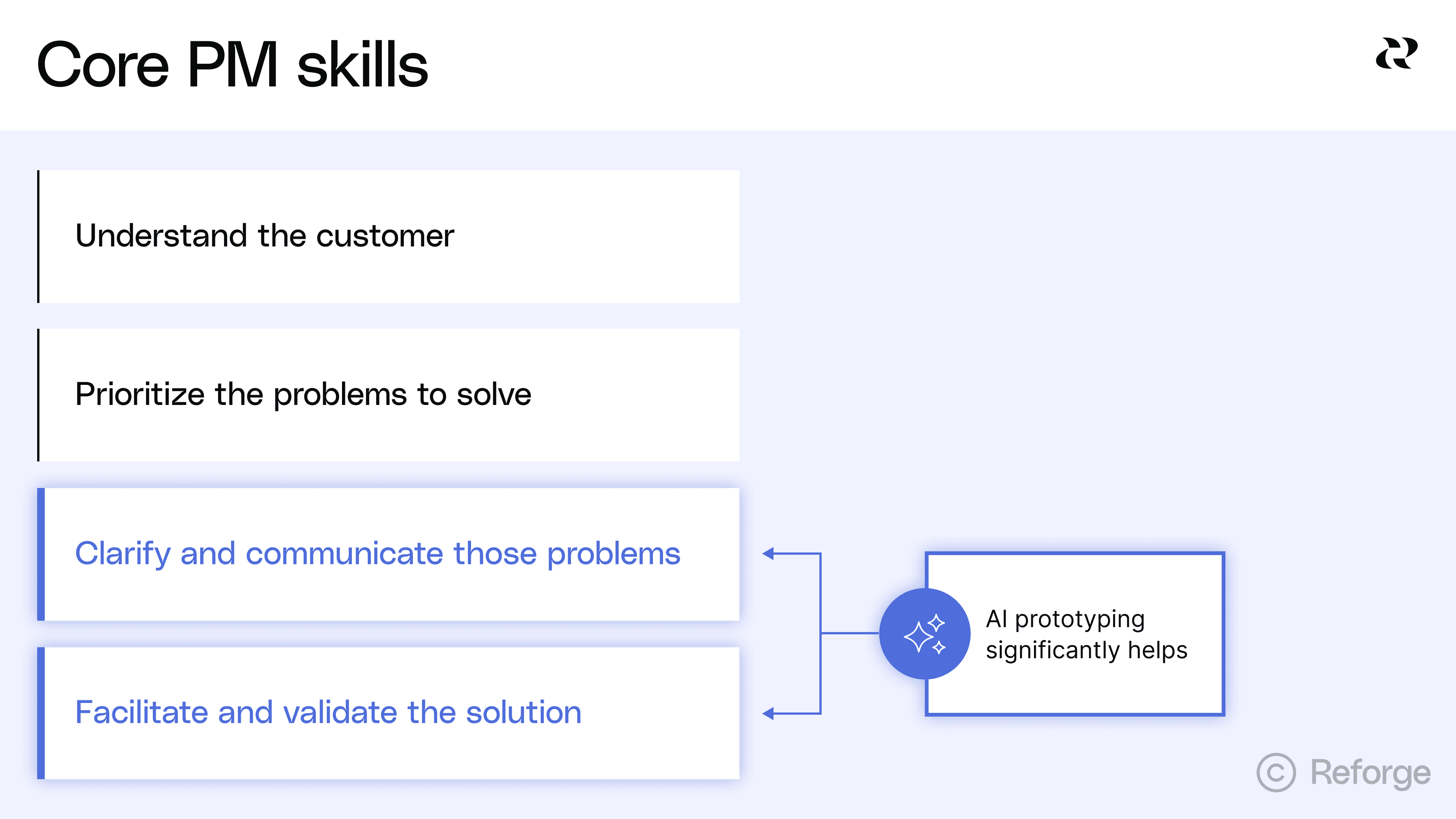
AI prototyping significantly helps both #3 and #4. The opportunity is massive but in these early days, it’s hard to know how to start and where exactly it fits into the product development cycle. Do prototypes replace PRDs? Can they spit out production-ready code? Do they have a place in quarterly or annual planning?
It’s a lot to take in, but in this article, we’ll walk through how to implement AI prototyping in a way that aligns your team, helps you ship faster and adds value to customers, while also pointing out the pitfalls that we’ve already seen plenty of teams falling into.
Introducing Reforge Build
*This has been top of mind for us here at Reforge lately. Early in 2025, we (like everyone else) were fascinated by the possibilities but frustrated that the market of vibe coding tools weren’t purpose-built for PMs working with existing products, stakeholders and organizational constraints. So we created Reforge Build, the AI prototyping tool for product builders. *You can learn more and start building here.
https://fast.wistia.net/embed/iframe/8eg1mtqlfb
AI prototyping makes three enticing promises
There are three main promises that AI prototyping offers. The potential won’t automatically turn into happier customers or more revenue—though this article will help you get to that part—but it’s helpful to distill the exact and practical ways your company benefits from AI prototyping.
1. Radical speed changes the game.
Traditional prototyping took weeks. A designer would create mockups in Figma, which meant knowing the tool but also have the design skills to bring an idea to life. A developer would then wire up the interactions. Back and forth, iteration after iteration. AI tools collapse this timeline from weeks to hours. You can go from a screenshot or rough description to a functional prototype in a single session and probably before lunch.
This isn't just incrementally faster. It's a fundamentally different operating speed. When you can bring an idea to life in one hour instead of 10 days, your perspective on how to create solutions for users expands dramatically.
2. Anyone can build AI prototypes.
Previously, only designers and developers could create prototypes. You needed to know Figma, React or other specialized tools. Everyone else was stuck with whiteboards and PowerPoint. AI prototyping removes these barriers entirely.
PMs can prototype their own ideas. Founders can test concepts before hiring a team. Customer success reps can mock up features their clients are requesting. This democratization matters because good ideas come from everywhere. The constraint was never imagination. It was the ability to make ideas tangible.
3. Costs have dropped to near zero.
Prototyping costs have fallen off a cliff. This economic shift unlocks new behaviors. You can explore five or even 10 solutions instead of committing to one or two. Multiple teams can prototype competing approaches in parallel. Ideas that would never justify the resource investment can now get tested. What looked like waste before (building something you might throw away) becomes smart exploration when the cost approaches zero.
So where does AI prototyping actually level-up your product development process?
You’ll find a recurring theme in this article that AI prototyping is great for discovery and less so for delivery. It’s not about generating code that can later be shipped. It’s primary benefit is determining what to build, then handing a detailed spec to eng to actually build it.
You’ll find a recurring theme in this article that AI prototyping is great for discovery and less so for delivery. It’s not about generating code that can later be shipped. It’s primary benefit is determining what to build, then handing a detailed spec to eng to actually build it.
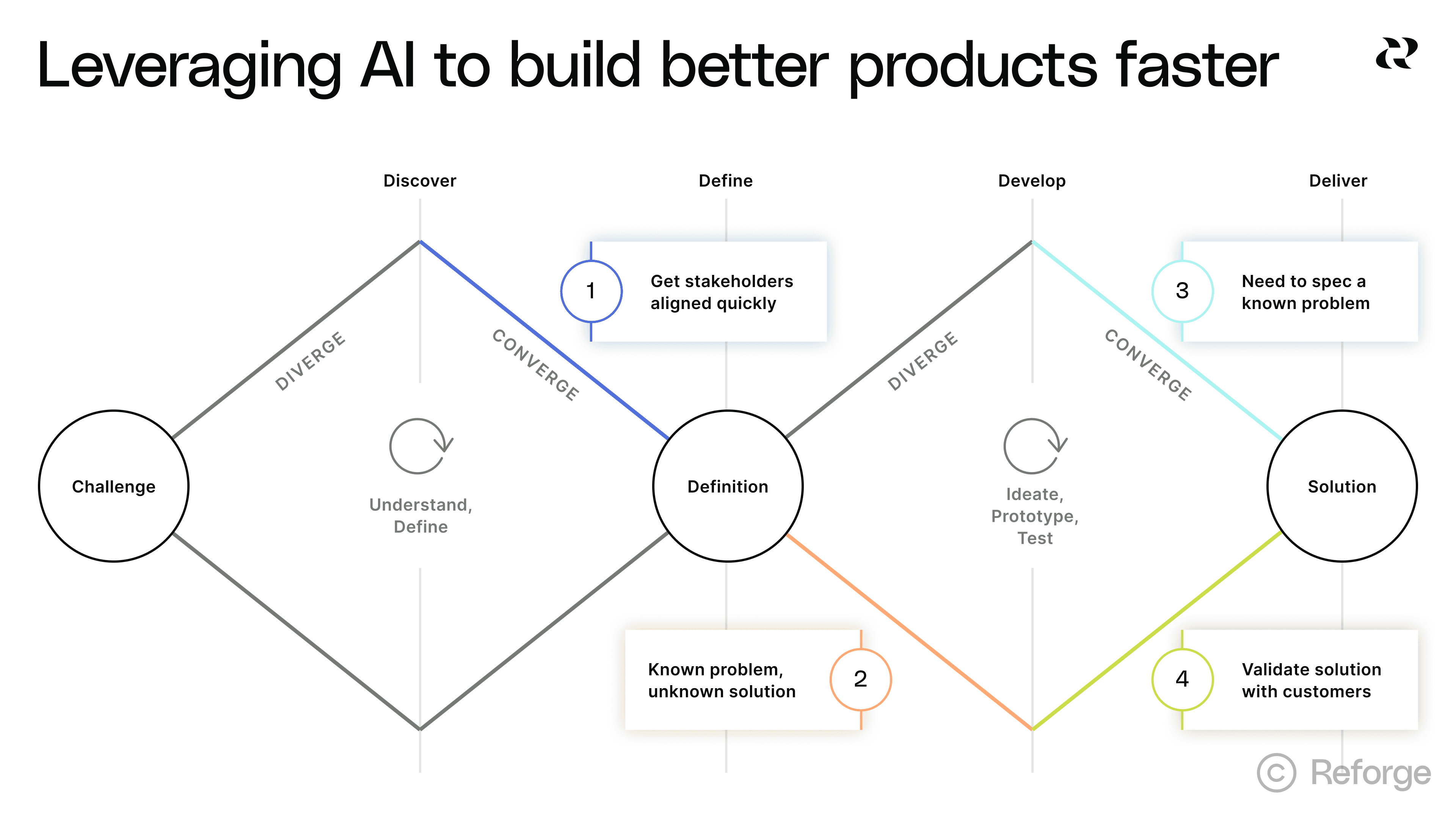
Here are the primary ways AI can be leveraged to build better products faster:
When you need to get everyone on the same page: Stakeholder alignment is the least sexy benefit of AI prototyping but an extremely valuable one nonetheless.
When you’re confident in the problem, but not in the solution: This is AI prototyping’s bread and butter. You can try all kinds of variations very quickly.
When you land on the solution and need to spec it: This is your chance to reduce “Is this what you mean?” conversations into clear instructions for eng.
When you need to validate solutions with customers: AI prototypes make it easier to show rather than explain features to customers, who are able to offer much better feedback.
This won’t happen at all once. In our new course on AI Productivity, Sachin Rekhi reveals what he calls the AI Prototyping Mastery Ladder. Vibe coding is easy, but using it as part of a collaborative product building process with many stakeholders is more difficult. Even experienced vibe coders are likely starting as “apprentices.”
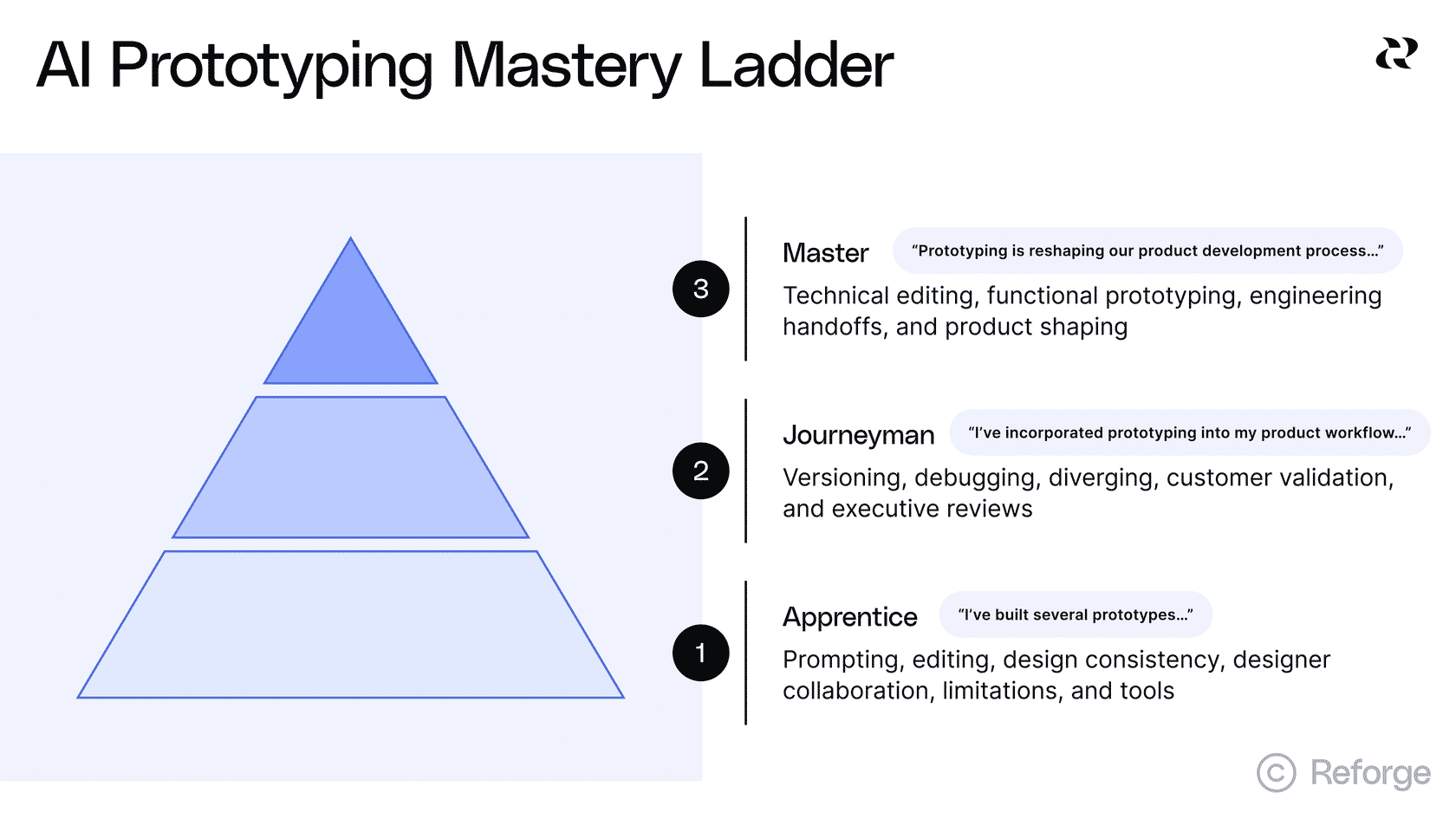
Using AI well is only partially about your technical skills. There’s an art to making good AI prototypes but the hardest change is buried in the systems and culture. You’ll see this through-line in this article, starting with the first place that AI prototyping can be inserted into your process: stakeholder alignment.
1. Exploring multiple solutions when the problem is clear
https://fast.wistia.net/embed/iframe/0gucmrdtqa
This is AI prototyping's sweet spot. You've validated the problem, the team agrees it's important and customers are asking for it. You have a hunch about a good solution, but it’s too early to commit.
In the past, it was difficult to create prototypes for multiple possible solutions. Many teams went with their gut, picked one and ran with it. Thankfully, AI changes this completely.
Because you can quickly generate five different solution approaches, then you should be generating five different approaches. The risk used to be wasted resources, but now the risk is committing to a mediocre solution because you never explored the alternatives.
How product teams should use AI to explore multiple solutions
Creating several clickable, functioning prototypes is the kind of step-change that has some teams struggling to change their behavior enough to maximize this opportunity. But this is where the magic happens. It’ll make your life easier, your product better and your customers happier.
Here’s how to do it.
Start by forcing divergence.
Before you build, use AI to help you brainstorm 3-5 different ways you could solve this problem. We’ve created Reforge Build to make this easy. Just click “Plan,” drop your notes/ideas and click “Variations.” Our AI will ask you some clarifying questions and then create variations that you can provide feedback on.
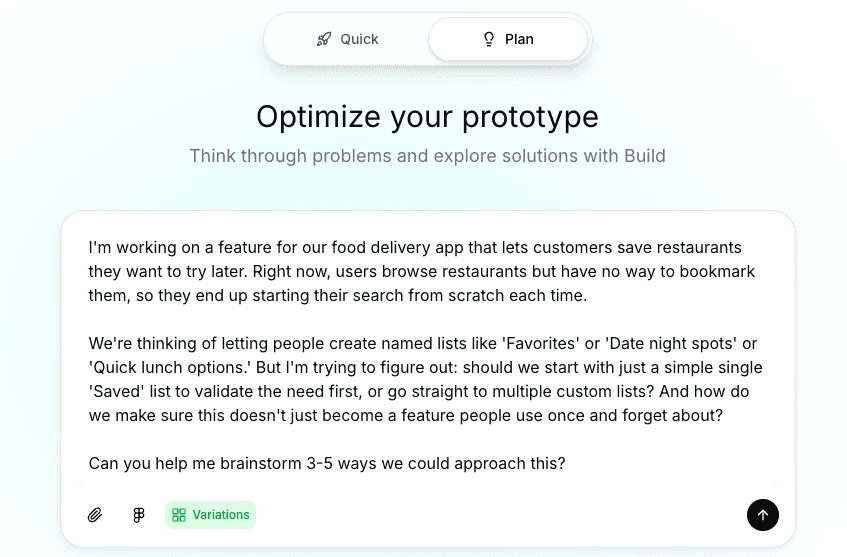
Reforge Build will ask you a few clarifying questions, then start creating divergent solutions options that you can start exploring.
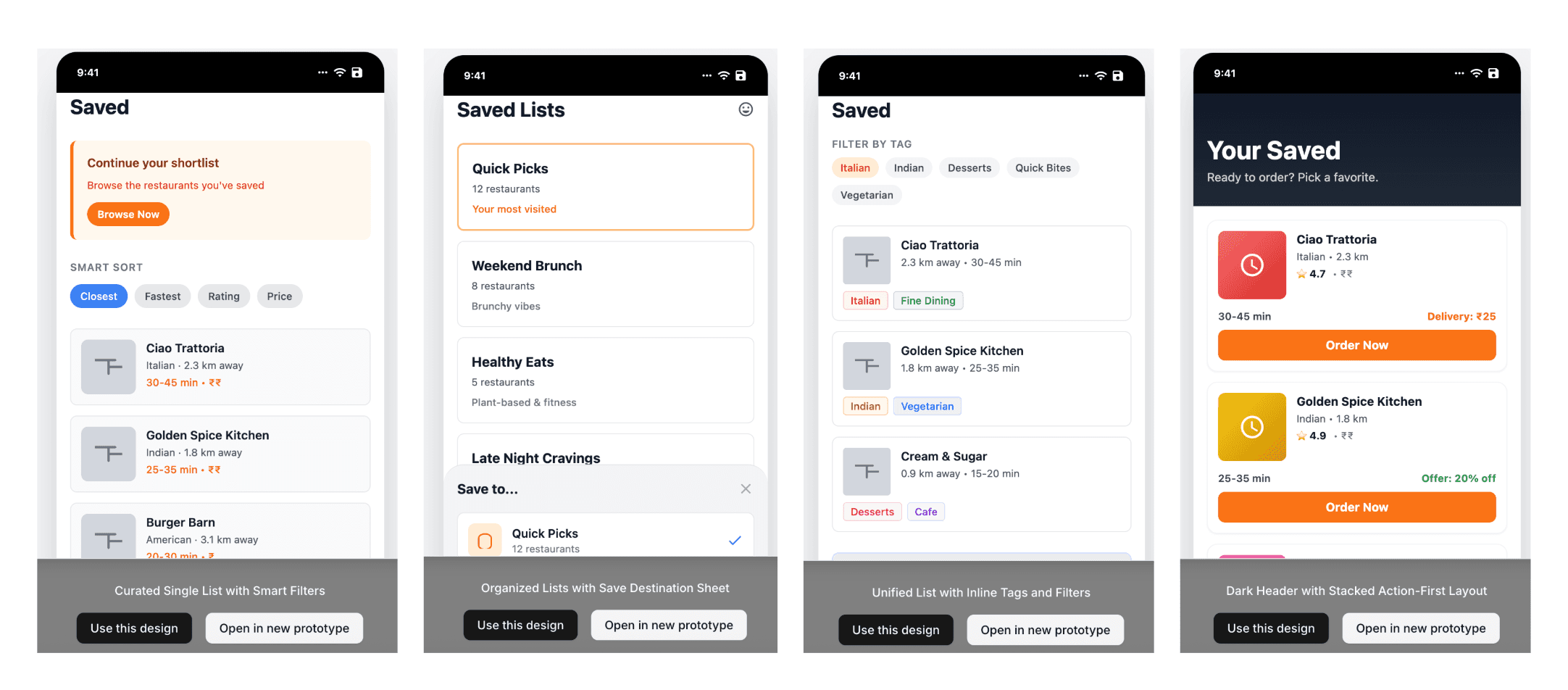
You can also zoom in with this 6-step template for brainstorming. The output is a great prompt for Reforge Build’s “Plan” mode. (You can see an example output here.)
Goal: [Your ideal end state]
Problem: [User need or business challenge]
Context: [Industry specifics, user workflows, technical environment]
Constraints: [What must be true for any solution]
Success looks like: [Measurable outcomes]
Explore: [3-5 different approaches to solving this]
Here’s an example of this template using a fictitious project management tool that knows its customers want to track blockers:
**Goal:**`` Explore four distinct solution directions for the following problem.
**Problem:**`` Project managers lose visibility when blockers affect multiple teams. By the time they find out about a dependency issue, it's already delayed the project.
**Context:**`` Our users manage 5–10 projects simultaneously with 3–7 teams per project. They spend most of their time in Slack and our project management tool. They check status once or twice daily, not continuously.
**Constraints:**
Must integrate with our existing project management toolMust work on mobile (60% of checks happen on phones)Can’t require team members to change their current workflow for logging blockersMust handle projects with different team structures
**Success looks like:**
PMs identify blockers within 4 hours instead of 2–3 daysFewer “I didn’t know that was blocked” moments in standups
**Explore:**
Show me ``**four distinct solution directions**`` that differ in how proactive, visible, and automated they are. Include at least one of each:
**Passive:**`` Information is surfaced in existing tools (e.g., Slack or dashboards)**Active:**`` PMs can query or interact to discover blockers**Predictive:**`` The system anticipates blockers based on activity patterns**Collaborative:**`` Teams surface blockers together through structured input
**For each concept, describe:**
Core ideaHow it worksHow it integrates with current tools/workflowsPotential risks or tradeoffs
At this stage, you’re looking for fundamentally different approaches. This step matters because, as one PM told us, AI "takes you to solution almost too quickly." You need several directions on the table, or you could mistake polish for proof and commit to something unvalidated.
Build lightweight versions of each approach.
This is the fun part. You're not trying to create pixel-perfect designs here, just working AI prototypes that you can start to collect feedback on. The goal is to make each solution direction tangible enough that people can react to it. Ask our AI to turn the ideas into prompts for prototypes, then run each one through Reforge Build.
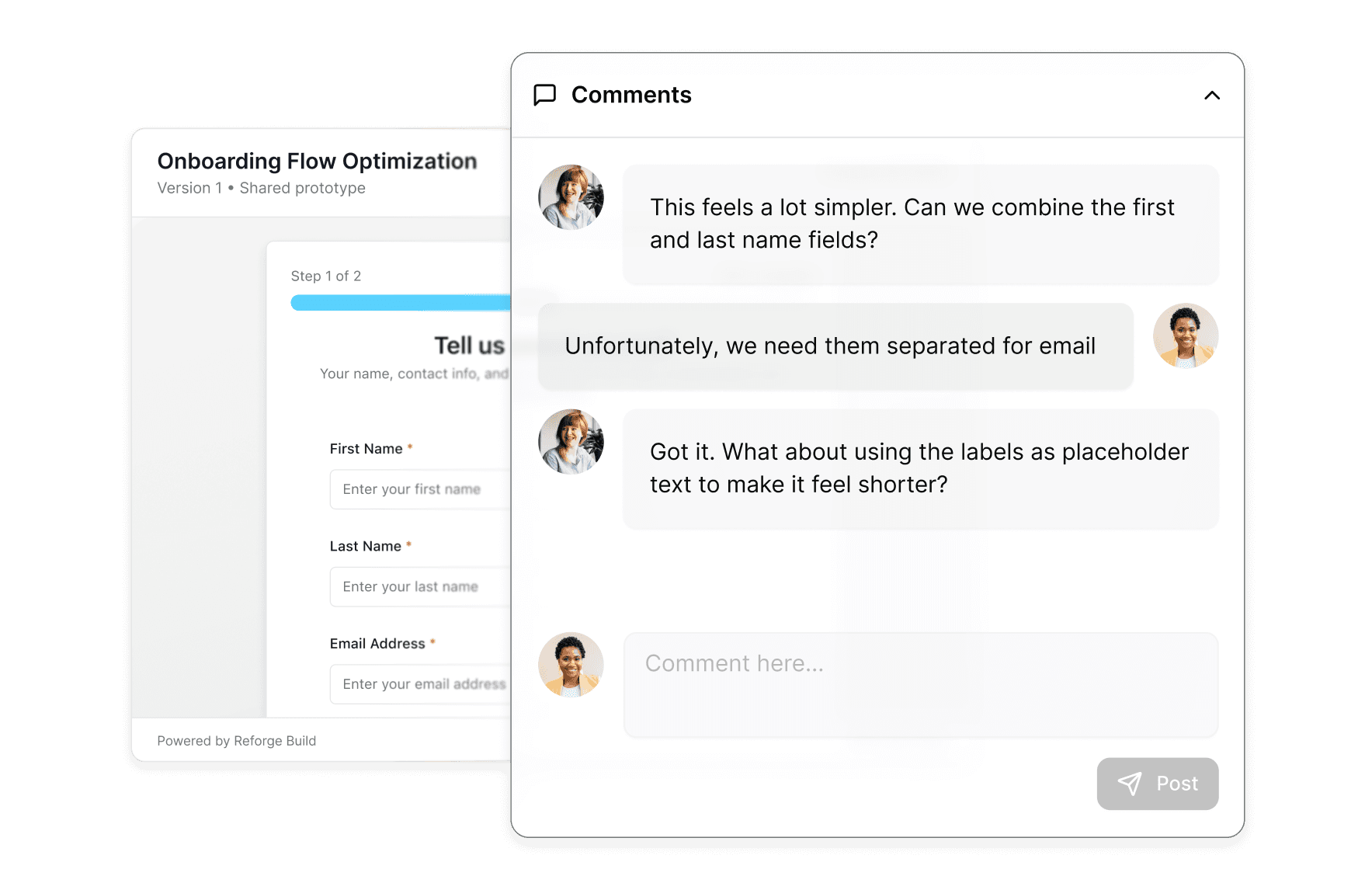
Name each variant and share links with your stakeholders. Reforge Build has element-level commenting similar to Figma so that others can weigh in. You can even allow others to remix your ideas, which creates a new branch that person can work on.
Try to match the fidelity of each prototype to the phase of development. The earlier in your discovery, the lower fidelity they can be. AI prototypes typically look very polished, so low-fidelity takes on a slightly new meaning. For example, you don’t need to vibe code an entire app, just the flow that you’re focused on. Not every button and menu needs to match the flow of the live app, but their presence makes it feel like you’re working with the real thing.
2. Getting stakeholders aligned quickly
The last thing any PM wants to do is to spend 8-10 weeks developing a feature, have a few customers test it and find that you’ve built the wrong thing. AI prototypes allow you to catch big problems way faster and with much lower consequences. When everyone is literally looking at and experiencing the same thing, there's very little room for misinterpretation.
One PM described using AI prototypes as "the front end of the pitch." It’s the thing that gets stakeholders excited and aligned on the direction. The supporting documents (the PRD, the JIRA tickets, the cost estimates, etc.) still exist, but they're secondary. The prototype is what everyone rallies around.
Most PMs find AI prototypes are especially useful after they've validated the problem, but before they commit to heavy engineering investment. This inflection point is early enough to surface feedback before designers spend weeks building out detailed flows in Figma, but late enough that the problem is well understood.
How to get everyone on the same page with AI prototypes
Now that almost all meetings are recorded and transcribed, you can use early stakeholder conversations to help you get alignment later. By working their ideas into your variants, you can connect the dots from idea to possible solution. Load your prompts with tons of context like call notes, screenshots and your own notes. In Reforge Build, you can add both system-wide and project-specific context so you only need to provide this information once. Stakeholders will appreciate the through-line and it’ll make each follow-up conversation easier.
Here are some best practices for getting prototypes in front of people with the intent to collect feedback and iterate.
Generate discussion and feedback: The PM shares prototypes with leadership, maybe cross-functional partners like customer success or sales. This is best done in a meeting so that people can click through and provide feedback that’s recorded in the call transcript. The feedback comes back specific and actionable. Stuff like, "The third step doesn't make sense" or "This will confuse our enterprise customers."
Discuss tradeoffs of each variant. One PM told us that, "If we can get to a point where you can get to diverging solutions so you can actually think about tradeoffs between different approaches, that could be incredibly useful." The key word is "tradeoffs." You're not asking "which one is perfect?" You're asking "what do we gain and lose with each approach?" You may ultimately blend two prototypes to get the best of each one, but allow yourself to experience each to its natural conclusion to understand that particular solution as best you can.
Iterate in real-time. You can actually make changes based on feedback during the call. If you wait until later, your stakeholders may lose their train of thought and you’ll need another meeting to go through your iteration.
This is especially valuable for non-technical stakeholders. One PM mentioned using prototypes to help customer success and other non-technical people communicate what they mean. Some people struggle to articulate product requirements in words, but when they can click through an experience and say "yes, like that" or "no, this feels off," suddenly the barrier breaks down.
AI prototypes accelerate alignment, but they can't create alignment where the underlying problem isn't clear. Use them too early and you'll just align people around the wrong solution faster. Use them at the right moment, and you've found a way to collapse weeks of back-and-forth meetings into a single conversation.
3. When you’ve got the solution, but need to spec it clearly
AI prototypes save tons of time—possibly weeks and in some cases, months—because they cut through the ambiguity. When you attach a working demo to your spec, everyone looks at the same thing. The "Is this what you mean?" questions get answered before engineering writes a single line of code.
How specs work better with AI prototypes
You've validated the problem and aligned on a solution direction. Now you need to document the requirements clearly enough that engineering can build it right the first time.
Here's where most PMs get stuck. You can describe a form with five fields in a document, but engineers might interpret those fields differently. Should the email field validate on blur or on submit? Does the date picker allow past dates? These details matter, and text documents hide them.
One PM we spoke with described it perfectly: "I can sit there and I can write out each field that should be on a form and then have the engineer misinterpret that. Or we can both look at the same HTML."
Here’s the new pattern for requirements:
Start with your written spec. The PRD isn't dead. You still need to document the business context, success metrics and technical considerations. But now you're adding a functional prototype as the reference implementation.
Build the prototype that shows what you mean. Use Reforge Build to further develop a working version of your solution. Focus on the interactions and edge cases that are hard to describe in words. What happens when a user submits an empty form? How should the loading state look? These details come alive in a prototype.
Walk the team through the prototype, not just the document. Instead of showing your engineering team a document or PowerPoint, walk through the prototype and make sure they have access to use it themselves.
Use the prototype to surface technical questions early. Engineers will see implementation details you missed. They'll ask about edge cases you didn't consider. Better to have these conversations before they start building than after they've spent two weeks going the wrong direction.
The prototype does the heavy lifting of communication. It shows exactly what users will see and do. The PRD provides the context engineers need about why decisions were made and what technical constraints exist.
This shift matters because it changes what you're asking engineering to do. You're not asking them to interpret your words and build something from imagination. You're showing them the target and asking them to build production-quality code that matches it.
Are prototypes disposable?
We hear this question a lot. And while I get where it’s coming from, I’d like to suggest that it’s not the right question. Exploring and validating ideas is the best way to leverage AI prototypes, so no work is “wasted” or “disposable.” The prototype is context and input for design and eng to turn into something you can ship.
Let your engineers handle the code. They have their own AI tools to make that process faster. Worrying about turning prototypes into production-ready code is a distraction from finding and facilitating the best solutions for your customers.
Your design and eng folks will appreciate having a prototype to make the hand-off easier. Include all the requirements, layout details and interaction guidelines. The prototype may never turn into the product itself, but it will serve as the blueprint for what you eventually ship.
4. When you need to validate solutions with customers
You've already validated the problem through customer interviews, support tickets or other discovery work. Now you have a proposed solution and you need to understand if customers can actually use it. Will they understand the interface? Can they complete the task? Does the flow make sense?
This is where AI prototypes shine. As one PM told us, "Customers need visuals to understand what we're talking about. If we did this, it's easier to show them. This is actually what we're thinking."
How to test prototypes with customers
The key is timing. Use prototypes for validation after you're confident about the problem but before you've invested heavily in building the solution. You're testing usability and comprehension, not gauging interest.
Here's what successful teams are doing:
Deploy your prototype. Most AI tools, including Reforge Build, let you publish a working URL that customers can click through. This is better than a static mockup because you can see how people actually interact with it. Do they find the submit button? Do they understand the workflow?
Test with a small group first. Start with customers who already give you feedback regularly. These are people who understand your product and can give you detailed input. One PM described using a "core group of customers that love to give feedback" to get early signals before running broader tests.
Watch behavior, not just opinions. The advantage of a functional prototype is that you can see what people do, not just what they say they'll do. Where do they click first? Where do they get confused? This behavioral data is more valuable than asking "would you use this feature?"
Use the right fidelity for the question. You don't need pixel-perfect design to test if a workflow makes sense and in fact, it’s not recommended. Save the high-fidelity work for later. This also helps with setting good expectations. High-fidelity prototypes can feel almost exactly like a shipped feature and it’s important for your users to understand whether or not that’s true.
What works and what doesn't
What works: Testing specific interactions. Validating that users understand a flow. Getting feedback on edge cases. Identifying confusion points before you build.
What doesn't work: Using a prototype to validate if the problem exists. Testing with customers who don't already understand your product. Expecting a prototype to generate demand for a feature.
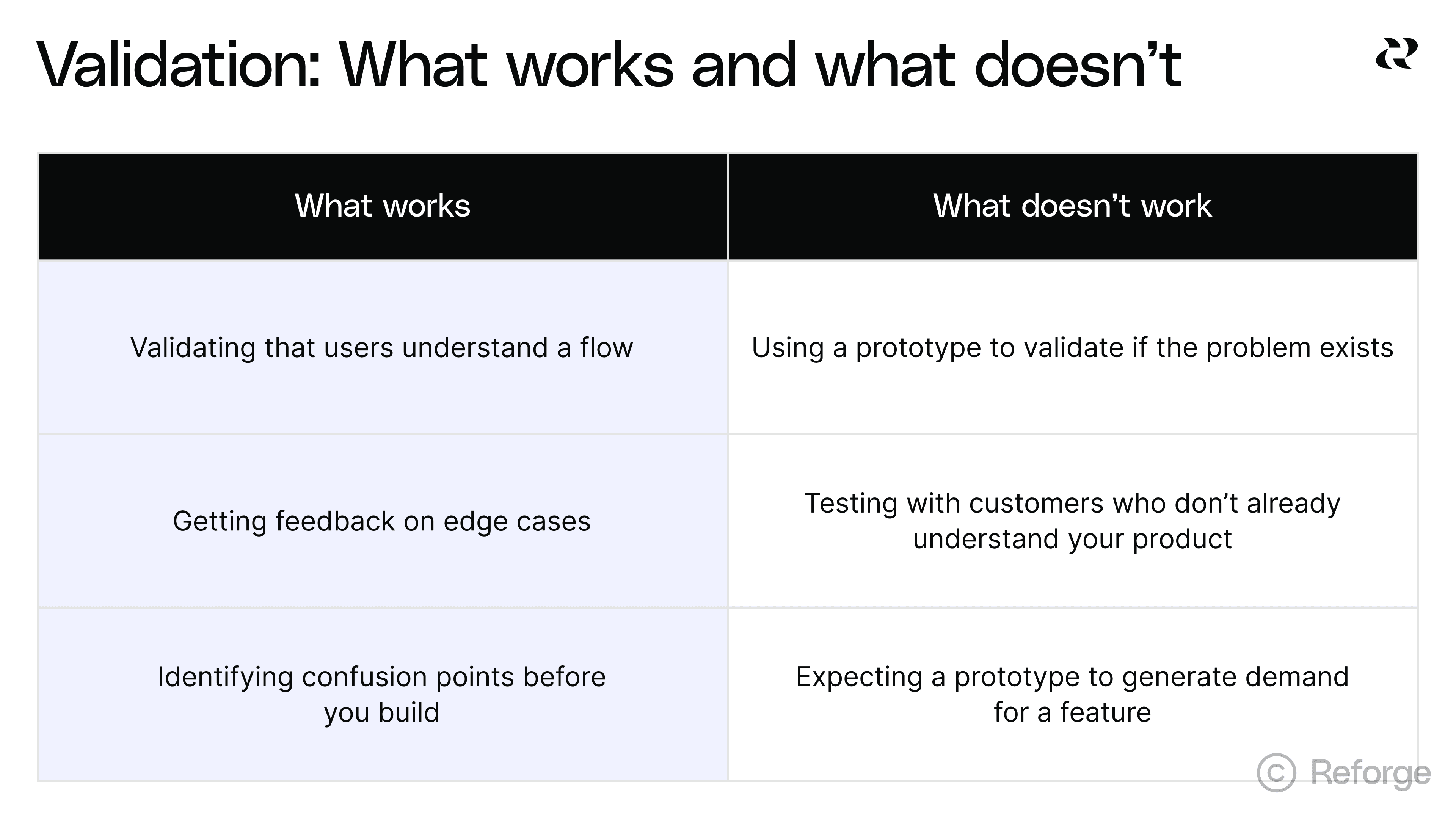
Customer feedback is most useful after you’ve gotten feedback from all of your internal stakeholders. Each stage of feedback should build confidence in your solution. Ideally, the customer testing is precise validation, not discovery.
When customer testing fails
The most common failure mode is using prototypes too early. You show customers a solution to a problem they don't have. They give you polite feedback. You build it, then nobody uses it.
The second most common failure is testing with the wrong fidelity. Your prototype looks so polished that customers focus on visual details instead of workflow questions. Or it looks so rough that they can't imagine using it.
Get the sequencing right. Validate the problem first. Build confidence internally. Then use prototypes to validate that your solution actually solves the problem in a way customers can understand and use.
Where AI prototyping doesn’t work
AI prototyping isn’t magical solution to every use-case. There are a few places to be careful with it.
Too Early in Discovery Phase. Now that you can make prototypes quickly, you can use them to test hunches. This can be a good way to make sure you’ve clearly identified the right problem. The issue is that you still need user research, analytics, input from customer success, etc. Don’t use prototypes to try to make solutions to problems that you don’t fully grasp.
Locking in Solutions Too Quickly. Some PMs we spoke with found that the speed and polish of AI prototypes makes it feel like you’re creating a solution even when you’re still in discovery. This makes it tempting to overlook divergent solutions, despite how useful they are in this phase.
Fidelity Mismatch Issues. Prototypes used to look like prototypes. Now low-fidelity prototypes can look like high-fidelity, even they are actually half-baked. This can create confusion when collecting feedback. For example, a stakeholder might be focused on something very specific like a button placement or color, when you’re really looking for high-level feedback on your solution.
AI prototyping is as much about soft skills and a disciplined process as it is prompting. Graduating from apprentice to journeyman to master takes practice and good communication with your team. The most important thing is just get started.
Start building now with Reforge Build
We’ve been hard at working making Reforge Build and now, it’s ready for you. Here’s a quick look look at the features that make Build the AI prototyping tool for product builders. Rather than 0→1, Reforge Build is built for 1→N work.
Prototypes that look like your product: Capture your design system with our browser extension, screenshots, or Figma so prototypes match your brand from the start.
AI that remembers your context: Store customer feedback, personas, product knowledge, and strategy docs that AI pulls from automatically when building.
Plan mode: from idea to structured plan: Research your context, brainstorm options, and create a detailed specification before generating anything.
Generate multiple variants: Create and compare multiple design approaches at once instead of exploring one direction at a time.
Built-in collaboration: Share prototypes so your team can comment directly on specific elements and see all feedback in context.
Reusable templates: Save any prototype as a template to start from that foundation next time.
Validate with customers (coming soon): Connect Reforge Research to deploy AI interviews or surveys that collect and synthesize feedback on your prototypes.
Scale across your product org (coming soon): Give your entire organization access to shared workspaces, centralized context, and reusable templates through Team Accounts.
Reforge Build isn't for everyone. If you're a founder starting from scratch or building a side project, there are some amazing tools for that. But if you're on a product team with an existing product, real customers, and established goals —we are building Reforge Build for you.


Prototyping has always been central to the product development workflow, but until now, it’s been something that most PMs didn’t have the time or skills to do. Now AI has made prototyping fast, accessible and cheap, and it’s quickly becoming a core part of every PM’s job.
AI prototyping is where vibe coding evolves from a fun way to tinker with AI to an essential step in the product workflow. This has all happened very fast (as do most things with AI) but this isn’t a fad. AI prototyping unlocks unprecedented speed and, when used well, helps you find better solutions to customer problems. It actually helps you create more value for your customers
To help place AI prototyping in the PM’s skillset, here’s what we consider to be the core skills of the PM:
AI prototyping significantly helps both #3 and #4. The opportunity is massive but in these early days, it’s hard to know how to start and where exactly it fits into the product development cycle. Do prototypes replace PRDs? Can they spit out production-ready code? Do they have a place in quarterly or annual planning?
It’s a lot to take in, but in this article, we’ll walk through how to implement AI prototyping in a way that aligns your team, helps you ship faster and adds value to customers, while also pointing out the pitfalls that we’ve already seen plenty of teams falling into.
Introducing Reforge Build
*This has been top of mind for us here at Reforge lately. Early in 2025, we (like everyone else) were fascinated by the possibilities but frustrated that the market of vibe coding tools weren’t purpose-built for PMs working with existing products, stakeholders and organizational constraints. So we created Reforge Build, the AI prototyping tool for product builders. *You can learn more and start building here.
https://fast.wistia.net/embed/iframe/8eg1mtqlfb
AI prototyping makes three enticing promises
There are three main promises that AI prototyping offers. The potential won’t automatically turn into happier customers or more revenue—though this article will help you get to that part—but it’s helpful to distill the exact and practical ways your company benefits from AI prototyping.
1. Radical speed changes the game.
Traditional prototyping took weeks. A designer would create mockups in Figma, which meant knowing the tool but also have the design skills to bring an idea to life. A developer would then wire up the interactions. Back and forth, iteration after iteration. AI tools collapse this timeline from weeks to hours. You can go from a screenshot or rough description to a functional prototype in a single session and probably before lunch.
This isn't just incrementally faster. It's a fundamentally different operating speed. When you can bring an idea to life in one hour instead of 10 days, your perspective on how to create solutions for users expands dramatically.
2. Anyone can build AI prototypes.
Previously, only designers and developers could create prototypes. You needed to know Figma, React or other specialized tools. Everyone else was stuck with whiteboards and PowerPoint. AI prototyping removes these barriers entirely.
PMs can prototype their own ideas. Founders can test concepts before hiring a team. Customer success reps can mock up features their clients are requesting. This democratization matters because good ideas come from everywhere. The constraint was never imagination. It was the ability to make ideas tangible.
3. Costs have dropped to near zero.
Prototyping costs have fallen off a cliff. This economic shift unlocks new behaviors. You can explore five or even 10 solutions instead of committing to one or two. Multiple teams can prototype competing approaches in parallel. Ideas that would never justify the resource investment can now get tested. What looked like waste before (building something you might throw away) becomes smart exploration when the cost approaches zero.
So where does AI prototyping actually level-up your product development process?
You’ll find a recurring theme in this article that AI prototyping is great for discovery and less so for delivery. It’s not about generating code that can later be shipped. It’s primary benefit is determining what to build, then handing a detailed spec to eng to actually build it.
You’ll find a recurring theme in this article that AI prototyping is great for discovery and less so for delivery. It’s not about generating code that can later be shipped. It’s primary benefit is determining what to build, then handing a detailed spec to eng to actually build it.
Here are the primary ways AI can be leveraged to build better products faster:
When you need to get everyone on the same page: Stakeholder alignment is the least sexy benefit of AI prototyping but an extremely valuable one nonetheless.
When you’re confident in the problem, but not in the solution: This is AI prototyping’s bread and butter. You can try all kinds of variations very quickly.
When you land on the solution and need to spec it: This is your chance to reduce “Is this what you mean?” conversations into clear instructions for eng.
When you need to validate solutions with customers: AI prototypes make it easier to show rather than explain features to customers, who are able to offer much better feedback.
This won’t happen at all once. In our new course on AI Productivity, Sachin Rekhi reveals what he calls the AI Prototyping Mastery Ladder. Vibe coding is easy, but using it as part of a collaborative product building process with many stakeholders is more difficult. Even experienced vibe coders are likely starting as “apprentices.”
Using AI well is only partially about your technical skills. There’s an art to making good AI prototypes but the hardest change is buried in the systems and culture. You’ll see this through-line in this article, starting with the first place that AI prototyping can be inserted into your process: stakeholder alignment.
1. Exploring multiple solutions when the problem is clear
https://fast.wistia.net/embed/iframe/0gucmrdtqa
This is AI prototyping's sweet spot. You've validated the problem, the team agrees it's important and customers are asking for it. You have a hunch about a good solution, but it’s too early to commit.
In the past, it was difficult to create prototypes for multiple possible solutions. Many teams went with their gut, picked one and ran with it. Thankfully, AI changes this completely.
Because you can quickly generate five different solution approaches, then you should be generating five different approaches. The risk used to be wasted resources, but now the risk is committing to a mediocre solution because you never explored the alternatives.
How product teams should use AI to explore multiple solutions
Creating several clickable, functioning prototypes is the kind of step-change that has some teams struggling to change their behavior enough to maximize this opportunity. But this is where the magic happens. It’ll make your life easier, your product better and your customers happier.
Here’s how to do it.
Start by forcing divergence.
Before you build, use AI to help you brainstorm 3-5 different ways you could solve this problem. We’ve created Reforge Build to make this easy. Just click “Plan,” drop your notes/ideas and click “Variations.” Our AI will ask you some clarifying questions and then create variations that you can provide feedback on.
Reforge Build will ask you a few clarifying questions, then start creating divergent solutions options that you can start exploring.
You can also zoom in with this 6-step template for brainstorming. The output is a great prompt for Reforge Build’s “Plan” mode. (You can see an example output here.)
Goal: [Your ideal end state]
Problem: [User need or business challenge]
Context: [Industry specifics, user workflows, technical environment]
Constraints: [What must be true for any solution]
Success looks like: [Measurable outcomes]
Explore: [3-5 different approaches to solving this]
Here’s an example of this template using a fictitious project management tool that knows its customers want to track blockers:
**Goal:**`` Explore four distinct solution directions for the following problem.
**Problem:**`` Project managers lose visibility when blockers affect multiple teams. By the time they find out about a dependency issue, it's already delayed the project.
**Context:**`` Our users manage 5–10 projects simultaneously with 3–7 teams per project. They spend most of their time in Slack and our project management tool. They check status once or twice daily, not continuously.
**Constraints:**
Must integrate with our existing project management toolMust work on mobile (60% of checks happen on phones)Can’t require team members to change their current workflow for logging blockersMust handle projects with different team structures
**Success looks like:**
PMs identify blockers within 4 hours instead of 2–3 daysFewer “I didn’t know that was blocked” moments in standups
**Explore:**
Show me ``**four distinct solution directions**`` that differ in how proactive, visible, and automated they are. Include at least one of each:
**Passive:**`` Information is surfaced in existing tools (e.g., Slack or dashboards)**Active:**`` PMs can query or interact to discover blockers**Predictive:**`` The system anticipates blockers based on activity patterns**Collaborative:**`` Teams surface blockers together through structured input
**For each concept, describe:**
Core ideaHow it worksHow it integrates with current tools/workflowsPotential risks or tradeoffs
At this stage, you’re looking for fundamentally different approaches. This step matters because, as one PM told us, AI "takes you to solution almost too quickly." You need several directions on the table, or you could mistake polish for proof and commit to something unvalidated.
Build lightweight versions of each approach.
This is the fun part. You're not trying to create pixel-perfect designs here, just working AI prototypes that you can start to collect feedback on. The goal is to make each solution direction tangible enough that people can react to it. Ask our AI to turn the ideas into prompts for prototypes, then run each one through Reforge Build.
Name each variant and share links with your stakeholders. Reforge Build has element-level commenting similar to Figma so that others can weigh in. You can even allow others to remix your ideas, which creates a new branch that person can work on.
Try to match the fidelity of each prototype to the phase of development. The earlier in your discovery, the lower fidelity they can be. AI prototypes typically look very polished, so low-fidelity takes on a slightly new meaning. For example, you don’t need to vibe code an entire app, just the flow that you’re focused on. Not every button and menu needs to match the flow of the live app, but their presence makes it feel like you’re working with the real thing.
2. Getting stakeholders aligned quickly
The last thing any PM wants to do is to spend 8-10 weeks developing a feature, have a few customers test it and find that you’ve built the wrong thing. AI prototypes allow you to catch big problems way faster and with much lower consequences. When everyone is literally looking at and experiencing the same thing, there's very little room for misinterpretation.
One PM described using AI prototypes as "the front end of the pitch." It’s the thing that gets stakeholders excited and aligned on the direction. The supporting documents (the PRD, the JIRA tickets, the cost estimates, etc.) still exist, but they're secondary. The prototype is what everyone rallies around.
Most PMs find AI prototypes are especially useful after they've validated the problem, but before they commit to heavy engineering investment. This inflection point is early enough to surface feedback before designers spend weeks building out detailed flows in Figma, but late enough that the problem is well understood.
How to get everyone on the same page with AI prototypes
Now that almost all meetings are recorded and transcribed, you can use early stakeholder conversations to help you get alignment later. By working their ideas into your variants, you can connect the dots from idea to possible solution. Load your prompts with tons of context like call notes, screenshots and your own notes. In Reforge Build, you can add both system-wide and project-specific context so you only need to provide this information once. Stakeholders will appreciate the through-line and it’ll make each follow-up conversation easier.
Here are some best practices for getting prototypes in front of people with the intent to collect feedback and iterate.
Generate discussion and feedback: The PM shares prototypes with leadership, maybe cross-functional partners like customer success or sales. This is best done in a meeting so that people can click through and provide feedback that’s recorded in the call transcript. The feedback comes back specific and actionable. Stuff like, "The third step doesn't make sense" or "This will confuse our enterprise customers."
Discuss tradeoffs of each variant. One PM told us that, "If we can get to a point where you can get to diverging solutions so you can actually think about tradeoffs between different approaches, that could be incredibly useful." The key word is "tradeoffs." You're not asking "which one is perfect?" You're asking "what do we gain and lose with each approach?" You may ultimately blend two prototypes to get the best of each one, but allow yourself to experience each to its natural conclusion to understand that particular solution as best you can.
Iterate in real-time. You can actually make changes based on feedback during the call. If you wait until later, your stakeholders may lose their train of thought and you’ll need another meeting to go through your iteration.
This is especially valuable for non-technical stakeholders. One PM mentioned using prototypes to help customer success and other non-technical people communicate what they mean. Some people struggle to articulate product requirements in words, but when they can click through an experience and say "yes, like that" or "no, this feels off," suddenly the barrier breaks down.
AI prototypes accelerate alignment, but they can't create alignment where the underlying problem isn't clear. Use them too early and you'll just align people around the wrong solution faster. Use them at the right moment, and you've found a way to collapse weeks of back-and-forth meetings into a single conversation.
3. When you’ve got the solution, but need to spec it clearly
AI prototypes save tons of time—possibly weeks and in some cases, months—because they cut through the ambiguity. When you attach a working demo to your spec, everyone looks at the same thing. The "Is this what you mean?" questions get answered before engineering writes a single line of code.
How specs work better with AI prototypes
You've validated the problem and aligned on a solution direction. Now you need to document the requirements clearly enough that engineering can build it right the first time.
Here's where most PMs get stuck. You can describe a form with five fields in a document, but engineers might interpret those fields differently. Should the email field validate on blur or on submit? Does the date picker allow past dates? These details matter, and text documents hide them.
One PM we spoke with described it perfectly: "I can sit there and I can write out each field that should be on a form and then have the engineer misinterpret that. Or we can both look at the same HTML."
Here’s the new pattern for requirements:
Start with your written spec. The PRD isn't dead. You still need to document the business context, success metrics and technical considerations. But now you're adding a functional prototype as the reference implementation.
Build the prototype that shows what you mean. Use Reforge Build to further develop a working version of your solution. Focus on the interactions and edge cases that are hard to describe in words. What happens when a user submits an empty form? How should the loading state look? These details come alive in a prototype.
Walk the team through the prototype, not just the document. Instead of showing your engineering team a document or PowerPoint, walk through the prototype and make sure they have access to use it themselves.
Use the prototype to surface technical questions early. Engineers will see implementation details you missed. They'll ask about edge cases you didn't consider. Better to have these conversations before they start building than after they've spent two weeks going the wrong direction.
The prototype does the heavy lifting of communication. It shows exactly what users will see and do. The PRD provides the context engineers need about why decisions were made and what technical constraints exist.
This shift matters because it changes what you're asking engineering to do. You're not asking them to interpret your words and build something from imagination. You're showing them the target and asking them to build production-quality code that matches it.
Are prototypes disposable?
We hear this question a lot. And while I get where it’s coming from, I’d like to suggest that it’s not the right question. Exploring and validating ideas is the best way to leverage AI prototypes, so no work is “wasted” or “disposable.” The prototype is context and input for design and eng to turn into something you can ship.
Let your engineers handle the code. They have their own AI tools to make that process faster. Worrying about turning prototypes into production-ready code is a distraction from finding and facilitating the best solutions for your customers.
Your design and eng folks will appreciate having a prototype to make the hand-off easier. Include all the requirements, layout details and interaction guidelines. The prototype may never turn into the product itself, but it will serve as the blueprint for what you eventually ship.
4. When you need to validate solutions with customers
You've already validated the problem through customer interviews, support tickets or other discovery work. Now you have a proposed solution and you need to understand if customers can actually use it. Will they understand the interface? Can they complete the task? Does the flow make sense?
This is where AI prototypes shine. As one PM told us, "Customers need visuals to understand what we're talking about. If we did this, it's easier to show them. This is actually what we're thinking."
How to test prototypes with customers
The key is timing. Use prototypes for validation after you're confident about the problem but before you've invested heavily in building the solution. You're testing usability and comprehension, not gauging interest.
Here's what successful teams are doing:
Deploy your prototype. Most AI tools, including Reforge Build, let you publish a working URL that customers can click through. This is better than a static mockup because you can see how people actually interact with it. Do they find the submit button? Do they understand the workflow?
Test with a small group first. Start with customers who already give you feedback regularly. These are people who understand your product and can give you detailed input. One PM described using a "core group of customers that love to give feedback" to get early signals before running broader tests.
Watch behavior, not just opinions. The advantage of a functional prototype is that you can see what people do, not just what they say they'll do. Where do they click first? Where do they get confused? This behavioral data is more valuable than asking "would you use this feature?"
Use the right fidelity for the question. You don't need pixel-perfect design to test if a workflow makes sense and in fact, it’s not recommended. Save the high-fidelity work for later. This also helps with setting good expectations. High-fidelity prototypes can feel almost exactly like a shipped feature and it’s important for your users to understand whether or not that’s true.
What works and what doesn't
What works: Testing specific interactions. Validating that users understand a flow. Getting feedback on edge cases. Identifying confusion points before you build.
What doesn't work: Using a prototype to validate if the problem exists. Testing with customers who don't already understand your product. Expecting a prototype to generate demand for a feature.
Customer feedback is most useful after you’ve gotten feedback from all of your internal stakeholders. Each stage of feedback should build confidence in your solution. Ideally, the customer testing is precise validation, not discovery.
When customer testing fails
The most common failure mode is using prototypes too early. You show customers a solution to a problem they don't have. They give you polite feedback. You build it, then nobody uses it.
The second most common failure is testing with the wrong fidelity. Your prototype looks so polished that customers focus on visual details instead of workflow questions. Or it looks so rough that they can't imagine using it.
Get the sequencing right. Validate the problem first. Build confidence internally. Then use prototypes to validate that your solution actually solves the problem in a way customers can understand and use.
Where AI prototyping doesn’t work
AI prototyping isn’t magical solution to every use-case. There are a few places to be careful with it.
Too Early in Discovery Phase. Now that you can make prototypes quickly, you can use them to test hunches. This can be a good way to make sure you’ve clearly identified the right problem. The issue is that you still need user research, analytics, input from customer success, etc. Don’t use prototypes to try to make solutions to problems that you don’t fully grasp.
Locking in Solutions Too Quickly. Some PMs we spoke with found that the speed and polish of AI prototypes makes it feel like you’re creating a solution even when you’re still in discovery. This makes it tempting to overlook divergent solutions, despite how useful they are in this phase.
Fidelity Mismatch Issues. Prototypes used to look like prototypes. Now low-fidelity prototypes can look like high-fidelity, even they are actually half-baked. This can create confusion when collecting feedback. For example, a stakeholder might be focused on something very specific like a button placement or color, when you’re really looking for high-level feedback on your solution.
AI prototyping is as much about soft skills and a disciplined process as it is prompting. Graduating from apprentice to journeyman to master takes practice and good communication with your team. The most important thing is just get started.
Start building now with Reforge Build
We’ve been hard at working making Reforge Build and now, it’s ready for you. Here’s a quick look look at the features that make Build the AI prototyping tool for product builders. Rather than 0→1, Reforge Build is built for 1→N work.
Prototypes that look like your product: Capture your design system with our browser extension, screenshots, or Figma so prototypes match your brand from the start.
AI that remembers your context: Store customer feedback, personas, product knowledge, and strategy docs that AI pulls from automatically when building.
Plan mode: from idea to structured plan: Research your context, brainstorm options, and create a detailed specification before generating anything.
Generate multiple variants: Create and compare multiple design approaches at once instead of exploring one direction at a time.
Built-in collaboration: Share prototypes so your team can comment directly on specific elements and see all feedback in context.
Reusable templates: Save any prototype as a template to start from that foundation next time.
Validate with customers (coming soon): Connect Reforge Research to deploy AI interviews or surveys that collect and synthesize feedback on your prototypes.
Scale across your product org (coming soon): Give your entire organization access to shared workspaces, centralized context, and reusable templates through Team Accounts.
Reforge Build isn't for everyone. If you're a founder starting from scratch or building a side project, there are some amazing tools for that. But if you're on a product team with an existing product, real customers, and established goals —we are building Reforge Build for you.