Reforge has joined Miro ↗
*We've just launched Reforge Build, the AI prototyping tool built for product teams. *You can learn more and start building for free here.
Product teams used to wait weeks for design resources to explore a single solution direction. Now they're testing five different approaches in an afternoon. This marks a fundamental shift in how fast product teams can move from validated problem to proven solution.
AI prototyping opens up a few new possibilities but it does one thing way better than traditional workflows. It helps PMs rapidly explore multiple solution directions when the problem is clear but the best path forward isn't. PMs can even try to prove their hunches wrong because it’s so easy to do. Divergent exploration has always been important to PMs, but now it’s accessible enough that it should be standard practice.
This article focuses on that specific sweet spot. You've validated the problem through customer interviews, support tickets and team discussions. You know it's important. You know it's worth solving. But you're not sure which solution approach will work best. That's where AI prototyping excels.
4 Steps to use AI prototyping to find the best solution
This article walks through a four-step process for using AI prototyping to find the best solution to a known problem. You'll learn how to frame problems with the right constraints, generate distinct solution directions, pressure test promising approaches and get useful feedback from stakeholders and users.
he goal isn't to produce production-ready designs. The goal is to explore the solution space thoroughly before you commit to one direction. By the end, you'll have clarity on which approach solves the problem best and why. You'll have rough prototypes that demonstrate the concept. And you'll be ready to hand off to your design team with a clear brief because you explored first.
Step 1: Frame the problem with constraints
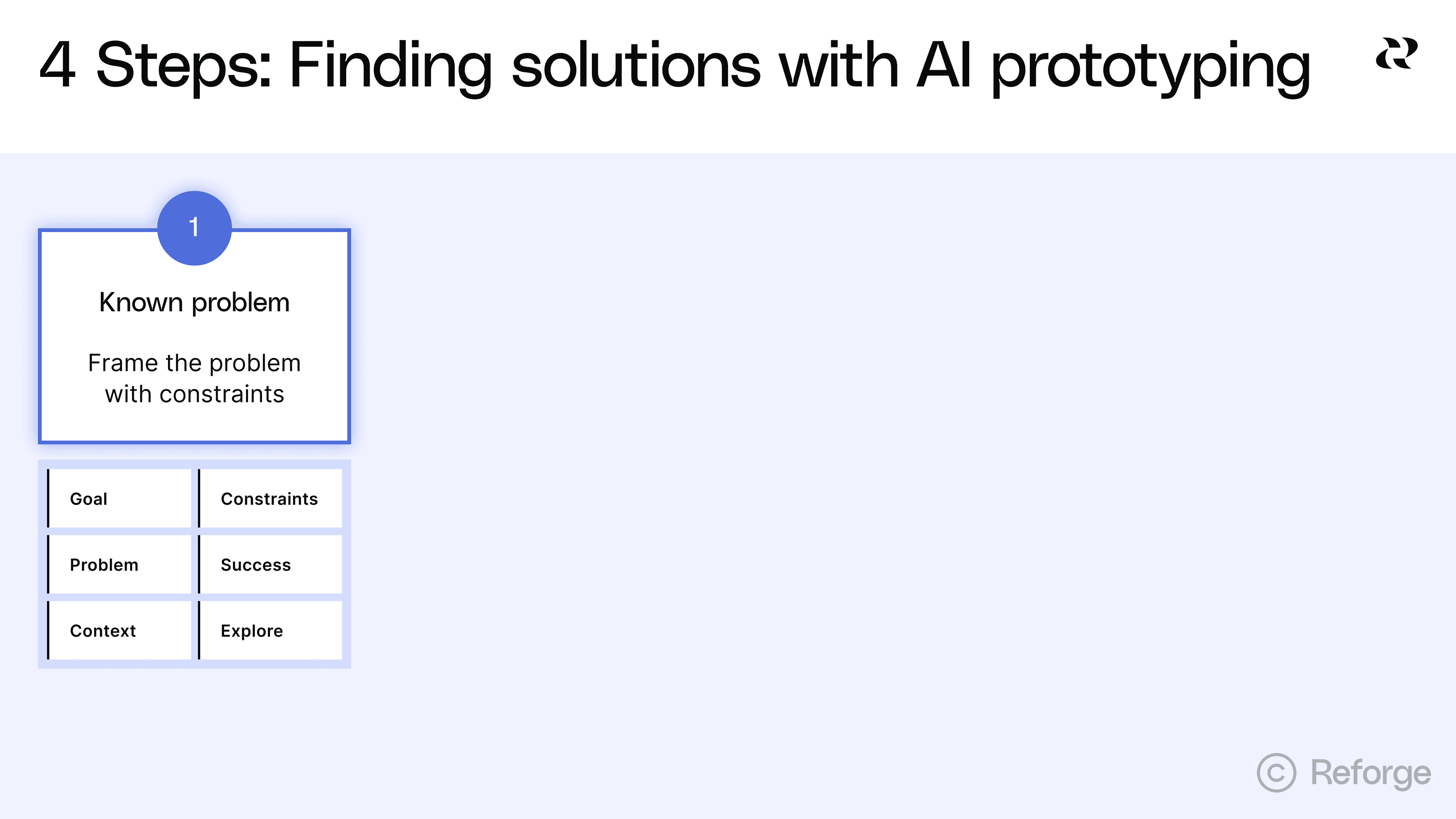
The quality of your exploration depends entirely on how you frame the problem.The goal is to give AI enough direction to be useful while staying open to unexpected approaches.
This is harder than it sounds. Most PMs either under-constrain or over-constrain their prompts. Under-constrained prompts produce "too wild" solutions that ignore your reality. Over-constrained prompts converge on one direction before you've explored alternatives. You need to find the middle ground.
The 6 things to include in your problem frame
Your problem frame should include these six elements:
Goal: State your intended outcome to AI stays focused on the end-goal.
Problem: A clear statement of the user need or business challenge you're solving. Why does it matter?
Context: Details about your environment. What are the industry specifics? How do users currently work? What technical environment are you operating in? This helps AI understand the constraints of your reality. In Reforge Build, you can add system-wide context as well as project-specific context so you don’t have to include it in every prompt.
Constraints: What must be true for any solution to work? This includes technical constraints like your tech stack or mobile requirements, business constraints like budget or timeline, user constraints like existing workflows or accessibility needs, and regulatory constraints like compliance requirements.
Success looks like: Specific metrics or user outcomes that define a good solution. "Improve user satisfaction" is too vague. "Reduce time to complete checkout from 3 minutes to under 60 seconds" gives AI something to work with.
Explore: The specific question you're trying to answer. Are you exploring different interaction patterns? Different information architectures? Different user flows? Be explicit about what you want to vary. Ask for 3-5 different approaches.
Here's a practical template:
💡``** Goal:**`` [Your ideal end state]🤔``** Problem:**`` [User need or business challenge]🗃️``** Context:**`` [Industry specifics, user workflows, technical environment]🙅``** Constraints:**`` [What must be true for any solution]📈``** Success looks like:**`` [Measurable outcomes]🧠``** Explore:**`` [3-5 different approaches to solving this]
You need enough vision to guide the exploration but not so much that you've already decided the answer. Your constraints should eliminate approaches that won't work in your context. They shouldn't eliminate approaches that might work differently than you expected.
Think of it this way. If you're solving for sales reps who need “pipeline insights on mobile in under 30 seconds,” the constraint "mobile-first" matters. It eliminates desktop-heavy dashboards that won't work. But it doesn't dictate whether you use a card-based layout, a timeline view or a notification system. Those are the variations you want to explore.
The constraint "insights in under 30 seconds" matters too. It eliminates approaches that require multiple taps or complex filtering. But it doesn't dictate the exact interaction pattern. That's what you're testing.
Steal this prompt: An example that will lead to great brainstorming
https://fast.wistia.net/embed/iframe/fi9iixjmmo
Let's say you're building a feature to help project managers track blockers across multiple teams. Here's how you might frame it to get great results:
**Goal:**`` Explore four distinct solution directions for the following problem.
**Problem:**`` Project managers lose visibility when blockers affect multiple teams. By the time they find out about a dependency issue, it's already delayed the project.
**Context:**`` Our users manage 5–10 projects simultaneously with 3–7 teams per project. They spend most of their time in Slack and our project management tool. They check status once or twice daily, not continuously.
**Constraints:**
Must integrate with our existing project management toolMust work on mobile (60% of checks happen on phones)Can’t require team members to change their current workflow for logging blockersMust handle projects with different team structures
**Success looks like:**
PMs identify blockers within 4 hours instead of 2–3 daysFewer “I didn’t know that was blocked” moments in standups
**Explore:**
Show me ``**four distinct solution directions**`` that differ in how proactive, visible, and automated they are. Include at least one of each:
**Passive:**`` Information is surfaced in existing tools (e.g., Slack or dashboards)**Active:**`` PMs can query or interact to discover blockers**Predictive:**`` The system anticipates blockers based on activity patterns**Collaborative:**`` Teams surface blockers together through structured input
For each concept, describe:
Core ideaHow it worksHow it integrates with current tools/workflowsPotential risks or tradeoffs
This framing gives AI enough to work with. It explains the problem clearly. It specifies real constraints that matter. It defines success in measurable terms. And it explicitly asks for divergent approaches without dictating the solution.
Step 2: Generate multiple, distinct solution directions
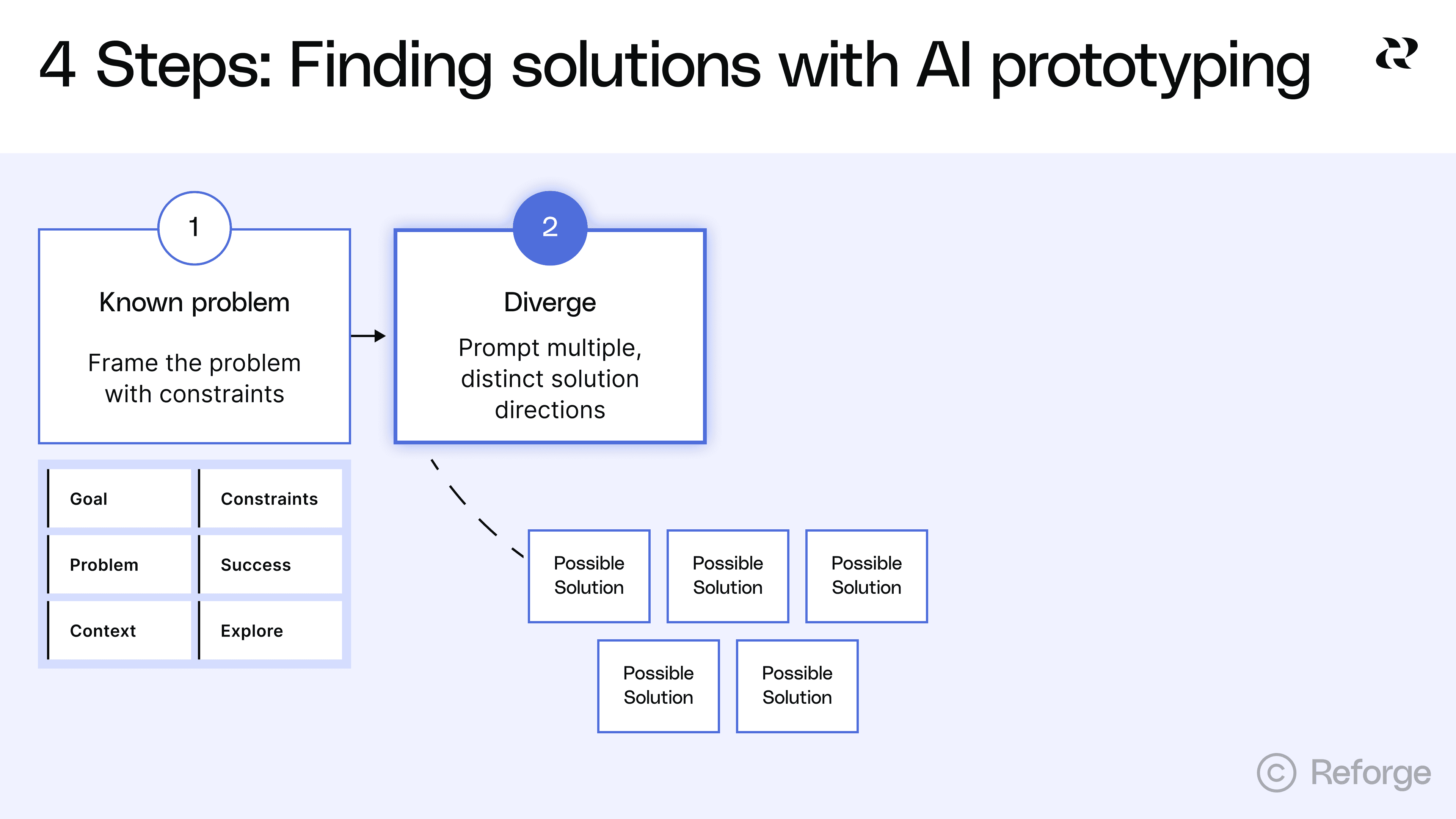
The goal is expanding your solution space, not landing on one answer, so encourage AI to surface approaches you haven't considered. This is where AI prototyping excels over traditional workflows. You can explore five fundamentally different approaches in the time it used to take to draw one on the whiteboard.
The trap is generating variations instead of distinct approaches. Most teams ask for "a few options" and get the same solution with different button placements. That wastes the main advantage of AI prototyping.
Prompt for divergence, not convergence
Most prompts converge too early. They ask for one thing and get one thing. They already assume a solution direction and leave no room for alternatives.
Bad prompts that converge too early:
"Build me a dashboard for sales metrics"
"Design a settings page"
"Create a checkout flow"
These prompts dictate the format before you've explored whether that format is best (dashboard, settings page, checkout flow, etc). You've basically already decided the answer.
Here are better prompts that invite exploration:
"Show me three different ways to help sales reps understand their pipeline health, considering that they primarily work on mobile and need insights in under 30 seconds"
"Explore four different approaches to letting users control their privacy settings, ranging from maximally simple to maximally granular"
"Generate five distinct checkout experiences optimized for different user types: first-time buyers, returning customers, bulk purchasers, gift givers and subscription renewals"
Notice the difference. Good prompts ask for multiple approaches. They specify constraints that matter but leave room for variation. They're clear about what success looks like without dictating how to get there.
Ask for fundamentally different approaches
As an example, we used the project management dependency example mentioned in the last section as input in Reforge Build’s Planning Mode. Here’s the output it gave us.
Notice that it provided completely divergent ideas but also a list of clarifying questions:
Which PM tool(s) should we integrate with first (e.g., Jira, Asana, Linear)? Any mandated fields or custom schemas we must respect?
Preferred cadence and channels for notifications (per-project Slack channels vs. PM DMs)? Any quiet hours?
How are dependencies represented today (issue links, epic hierarchy, labels)? If inconsistent, can we start with heuristics?
Mobile priority: Should we make Slack the primary mobile surface, or also deliver a minimal mobile web dashboard?
Success metrics access: Can we instrument mentions in standups, or should we proxy via dashboard/alert interactions only?
Once answered, Build will create the prompts and prototypes for you. This only took a few minutes, but quickly expands the way you approach finding a solution. You can try it yourself here.
Step 3: Pressure test with targeted prompts
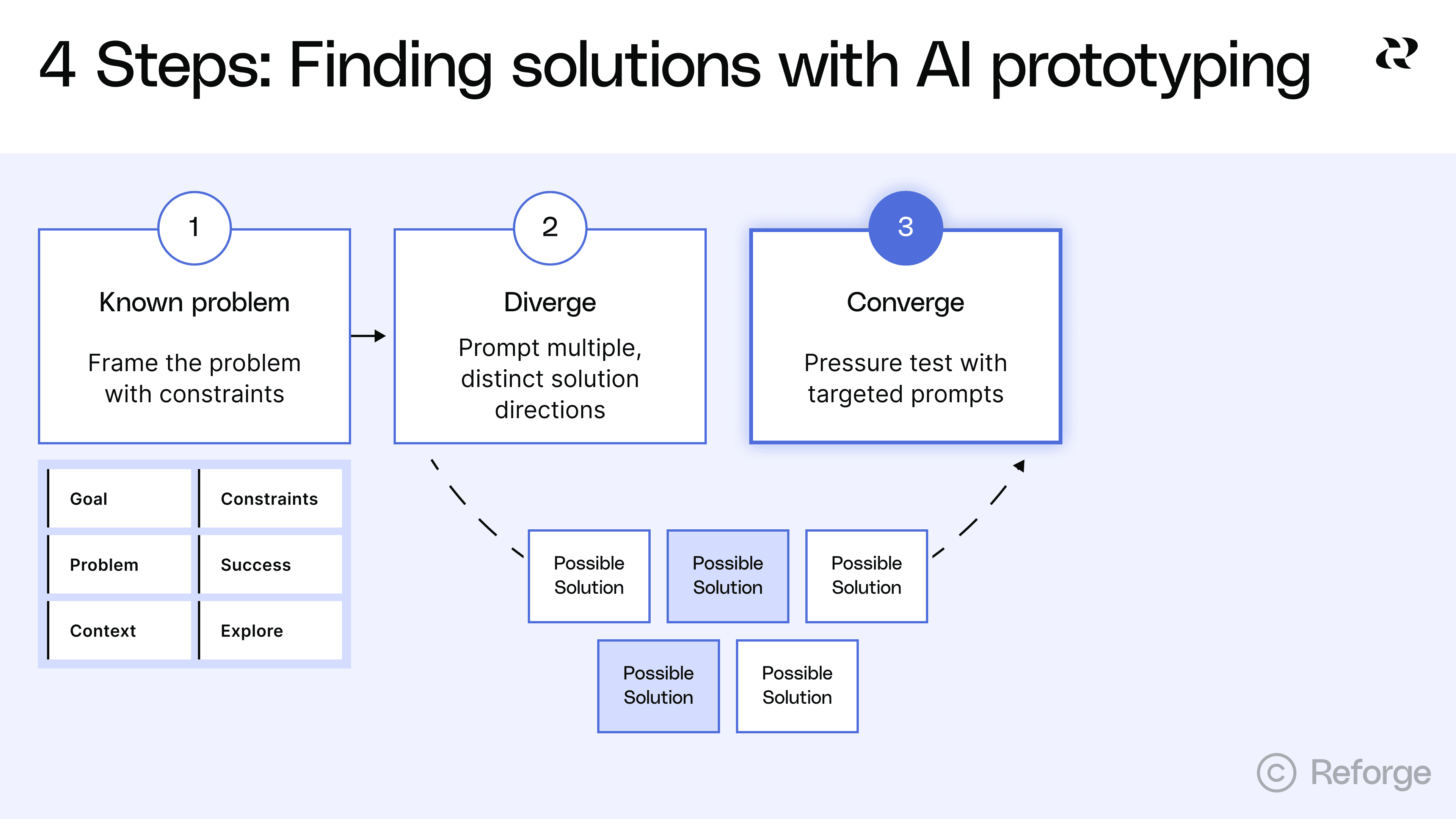
Iterate on promising directions and kill dead ends quickly. But know when to stop fighting the tool too. This step is about understanding trade-offs, not achieving perfection.
Once you’ve settled on the 3-5 solutions you want to explore, have AI write the prompts for you. Pretty quickly, you’ll have 3-5 distinct prototypes to work with. Click around, go through the flows and make notes on each. Assuming the direction is promising, keep iterating. Some will clearly be better than others. Some will reveal problems you didn't anticipate. Your job now is to explore the promising ones more deeply while eliminating the directions that won't work. This may also help you land on other divergent solutions worth exploring too.
What good pressure testing looks like
Good pressure testing asks specific questions about how a solution handles real constraints. You're not trying to polish the design, even though the prototypes appear high-fidelity.. You're trying to understand if the approach can actually work in your environment.
Questions that lead to useful insights:
"How would this approach handle [specific edge case]?"
"Show me what this looks like when [constraint changes]"
"What are the downsides of this direction?"
"If we prioritized [different success metric], how would this change?"
"Generate an alternative for just [this specific element]"
These questions force you to think about trade-offs. They reveal weaknesses in approaches that looked good at first glance. They help you articulate why one direction might be better than another.
Know when to stop iterating in the tool
AI prototyping excels at exploring different conceptual approaches, generating multiple directions quickly and showing what's possible. It struggles with precise layout and spacing, complex interaction patterns and edge case handling in UI.
If you're spending five or more prompts fighting with column alignment, stop. If you're trying to match your exact design system components, stop. If you're attempting to handle every possible edge case in the prototype, stop. These are signs you've moved past exploration into execution.
Clear criteria for moving on
Stop iterating when you've identified 2-3 promising directions. You should understand the trade-offs between approaches. You should be able to articulate why one direction is better than others. You should have rough prototypes that are good enough to get meaningful feedback and clarity on what questions still need answers.
If you can explain to your team "we're going with ‘approach B’ because it handles our mobile constraint better, even though approach A would be simpler to build," you're ready to move on. If you're still tweaking font sizes and spacing, you're not.
Step 4: Get prototypes in front of stakeholders and users
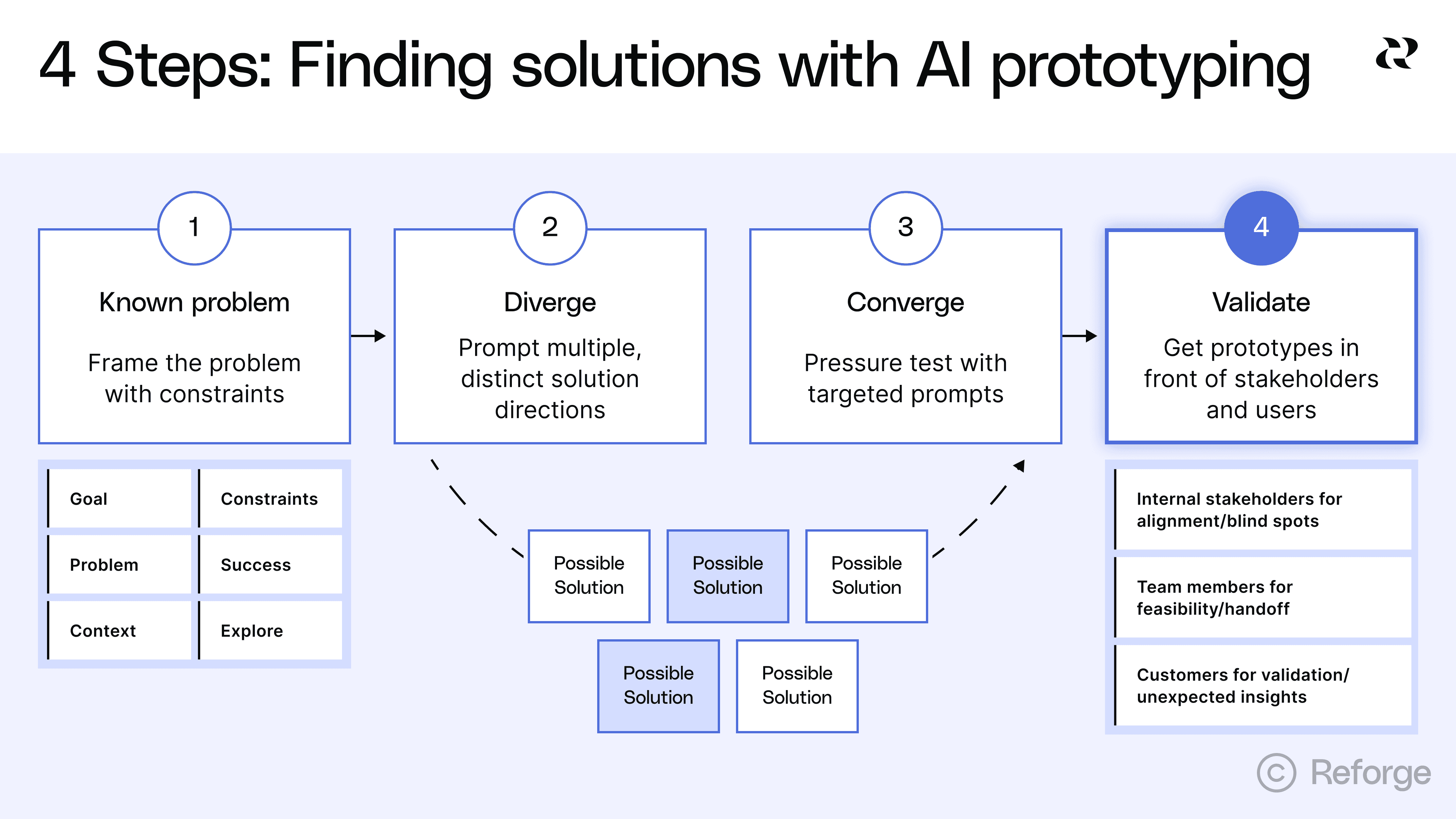
AI prototypes are best used as questions, not answers. At this point, you’ve hopefully brainstormed 3-5 solutions and prototyped 2-3 in a just a few days rather than weeks or even months. Now you get capture even more value from this workflow because you’ll be able to collect the best feedback you’ve ever gotten on prototypes.
Why showing beats telling
One PM described using AI prototypes as "another communication tool." When everyone is literally looking at, clicking around and actually experiencing the same thing, there's very little room for misinterpretation.
This is especially true in large organizations with many cross-functional partners. Showing multiple concrete options beats abstract discussion every time. We built in-line commenting into Reforge Build for this exact reason. It allows anyone on your team to leave extremely specific feedback that’ll be very easy for you to act on.
Remember at this stage you’re still aligning on the concept, not yet writing the specs for engineering to actually build. It can be helpful to remind stakeholders that while each prototype looks ready to ship, it’s not actually that high-fidelity just yet.
Three types of feedback sessions
You need feedback from three different groups. Each group answers different questions. Each group needs to see the prototypes at the right fidelity.
1. Internal stakeholders for alignment and blind spots
Show 2-3 directions to leadership and cross-functional partners like customer success or sales. Do this in a meeting so people can click through and provide feedback. The feedback comes back specific and actionable. "The third step doesn't make sense" or "This will confuse our enterprise customers."
Ask "which approach resonates and why?" Don't ask "which one is perfect?" You're trying to understand what each stakeholder values and what concerns they have. You want to surface constraints and objections you missed before you've committed resources.
One PM told us that "if we can get to a point where you can get to diverging solutions so you can actually think about tradeoffs between different approaches, it’s incredibly useful." The key word is tradeoffs. What do you gain and lose with each approach? You may ultimately blend two prototypes to get the best of each one.
You can actually make changes based on feedback during the call. If you wait until later, your stakeholders may lose their train of thought and you'll need another meeting to go through your iteration. Real-time iteration keeps the momentum going.
2. Team members for feasibility and handoff
Show prototypes to your team members before you commit to a direction. Designers will offer perspective and have specific questions about UI/UX. Engineers may spot technical constraints early and can flag implementation issues. And customer success can validate which approaches will actually solve customer problems.
3. Customers for validation and unexpected insights
This is where you test if users can actually use your solution. Will they understand the interface? Can they complete the task? Does the flow make sense?
As one PM told us, "Customers need visuals to understand what we're talking about"but AI prototypes take this to another level because they can actually use the feature.
Start with customers who already give you feedback regularly. These are people who understand your product and can give you detailed input. It’s a good idea to get early signals before running broader tests.
Focus on workflows and mental models, not visual design. Ask things like, "which approach fits how you work?" Watch where they click first. Watch where they get confused. This behavioral data is more valuable than asking "would you use this feature?"
Be sure to set good expectations, especially with customers. They may think they are using a beta feature when in reality, it’s one of several prototypes you’re still thinking through.
How this improves the traditional process
One PM described the traditional process this way. "Usually we do a lot of discovery, ideation, get customer feedback when we can and then basically create a really in depth mural with the challenges and then you have to go away and build it."
With AI exploration first, the handoff to design includes clear direction on which approach to pursue, evidence from customer feedback about what works, eliminated directions that don't need design time and specific questions that need design expertise.
The goal is that designers spend time on the right solution, not exploring whether it's the right direction. You've already done that exploration. Now they can focus on making it great.
Start building now with Reforge Build
We’ve been hard at working making Reforge Build and now, it’s ready for you. Here’s a quick look look at the features that make Build the AI prototyping tool for product builders. Rather than 0→1, Reforge Build is built for 1→N work.
Prototypes that look like your product: Capture your design system with our browser extension, screenshots, or Figma so prototypes match your brand from the start.
AI that remembers your context: Store customer feedback, personas, product knowledge, and strategy docs that AI pulls from automatically when building.
Plan mode: from idea to structured plan: Research your context, brainstorm options, and create a detailed specification before generating anything.
Generate multiple variants: Create and compare multiple design approaches at once instead of exploring one direction at a time.
Built-in collaboration: Share prototypes so your team can comment directly on specific elements and see all feedback in context.
Reusable templates: Save any prototype as a template to start from that foundation next time.
Validate with customers (coming soon): Connect Reforge Research to deploy AI interviews or surveys that collect and synthesize feedback on your prototypes.
Scale across your product org (coming soon): Give your entire organization access to shared workspaces, centralized context, and reusable templates through Team Accounts.
Reforge Build isn't for everyone. If you're a founder starting from scratch or building a side project, there are some amazing tools for that. But if you're on a product team with an existing product, real customers, and established goals —we are building Reforge Build for you.


*We've just launched Reforge Build, the AI prototyping tool built for product teams. *You can learn more and start building for free here.
Product teams used to wait weeks for design resources to explore a single solution direction. Now they're testing five different approaches in an afternoon. This marks a fundamental shift in how fast product teams can move from validated problem to proven solution.
AI prototyping opens up a few new possibilities but it does one thing way better than traditional workflows. It helps PMs rapidly explore multiple solution directions when the problem is clear but the best path forward isn't. PMs can even try to prove their hunches wrong because it’s so easy to do. Divergent exploration has always been important to PMs, but now it’s accessible enough that it should be standard practice.
This article focuses on that specific sweet spot. You've validated the problem through customer interviews, support tickets and team discussions. You know it's important. You know it's worth solving. But you're not sure which solution approach will work best. That's where AI prototyping excels.
4 Steps to use AI prototyping to find the best solution
This article walks through a four-step process for using AI prototyping to find the best solution to a known problem. You'll learn how to frame problems with the right constraints, generate distinct solution directions, pressure test promising approaches and get useful feedback from stakeholders and users.
he goal isn't to produce production-ready designs. The goal is to explore the solution space thoroughly before you commit to one direction. By the end, you'll have clarity on which approach solves the problem best and why. You'll have rough prototypes that demonstrate the concept. And you'll be ready to hand off to your design team with a clear brief because you explored first.
Step 1: Frame the problem with constraints
The quality of your exploration depends entirely on how you frame the problem.The goal is to give AI enough direction to be useful while staying open to unexpected approaches.
This is harder than it sounds. Most PMs either under-constrain or over-constrain their prompts. Under-constrained prompts produce "too wild" solutions that ignore your reality. Over-constrained prompts converge on one direction before you've explored alternatives. You need to find the middle ground.
The 6 things to include in your problem frame
Your problem frame should include these six elements:
Goal: State your intended outcome to AI stays focused on the end-goal.
Problem: A clear statement of the user need or business challenge you're solving. Why does it matter?
Context: Details about your environment. What are the industry specifics? How do users currently work? What technical environment are you operating in? This helps AI understand the constraints of your reality. In Reforge Build, you can add system-wide context as well as project-specific context so you don’t have to include it in every prompt.
Constraints: What must be true for any solution to work? This includes technical constraints like your tech stack or mobile requirements, business constraints like budget or timeline, user constraints like existing workflows or accessibility needs, and regulatory constraints like compliance requirements.
Success looks like: Specific metrics or user outcomes that define a good solution. "Improve user satisfaction" is too vague. "Reduce time to complete checkout from 3 minutes to under 60 seconds" gives AI something to work with.
Explore: The specific question you're trying to answer. Are you exploring different interaction patterns? Different information architectures? Different user flows? Be explicit about what you want to vary. Ask for 3-5 different approaches.
Here's a practical template:
💡``** Goal:**`` [Your ideal end state]🤔``** Problem:**`` [User need or business challenge]🗃️``** Context:**`` [Industry specifics, user workflows, technical environment]🙅``** Constraints:**`` [What must be true for any solution]📈``** Success looks like:**`` [Measurable outcomes]🧠``** Explore:**`` [3-5 different approaches to solving this]
You need enough vision to guide the exploration but not so much that you've already decided the answer. Your constraints should eliminate approaches that won't work in your context. They shouldn't eliminate approaches that might work differently than you expected.
Think of it this way. If you're solving for sales reps who need “pipeline insights on mobile in under 30 seconds,” the constraint "mobile-first" matters. It eliminates desktop-heavy dashboards that won't work. But it doesn't dictate whether you use a card-based layout, a timeline view or a notification system. Those are the variations you want to explore.
The constraint "insights in under 30 seconds" matters too. It eliminates approaches that require multiple taps or complex filtering. But it doesn't dictate the exact interaction pattern. That's what you're testing.
Steal this prompt: An example that will lead to great brainstorming
https://fast.wistia.net/embed/iframe/fi9iixjmmo
Let's say you're building a feature to help project managers track blockers across multiple teams. Here's how you might frame it to get great results:
**Goal:**`` Explore four distinct solution directions for the following problem.
**Problem:**`` Project managers lose visibility when blockers affect multiple teams. By the time they find out about a dependency issue, it's already delayed the project.
**Context:**`` Our users manage 5–10 projects simultaneously with 3–7 teams per project. They spend most of their time in Slack and our project management tool. They check status once or twice daily, not continuously.
**Constraints:**
Must integrate with our existing project management toolMust work on mobile (60% of checks happen on phones)Can’t require team members to change their current workflow for logging blockersMust handle projects with different team structures
**Success looks like:**
PMs identify blockers within 4 hours instead of 2–3 daysFewer “I didn’t know that was blocked” moments in standups
**Explore:**
Show me ``**four distinct solution directions**`` that differ in how proactive, visible, and automated they are. Include at least one of each:
**Passive:**`` Information is surfaced in existing tools (e.g., Slack or dashboards)**Active:**`` PMs can query or interact to discover blockers**Predictive:**`` The system anticipates blockers based on activity patterns**Collaborative:**`` Teams surface blockers together through structured input
For each concept, describe:
Core ideaHow it worksHow it integrates with current tools/workflowsPotential risks or tradeoffs
This framing gives AI enough to work with. It explains the problem clearly. It specifies real constraints that matter. It defines success in measurable terms. And it explicitly asks for divergent approaches without dictating the solution.
Step 2: Generate multiple, distinct solution directions
The goal is expanding your solution space, not landing on one answer, so encourage AI to surface approaches you haven't considered. This is where AI prototyping excels over traditional workflows. You can explore five fundamentally different approaches in the time it used to take to draw one on the whiteboard.
The trap is generating variations instead of distinct approaches. Most teams ask for "a few options" and get the same solution with different button placements. That wastes the main advantage of AI prototyping.
Prompt for divergence, not convergence
Most prompts converge too early. They ask for one thing and get one thing. They already assume a solution direction and leave no room for alternatives.
Bad prompts that converge too early:
"Build me a dashboard for sales metrics"
"Design a settings page"
"Create a checkout flow"
These prompts dictate the format before you've explored whether that format is best (dashboard, settings page, checkout flow, etc). You've basically already decided the answer.
Here are better prompts that invite exploration:
"Show me three different ways to help sales reps understand their pipeline health, considering that they primarily work on mobile and need insights in under 30 seconds"
"Explore four different approaches to letting users control their privacy settings, ranging from maximally simple to maximally granular"
"Generate five distinct checkout experiences optimized for different user types: first-time buyers, returning customers, bulk purchasers, gift givers and subscription renewals"
Notice the difference. Good prompts ask for multiple approaches. They specify constraints that matter but leave room for variation. They're clear about what success looks like without dictating how to get there.
Ask for fundamentally different approaches
As an example, we used the project management dependency example mentioned in the last section as input in Reforge Build’s Planning Mode. Here’s the output it gave us.
Notice that it provided completely divergent ideas but also a list of clarifying questions:
Which PM tool(s) should we integrate with first (e.g., Jira, Asana, Linear)? Any mandated fields or custom schemas we must respect?
Preferred cadence and channels for notifications (per-project Slack channels vs. PM DMs)? Any quiet hours?
How are dependencies represented today (issue links, epic hierarchy, labels)? If inconsistent, can we start with heuristics?
Mobile priority: Should we make Slack the primary mobile surface, or also deliver a minimal mobile web dashboard?
Success metrics access: Can we instrument mentions in standups, or should we proxy via dashboard/alert interactions only?
Once answered, Build will create the prompts and prototypes for you. This only took a few minutes, but quickly expands the way you approach finding a solution. You can try it yourself here.
Step 3: Pressure test with targeted prompts
Iterate on promising directions and kill dead ends quickly. But know when to stop fighting the tool too. This step is about understanding trade-offs, not achieving perfection.
Once you’ve settled on the 3-5 solutions you want to explore, have AI write the prompts for you. Pretty quickly, you’ll have 3-5 distinct prototypes to work with. Click around, go through the flows and make notes on each. Assuming the direction is promising, keep iterating. Some will clearly be better than others. Some will reveal problems you didn't anticipate. Your job now is to explore the promising ones more deeply while eliminating the directions that won't work. This may also help you land on other divergent solutions worth exploring too.
What good pressure testing looks like
Good pressure testing asks specific questions about how a solution handles real constraints. You're not trying to polish the design, even though the prototypes appear high-fidelity.. You're trying to understand if the approach can actually work in your environment.
Questions that lead to useful insights:
"How would this approach handle [specific edge case]?"
"Show me what this looks like when [constraint changes]"
"What are the downsides of this direction?"
"If we prioritized [different success metric], how would this change?"
"Generate an alternative for just [this specific element]"
These questions force you to think about trade-offs. They reveal weaknesses in approaches that looked good at first glance. They help you articulate why one direction might be better than another.
Know when to stop iterating in the tool
AI prototyping excels at exploring different conceptual approaches, generating multiple directions quickly and showing what's possible. It struggles with precise layout and spacing, complex interaction patterns and edge case handling in UI.
If you're spending five or more prompts fighting with column alignment, stop. If you're trying to match your exact design system components, stop. If you're attempting to handle every possible edge case in the prototype, stop. These are signs you've moved past exploration into execution.
Clear criteria for moving on
Stop iterating when you've identified 2-3 promising directions. You should understand the trade-offs between approaches. You should be able to articulate why one direction is better than others. You should have rough prototypes that are good enough to get meaningful feedback and clarity on what questions still need answers.
If you can explain to your team "we're going with ‘approach B’ because it handles our mobile constraint better, even though approach A would be simpler to build," you're ready to move on. If you're still tweaking font sizes and spacing, you're not.
Step 4: Get prototypes in front of stakeholders and users
AI prototypes are best used as questions, not answers. At this point, you’ve hopefully brainstormed 3-5 solutions and prototyped 2-3 in a just a few days rather than weeks or even months. Now you get capture even more value from this workflow because you’ll be able to collect the best feedback you’ve ever gotten on prototypes.
Why showing beats telling
One PM described using AI prototypes as "another communication tool." When everyone is literally looking at, clicking around and actually experiencing the same thing, there's very little room for misinterpretation.
This is especially true in large organizations with many cross-functional partners. Showing multiple concrete options beats abstract discussion every time. We built in-line commenting into Reforge Build for this exact reason. It allows anyone on your team to leave extremely specific feedback that’ll be very easy for you to act on.
Remember at this stage you’re still aligning on the concept, not yet writing the specs for engineering to actually build. It can be helpful to remind stakeholders that while each prototype looks ready to ship, it’s not actually that high-fidelity just yet.
Three types of feedback sessions
You need feedback from three different groups. Each group answers different questions. Each group needs to see the prototypes at the right fidelity.
1. Internal stakeholders for alignment and blind spots
Show 2-3 directions to leadership and cross-functional partners like customer success or sales. Do this in a meeting so people can click through and provide feedback. The feedback comes back specific and actionable. "The third step doesn't make sense" or "This will confuse our enterprise customers."
Ask "which approach resonates and why?" Don't ask "which one is perfect?" You're trying to understand what each stakeholder values and what concerns they have. You want to surface constraints and objections you missed before you've committed resources.
One PM told us that "if we can get to a point where you can get to diverging solutions so you can actually think about tradeoffs between different approaches, it’s incredibly useful." The key word is tradeoffs. What do you gain and lose with each approach? You may ultimately blend two prototypes to get the best of each one.
You can actually make changes based on feedback during the call. If you wait until later, your stakeholders may lose their train of thought and you'll need another meeting to go through your iteration. Real-time iteration keeps the momentum going.
2. Team members for feasibility and handoff
Show prototypes to your team members before you commit to a direction. Designers will offer perspective and have specific questions about UI/UX. Engineers may spot technical constraints early and can flag implementation issues. And customer success can validate which approaches will actually solve customer problems.
3. Customers for validation and unexpected insights
This is where you test if users can actually use your solution. Will they understand the interface? Can they complete the task? Does the flow make sense?
As one PM told us, "Customers need visuals to understand what we're talking about"but AI prototypes take this to another level because they can actually use the feature.
Start with customers who already give you feedback regularly. These are people who understand your product and can give you detailed input. It’s a good idea to get early signals before running broader tests.
Focus on workflows and mental models, not visual design. Ask things like, "which approach fits how you work?" Watch where they click first. Watch where they get confused. This behavioral data is more valuable than asking "would you use this feature?"
Be sure to set good expectations, especially with customers. They may think they are using a beta feature when in reality, it’s one of several prototypes you’re still thinking through.
How this improves the traditional process
One PM described the traditional process this way. "Usually we do a lot of discovery, ideation, get customer feedback when we can and then basically create a really in depth mural with the challenges and then you have to go away and build it."
With AI exploration first, the handoff to design includes clear direction on which approach to pursue, evidence from customer feedback about what works, eliminated directions that don't need design time and specific questions that need design expertise.
The goal is that designers spend time on the right solution, not exploring whether it's the right direction. You've already done that exploration. Now they can focus on making it great.
Start building now with Reforge Build
We’ve been hard at working making Reforge Build and now, it’s ready for you. Here’s a quick look look at the features that make Build the AI prototyping tool for product builders. Rather than 0→1, Reforge Build is built for 1→N work.
Prototypes that look like your product: Capture your design system with our browser extension, screenshots, or Figma so prototypes match your brand from the start.
AI that remembers your context: Store customer feedback, personas, product knowledge, and strategy docs that AI pulls from automatically when building.
Plan mode: from idea to structured plan: Research your context, brainstorm options, and create a detailed specification before generating anything.
Generate multiple variants: Create and compare multiple design approaches at once instead of exploring one direction at a time.
Built-in collaboration: Share prototypes so your team can comment directly on specific elements and see all feedback in context.
Reusable templates: Save any prototype as a template to start from that foundation next time.
Validate with customers (coming soon): Connect Reforge Research to deploy AI interviews or surveys that collect and synthesize feedback on your prototypes.
Scale across your product org (coming soon): Give your entire organization access to shared workspaces, centralized context, and reusable templates through Team Accounts.
Reforge Build isn't for everyone. If you're a founder starting from scratch or building a side project, there are some amazing tools for that. But if you're on a product team with an existing product, real customers, and established goals —we are building Reforge Build for you.