Reforge has joined Miro ↗
Article details
We've just launched Reforge Build, the AI prototyping tool built for product teams. You can learn more and start building for free here.
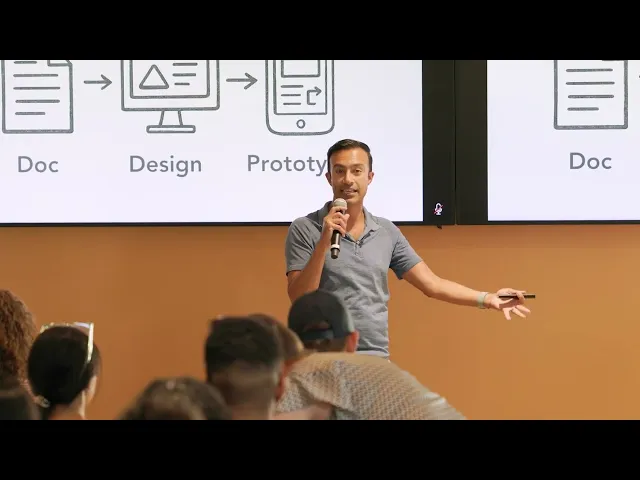
We recently announced the launch of Reforge Build—our AI prototyping tool built specifically for product teams. To kick off the announcement, we invited Sachin Rekhi to show everyone why AI prototyping matters and how to master it.
Sachin teaches Reforge's new AI Productivity course and created a free AI prototyping course launching soon. He's also the former Head of Product at LinkedIn and founder of Notejoy.
Why every product person should be prototyping yesterday
Sachin made two arguments for why we should all be prototyping.
The evolutionary argument is simple. We've evolved from 30-page specs to design mockups. Prototyping is the next evolution—adding interactions and functionality to increase fidelity. A designer at Notion recently said that at a design crit, no one shared work via Figma. Everything was vibecoded prototypes.
The revolutionary argument is what excited me. Most teams prioritize a customer problem, put it on the roadmap, then build a solution. But the best teams do product shaping. They build prototypes for potential problems, test them, and then prioritize the most successful ones.
You're prioritizing problem-solution pairs that you know work, not just problems you hope to solve.
When Jony Ive showed Steve Jobs the multi-touch interface on a tablet, Jobs said it would be better on a phone. They shelved the tablet project and created the iPhone instead. That's product shaping.
Why doesn't everyone do this? Running an expensive prototyping lab where you throw away 90% of your work is insanely expensive. AI prototyping completely changes the economics.
The AI Prototyping Mastery Ladder
These prototyping tools are incredibly easy to get started with, but that's half the problem.
Sachin showed an example where someone prompted "create a traditional CRM application" and got back a working CRM in minutes. But he calls this "AI slop." It lacks branding, differentiation, and depth.
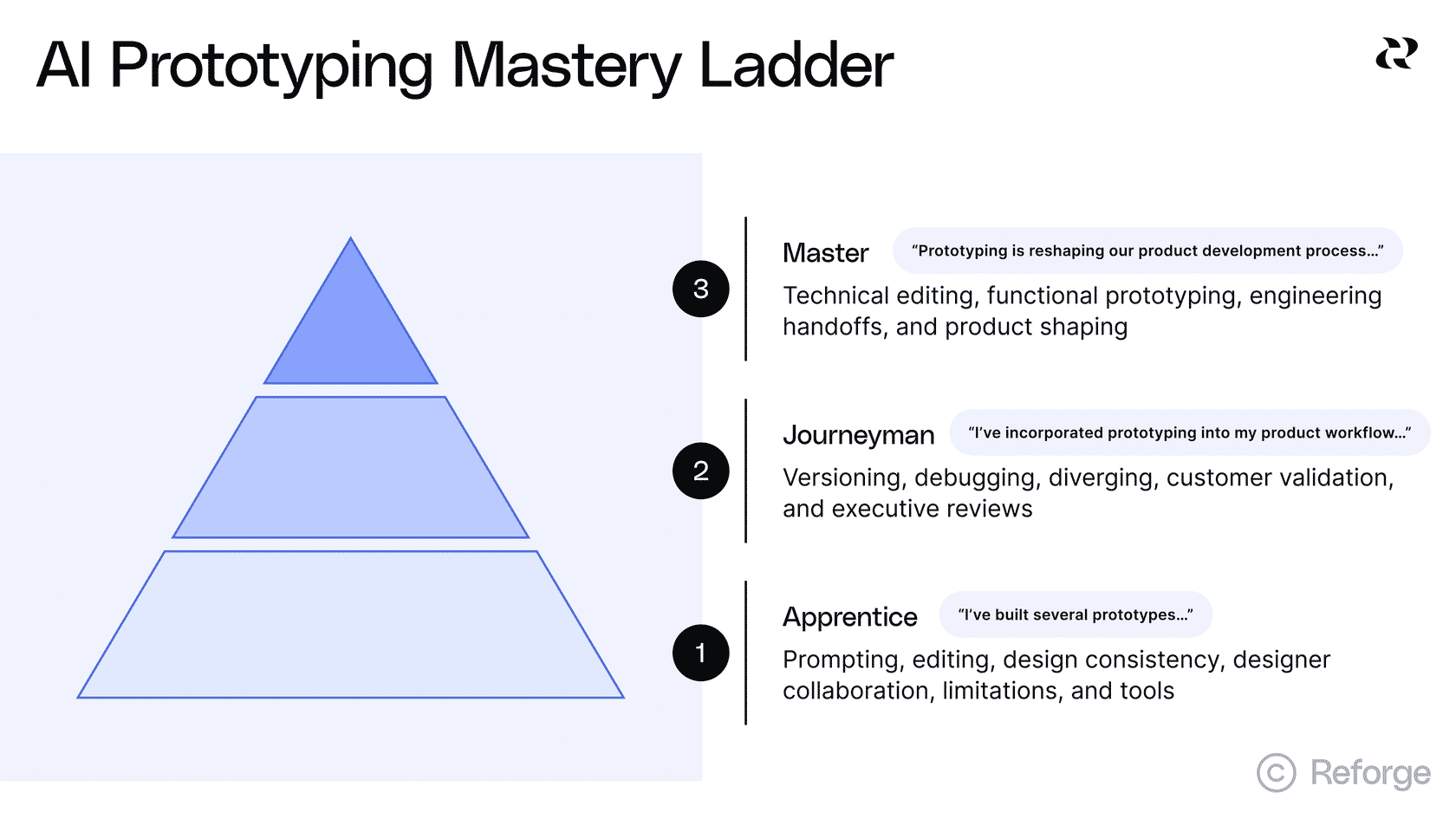
To help people get really good at this, Sachin developed the AI Prototyping Mastery Ladder. Just like traditional craftsmanship, you master the basics before moving up.
Apprentice Level:
1 - Prompting
2 - Editing
3 - Design consistency
4- Collaboration
5 - Understanding limitations
Journeyman Level:
6 - Versioning
7 - Debugging
8 - Diverging
Craftsman Level:
9 - Functional prototyping
10 - Testing
11 - Customer validation
12 - Engineering handoffs
13-15 - Advanced techniques that will be covered in the full course, so subscribe to the newsletter to be notified when it launches 😎
Sachin demonstrated four of these skills with live demos.
Design consistency
The challenge is making prototypes look like your actual product. Sachin showed how to import your existing design as a baseline by starting with a screenshot. The AI extracts your design system—colors, fonts, spacing, everything.
You only have to do this once. One person creates the baseline, and everyone else builds on top of it.
Sachin demonstrated with Notejoy. He imported a screenshot, refined the styling, and built an "Ask AI" feature. The new feature automatically matched the existing product's design with no styling instructions needed.
Divergent exploration
Most people use prototyping tools to get their first idea out. But that's a poor use of AI.
AI can be a design partner. Sachin showed a LinkedIn example where he wanted to add a "News in Your Network" feature. One prompt generated four completely different design directions. Different tools gave him different variations—Magic Patterns gave him four, Bolt gave him four more.
Use AI to diverge and explore, then converge on the best solution.
Functional prototyping
Sachin's prototypes weren't just interactive mockups—they were fully functional. The "Ask AI" feature actually called OpenAI's API, processed note content, and returned real responses.
He didn't write a single line of code. Everything was prompted.
Now you can validate with customers at a completely different level. Hand them the prototype and watch them use the feature in real-time.
Customer validation
Sachin embedded validation tools directly into the prototype. Built-in surveys. Analytics showing daily active users and retention. Session replays so the team could watch users. Heat maps revealing what people actually clicked.
Remember the Sony Walkman story. They ran a focus group for a yellow Walkman. Everyone said it was sportier and more fun. Then they let people pick one as a gift. 100% chose black.
User behavior beats expressed preferences every time. Prototypes give you behavior, not just opinions.
Prototypes are for discovery, not delivery
Prototypes are for discovery, not delivery. Don't hand the prototype code to engineering and expect them to ship it.
But prototypes help you discover the right product to build. They let you validate with your team, executives, and customers before engineering gets involved.
Start building now with Reforge Build
We’ve been hard at working making Reforge Build and now, it’s ready for you. Here’s a quick look look at the features that make Build the AI prototyping tool for product builders. Rather than 0→1, Reforge Build is built for 1→N work.
Prototypes that look like your product: Capture your design system with our browser extension, screenshots, or Figma so prototypes match your brand from the start.
AI that remembers your context: Store customer feedback, personas, product knowledge, and strategy docs that AI pulls from automatically when building.
Plan mode: from idea to structured plan: Research your context, brainstorm options, and create a detailed specification before generating anything.
Generate multiple variants: Create and compare multiple design approaches at once instead of exploring one direction at a time.
Built-in collaboration: Share prototypes so your team can comment directly on specific elements and see all feedback in context.
Reusable templates: Save any prototype as a template to start from that foundation next time.
Validate with customers (coming soon): Connect Reforge Research to deploy AI interviews or surveys that collect and synthesize feedback on your prototypes.
Scale across your product org (coming soon): Give your entire organization access to shared workspaces, centralized context, and reusable templates through Team Accounts.
Reforge Build isn't for everyone. If you're a founder starting from scratch or building a side project, there are some amazing tools for that. But if you're on a product team with an existing product, real customers, and established goals —we are building Reforge Build for you.


We've just launched Reforge Build, the AI prototyping tool built for product teams. You can learn more and start building for free here.
We recently announced the launch of Reforge Build—our AI prototyping tool built specifically for product teams. To kick off the announcement, we invited Sachin Rekhi to show everyone why AI prototyping matters and how to master it.
Sachin teaches Reforge's new AI Productivity course and created a free AI prototyping course launching soon. He's also the former Head of Product at LinkedIn and founder of Notejoy.
Why every product person should be prototyping yesterday
Sachin made two arguments for why we should all be prototyping.
The evolutionary argument is simple. We've evolved from 30-page specs to design mockups. Prototyping is the next evolution—adding interactions and functionality to increase fidelity. A designer at Notion recently said that at a design crit, no one shared work via Figma. Everything was vibecoded prototypes.
The revolutionary argument is what excited me. Most teams prioritize a customer problem, put it on the roadmap, then build a solution. But the best teams do product shaping. They build prototypes for potential problems, test them, and then prioritize the most successful ones.
You're prioritizing problem-solution pairs that you know work, not just problems you hope to solve.
When Jony Ive showed Steve Jobs the multi-touch interface on a tablet, Jobs said it would be better on a phone. They shelved the tablet project and created the iPhone instead. That's product shaping.
Why doesn't everyone do this? Running an expensive prototyping lab where you throw away 90% of your work is insanely expensive. AI prototyping completely changes the economics.
The AI Prototyping Mastery Ladder
These prototyping tools are incredibly easy to get started with, but that's half the problem.
Sachin showed an example where someone prompted "create a traditional CRM application" and got back a working CRM in minutes. But he calls this "AI slop." It lacks branding, differentiation, and depth.
To help people get really good at this, Sachin developed the AI Prototyping Mastery Ladder. Just like traditional craftsmanship, you master the basics before moving up.
Apprentice Level:
1 - Prompting
2 - Editing
3 - Design consistency
4- Collaboration
5 - Understanding limitations
Journeyman Level:
6 - Versioning
7 - Debugging
8 - Diverging
Craftsman Level:
9 - Functional prototyping
10 - Testing
11 - Customer validation
12 - Engineering handoffs
13-15 - Advanced techniques that will be covered in the full course, so subscribe to the newsletter to be notified when it launches 😎
Sachin demonstrated four of these skills with live demos.
Design consistency
The challenge is making prototypes look like your actual product. Sachin showed how to import your existing design as a baseline by starting with a screenshot. The AI extracts your design system—colors, fonts, spacing, everything.
You only have to do this once. One person creates the baseline, and everyone else builds on top of it.
Sachin demonstrated with Notejoy. He imported a screenshot, refined the styling, and built an "Ask AI" feature. The new feature automatically matched the existing product's design with no styling instructions needed.
Divergent exploration
Most people use prototyping tools to get their first idea out. But that's a poor use of AI.
AI can be a design partner. Sachin showed a LinkedIn example where he wanted to add a "News in Your Network" feature. One prompt generated four completely different design directions. Different tools gave him different variations—Magic Patterns gave him four, Bolt gave him four more.
Use AI to diverge and explore, then converge on the best solution.
Functional prototyping
Sachin's prototypes weren't just interactive mockups—they were fully functional. The "Ask AI" feature actually called OpenAI's API, processed note content, and returned real responses.
He didn't write a single line of code. Everything was prompted.
Now you can validate with customers at a completely different level. Hand them the prototype and watch them use the feature in real-time.
Customer validation
Sachin embedded validation tools directly into the prototype. Built-in surveys. Analytics showing daily active users and retention. Session replays so the team could watch users. Heat maps revealing what people actually clicked.
Remember the Sony Walkman story. They ran a focus group for a yellow Walkman. Everyone said it was sportier and more fun. Then they let people pick one as a gift. 100% chose black.
User behavior beats expressed preferences every time. Prototypes give you behavior, not just opinions.
Prototypes are for discovery, not delivery
Prototypes are for discovery, not delivery. Don't hand the prototype code to engineering and expect them to ship it.
But prototypes help you discover the right product to build. They let you validate with your team, executives, and customers before engineering gets involved.
Start building now with Reforge Build
We’ve been hard at working making Reforge Build and now, it’s ready for you. Here’s a quick look look at the features that make Build the AI prototyping tool for product builders. Rather than 0→1, Reforge Build is built for 1→N work.
Prototypes that look like your product: Capture your design system with our browser extension, screenshots, or Figma so prototypes match your brand from the start.
AI that remembers your context: Store customer feedback, personas, product knowledge, and strategy docs that AI pulls from automatically when building.
Plan mode: from idea to structured plan: Research your context, brainstorm options, and create a detailed specification before generating anything.
Generate multiple variants: Create and compare multiple design approaches at once instead of exploring one direction at a time.
Built-in collaboration: Share prototypes so your team can comment directly on specific elements and see all feedback in context.
Reusable templates: Save any prototype as a template to start from that foundation next time.
Validate with customers (coming soon): Connect Reforge Research to deploy AI interviews or surveys that collect and synthesize feedback on your prototypes.
Scale across your product org (coming soon): Give your entire organization access to shared workspaces, centralized context, and reusable templates through Team Accounts.
Reforge Build isn't for everyone. If you're a founder starting from scratch or building a side project, there are some amazing tools for that. But if you're on a product team with an existing product, real customers, and established goals —we are building Reforge Build for you.