Reforge has joined Miro ↗
In the October edition of Inside Reforge, we demo the new Extension UI, suggested drafts, the Extension in Confluence, and more.
Welcome to the October edition of Inside Reforge, your monthly dive into product updates and behind-the-scenes insights.
This month, we’re doubling down on the Reforge Extension—your in-browser copilot that brings Reforge’s insights straight to the tools where real work happens.
With Annual Planning on the horizon, the Reforge Extension will help sharpen your 2024 retrospectives, 2025 roadmaps, GTM strategies, and more. Whether you’re in JIRA, Google Docs, or Notion, we’re here to ensure your work is smarter, faster, and more impactful.
Additionally, you can watch our team demo the new features in the video below.
Let’s dive in (If you don't have the Extension already, we highly recommend downloading it before reading.)
Supercharged In-Line Suggestions w/ New Instant Section Drafts
What It Is
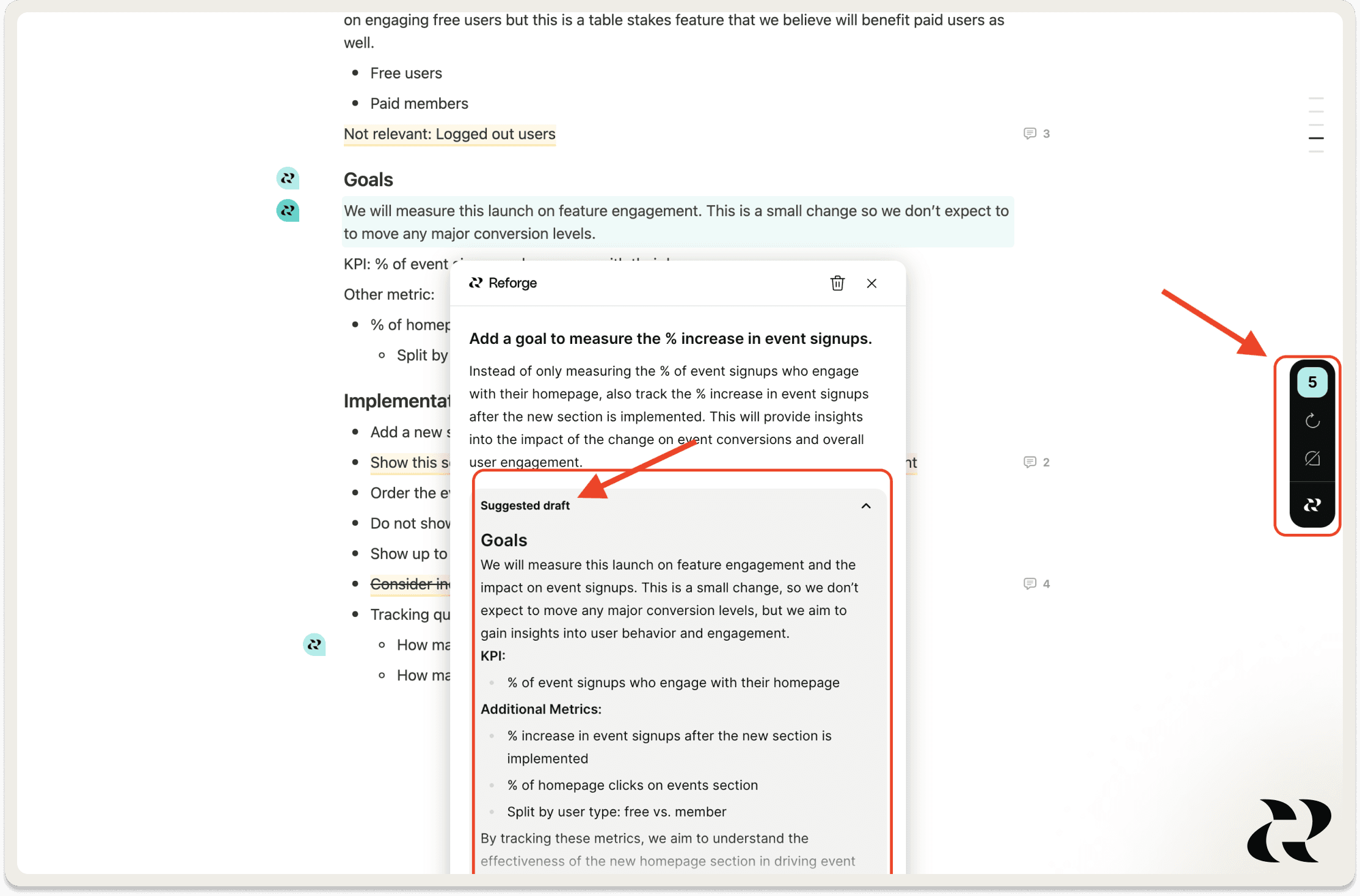
A few weeks ago, we launched v1 of our In-Line Suggestions, giving you expert feedback directly in your documents. Now, with v2, we’ve taken it up a notch, giving you more control and advice you can use immediately.
**More Actionable: **Every suggestion is now laser-focused on delivering tactical feedback you can apply immediately. No fluff, just clarity.
New Toolbar: Suggestions when you need them, hidden when you don’t. Our dynamic toolbar lets you manage when and how feedback appears.
Instant Drafts: Now, for each suggestion, you get instant draft options to make it easier to action our feedback. Speed through your work with one-click drafts that refine your document on the spot.
Why We Built It
In-line suggestions, or what we call "blue dots," provide you with a copilot experience without requiring you to leave the section you're working on. This feature offers seamless, instant feedback.
But feedback that’s unclear or too abstract slows you down; it should provide a lightbulb of clarity, not a moment of confusion. To fulfill our tool's promise, we made the suggestions even more actionable, crisp, and always relevant.
Last but not least, we aim to reduce your workload, not add to it. One-click drafts help you turn our feedback into action immediately.
How We Built It
We significantly upgraded the LLM prompts powering our extension by providing over 20 examples of good and bad feedback across various document types. We also trained it to write the description first and then extract the title, ensuring the "meat" of the suggestion is the first thing you read. Dan and Ben led this effort.
The toolbar resulted from engineering wizardry by Vlad and brilliant design by Archie. Archie dedicated hours to customer conversations to understand their preferences for suggestions.
For instant drafts, we leveraged our experience from the "Help Me Improve This" prompt to integrate it into in-line feedback. We first taught it to re-read the document to avoid duplication and to draft a Scope of Work for the suggestion without exceeding it.
Who Built It
The brains behind the Extension magic: Dan, Eddie, Vlad, Archie, and Ben.
The Reforge Extension is Now in Confluence
What It Is
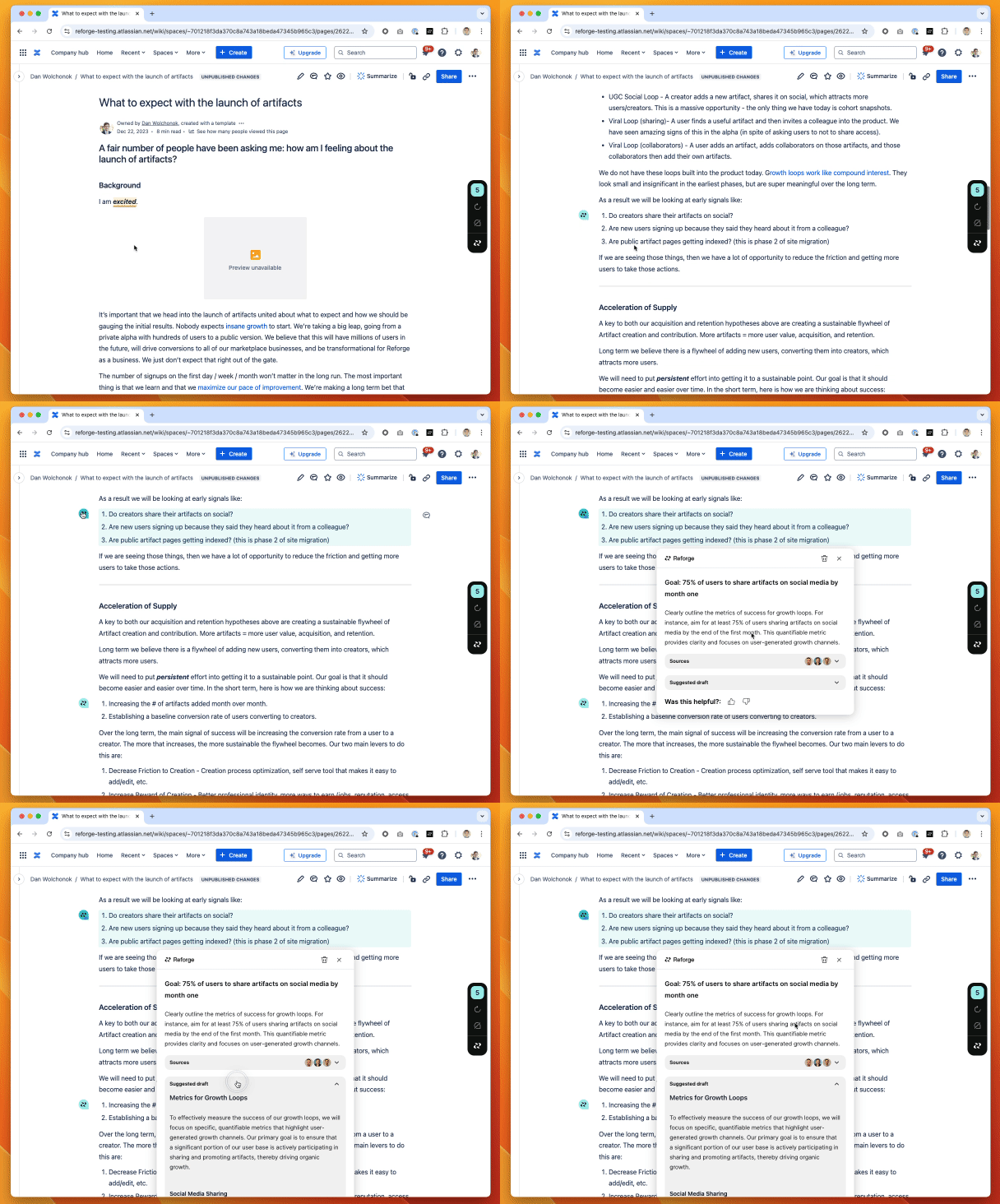
We provide the same powerful in-line suggestions and drafts, and a new way to interact with the sidebar are now available in Confluence.
Why We Built It
We heard time and time, teams love Confluence and so do we. If you have the reforge extension installed in your browser, it will now appear next time you use confluence too so we can deliver the high quality, expert backed feedback and drafts to supercharge your work there too.
How We Built It
The challenge of building in-line suggestions for Confluence lies in its two modes: view mode and edit mode. We first had to detect the elements of your document and then link them to HTML.
Who Built It
Hat tip to Dan, Eddie, Vlad, Archie, and Ben.
The Reforge Extension Now in Português, 日本語, Hrvatski, y muchos más idiomas
What It Is
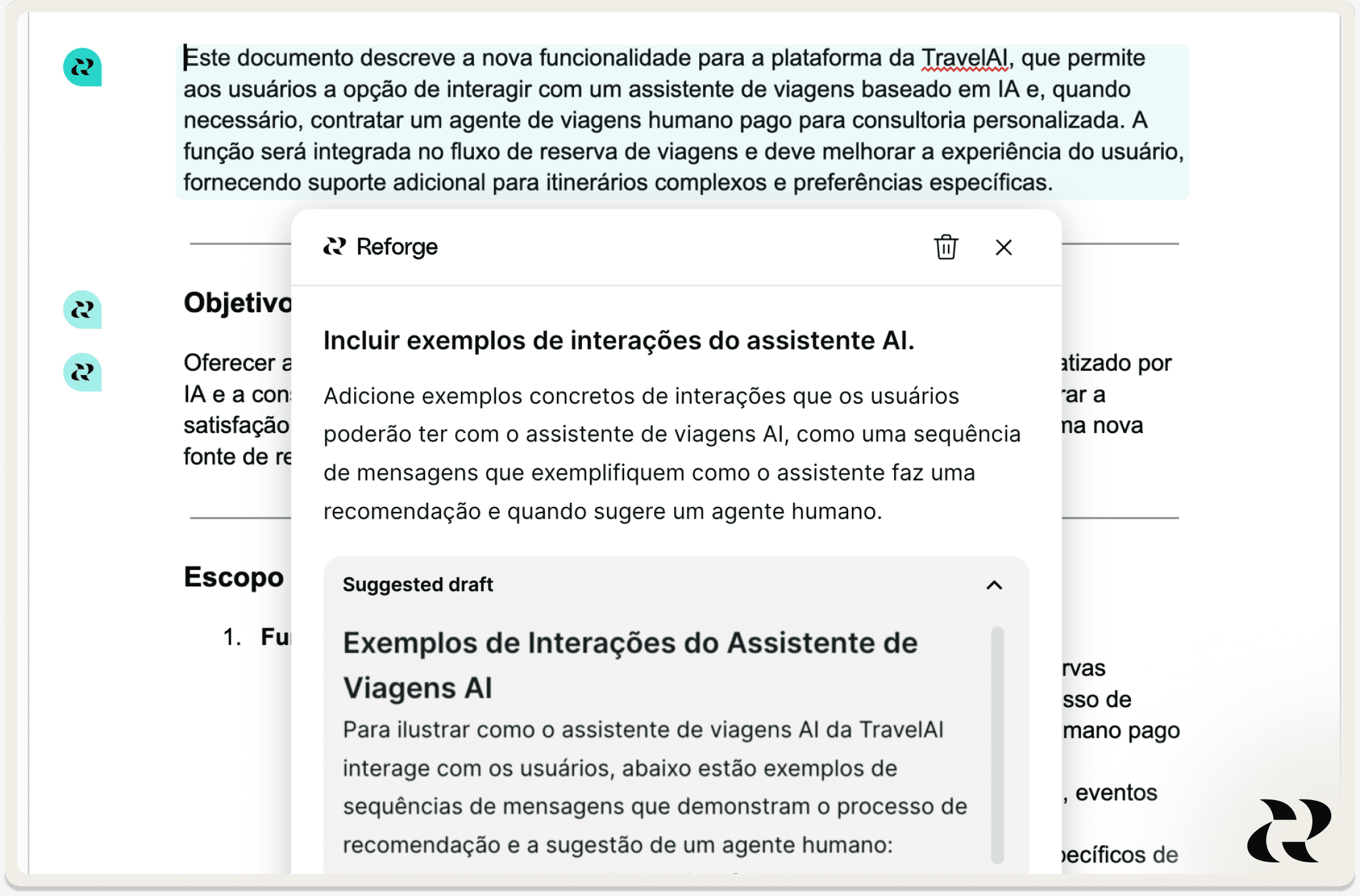
The extension now detects the language of the document you're working on and provides feedback and drafts in that language. If you wish to manually change the language, simply open your preferences via the toolbar and select your preferred language.
Why We Built It
We value our global audience, and thanks to the power and speed of AI, we can communicate with you in your preferred language.
How We Built It
We simply told the LLM to detect the language and respond in the same language. It was shockingly easy.
Who Built It
The brains behind the Extension magic: Dan, Eddie, Vlad, Archie, and Ben.
A Better Way to Explore Reforge’s Content - Now Live
What It Is
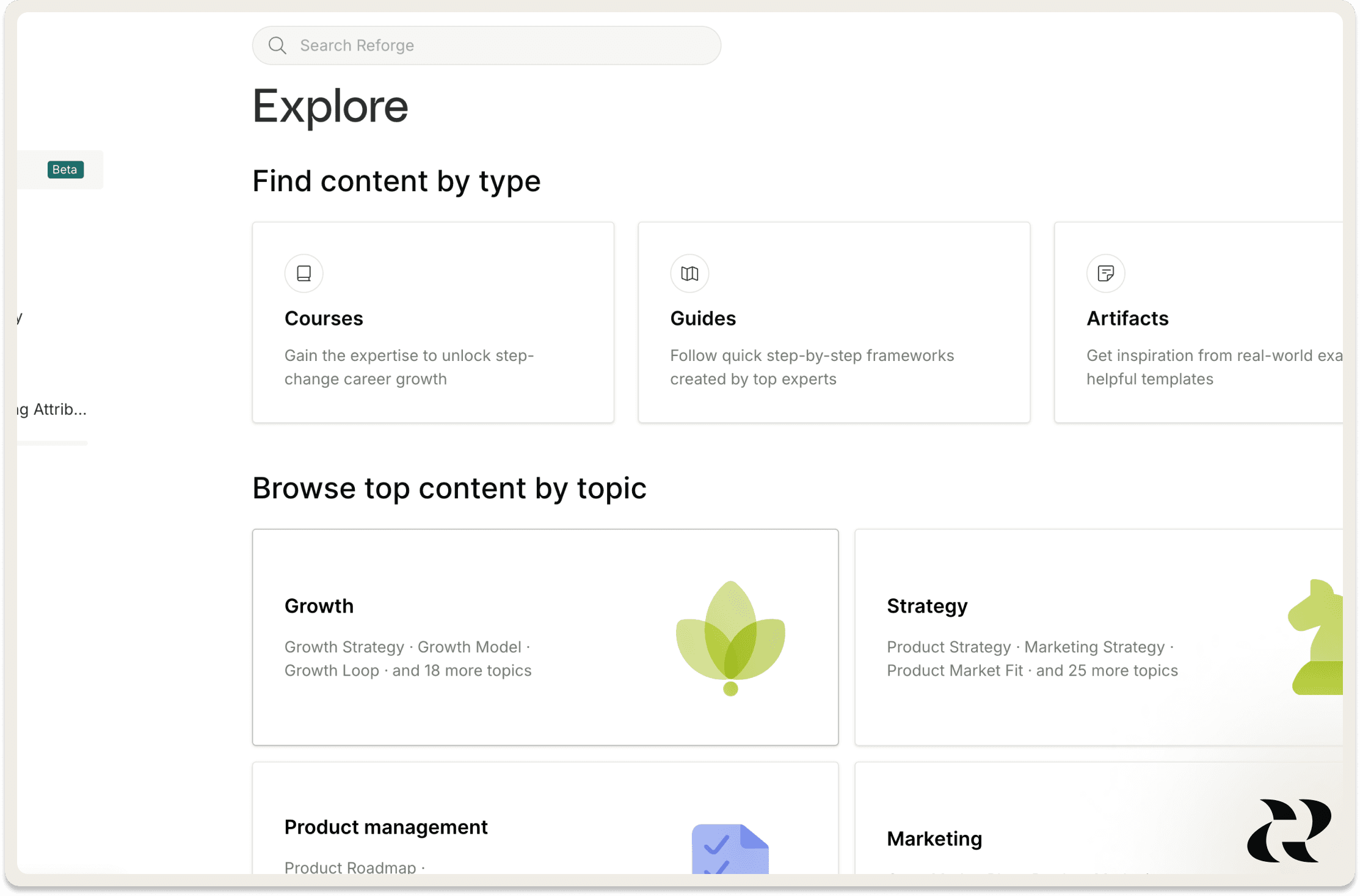
Last month, we previewed a new Explore page that makes it super simple to find top content on topics you’re interested in. It’s now live.
Why We Built It
We heard it was challenging to find all the Reforge content on a specific topic, like AI, product management, and growth. This update gives you the flexibility to browse by topic, subtopic or format — whatever way you discover best.
How We Built It
After getting feedback on early designs from our members, we created a UI to showcase our top-performing content under each topic and subtopic. Our team also manually reviewed and tagged content in our library to ensure it showed up under the right topics.
Who Built It
Hat tip to Ginny, Ali R., Will M., Tracy, Alexis, Anne, and Andrew.
Try it here
Redesigned Team Member Administration Page
What It Is
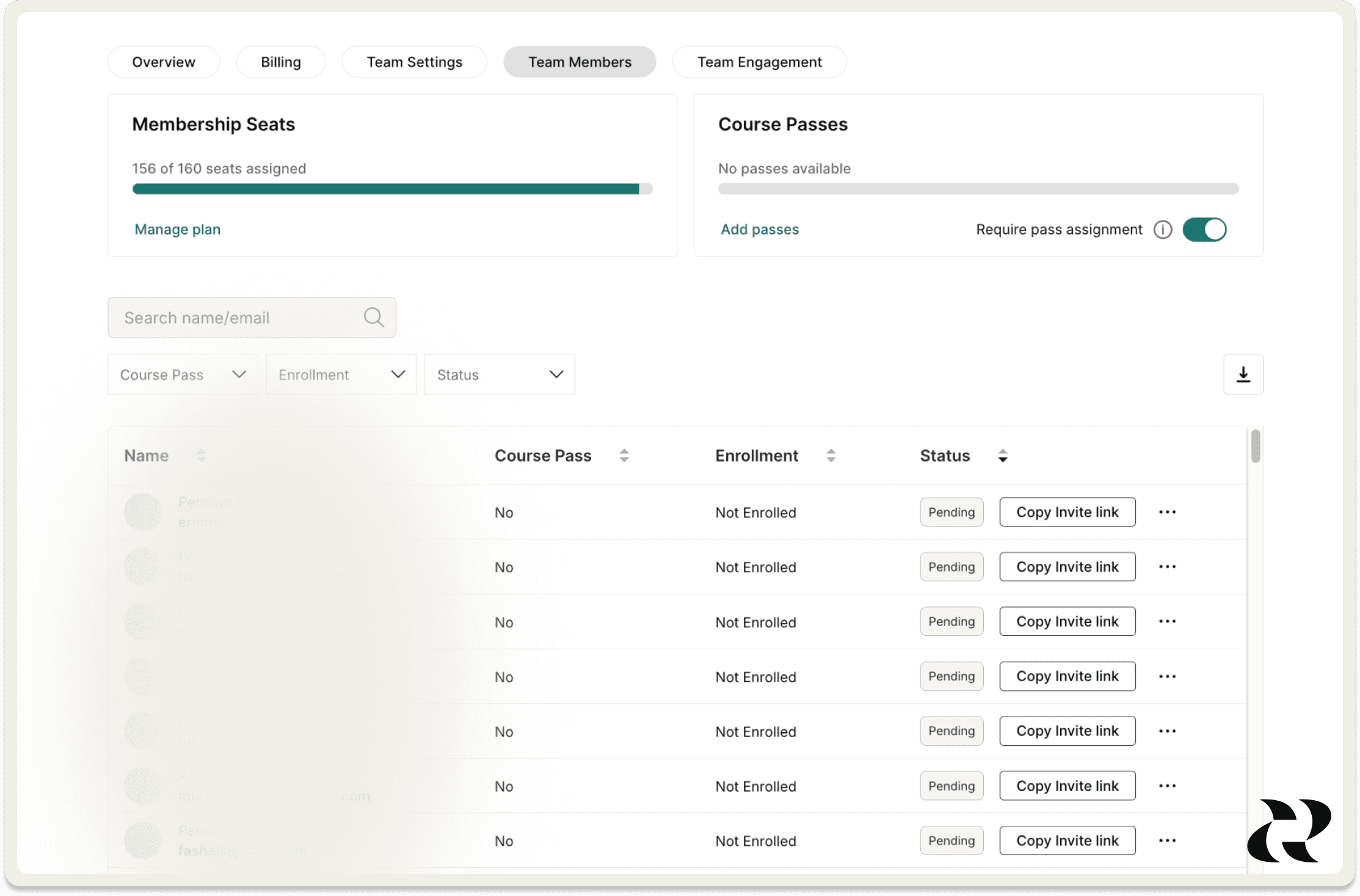
We made it easier for teams to manage their invites and seats by overhauling the Team Members page.
Why We Built It
We have more and more teams using Reforge, and the admins who manage it have a difficult time corralling all the requests to invite and remove folks - especially on large teams. With limited options for sending invites and invite reminders, this meant Team Members often didn’t even get access to their subscription.
How We Built It
We’ve gotten tons of feedback from our admins but also our Success and Support teams about the challenges of managing a team. Looking at those, there were some pretty clear and reasonable effort options to drastically increase the usability of our team management pages.
Who Built It
Hat tip to Adam, Tara, Ian, and Lori.
That's it for the October edition of Inside Reforge. Our product team is cooking right now, and we can't wait for you to see what's in store for November.
In the October edition of Inside Reforge, we demo the new Extension UI, suggested drafts, the Extension in Confluence, and more.
Welcome to the October edition of Inside Reforge, your monthly dive into product updates and behind-the-scenes insights.
This month, we’re doubling down on the Reforge Extension—your in-browser copilot that brings Reforge’s insights straight to the tools where real work happens.
With Annual Planning on the horizon, the Reforge Extension will help sharpen your 2024 retrospectives, 2025 roadmaps, GTM strategies, and more. Whether you’re in JIRA, Google Docs, or Notion, we’re here to ensure your work is smarter, faster, and more impactful.
Additionally, you can watch our team demo the new features in the video below.
Let’s dive in (If you don't have the Extension already, we highly recommend downloading it before reading.)
Supercharged In-Line Suggestions w/ New Instant Section Drafts
What It Is
A few weeks ago, we launched v1 of our In-Line Suggestions, giving you expert feedback directly in your documents. Now, with v2, we’ve taken it up a notch, giving you more control and advice you can use immediately.
**More Actionable: **Every suggestion is now laser-focused on delivering tactical feedback you can apply immediately. No fluff, just clarity.
New Toolbar: Suggestions when you need them, hidden when you don’t. Our dynamic toolbar lets you manage when and how feedback appears.
Instant Drafts: Now, for each suggestion, you get instant draft options to make it easier to action our feedback. Speed through your work with one-click drafts that refine your document on the spot.
Why We Built It
In-line suggestions, or what we call "blue dots," provide you with a copilot experience without requiring you to leave the section you're working on. This feature offers seamless, instant feedback.
But feedback that’s unclear or too abstract slows you down; it should provide a lightbulb of clarity, not a moment of confusion. To fulfill our tool's promise, we made the suggestions even more actionable, crisp, and always relevant.
Last but not least, we aim to reduce your workload, not add to it. One-click drafts help you turn our feedback into action immediately.
How We Built It
We significantly upgraded the LLM prompts powering our extension by providing over 20 examples of good and bad feedback across various document types. We also trained it to write the description first and then extract the title, ensuring the "meat" of the suggestion is the first thing you read. Dan and Ben led this effort.
The toolbar resulted from engineering wizardry by Vlad and brilliant design by Archie. Archie dedicated hours to customer conversations to understand their preferences for suggestions.
For instant drafts, we leveraged our experience from the "Help Me Improve This" prompt to integrate it into in-line feedback. We first taught it to re-read the document to avoid duplication and to draft a Scope of Work for the suggestion without exceeding it.
Who Built It
The brains behind the Extension magic: Dan, Eddie, Vlad, Archie, and Ben.
The Reforge Extension is Now in Confluence
What It Is
We provide the same powerful in-line suggestions and drafts, and a new way to interact with the sidebar are now available in Confluence.
Why We Built It
We heard time and time, teams love Confluence and so do we. If you have the reforge extension installed in your browser, it will now appear next time you use confluence too so we can deliver the high quality, expert backed feedback and drafts to supercharge your work there too.
How We Built It
The challenge of building in-line suggestions for Confluence lies in its two modes: view mode and edit mode. We first had to detect the elements of your document and then link them to HTML.
Who Built It
Hat tip to Dan, Eddie, Vlad, Archie, and Ben.
The Reforge Extension Now in Português, 日本語, Hrvatski, y muchos más idiomas
What It Is
The extension now detects the language of the document you're working on and provides feedback and drafts in that language. If you wish to manually change the language, simply open your preferences via the toolbar and select your preferred language.
Why We Built It
We value our global audience, and thanks to the power and speed of AI, we can communicate with you in your preferred language.
How We Built It
We simply told the LLM to detect the language and respond in the same language. It was shockingly easy.
Who Built It
The brains behind the Extension magic: Dan, Eddie, Vlad, Archie, and Ben.
A Better Way to Explore Reforge’s Content - Now Live
What It Is
Last month, we previewed a new Explore page that makes it super simple to find top content on topics you’re interested in. It’s now live.
Why We Built It
We heard it was challenging to find all the Reforge content on a specific topic, like AI, product management, and growth. This update gives you the flexibility to browse by topic, subtopic or format — whatever way you discover best.
How We Built It
After getting feedback on early designs from our members, we created a UI to showcase our top-performing content under each topic and subtopic. Our team also manually reviewed and tagged content in our library to ensure it showed up under the right topics.
Who Built It
Hat tip to Ginny, Ali R., Will M., Tracy, Alexis, Anne, and Andrew.
Try it here
Redesigned Team Member Administration Page
What It Is
We made it easier for teams to manage their invites and seats by overhauling the Team Members page.
Why We Built It
We have more and more teams using Reforge, and the admins who manage it have a difficult time corralling all the requests to invite and remove folks - especially on large teams. With limited options for sending invites and invite reminders, this meant Team Members often didn’t even get access to their subscription.
How We Built It
We’ve gotten tons of feedback from our admins but also our Success and Support teams about the challenges of managing a team. Looking at those, there were some pretty clear and reasonable effort options to drastically increase the usability of our team management pages.
Who Built It
Hat tip to Adam, Tara, Ian, and Lori.
That's it for the October edition of Inside Reforge. Our product team is cooking right now, and we can't wait for you to see what's in store for November.