Reforge has joined Miro ↗
The Reforge Build Agent is now available in Slack. To learn more about how product teams are exploring better solutions and collecting feedback from human and synthetic users, book a demo or sign up today.
Every product team we talk to has the same problem. They have the tools. They have the data. They have the instinct to validate ideas before shipping them. What they don't have is time. Or more specifically, the activation energy required to use all of the tools and knowledge at their disposal.
This is why we are so excited to announce that the Reforge Build Agent is now in Slack. Imagine you're in a Slack thread where someone raises a good idea or flags a bug. The conversation is live, the context is fresh, and the team is engaged. Then someone says "let's build a quick prototype" and the moment breaks. You open a new tab. You re-explain everything. By the time the prototype exists, the conversation has moved on.
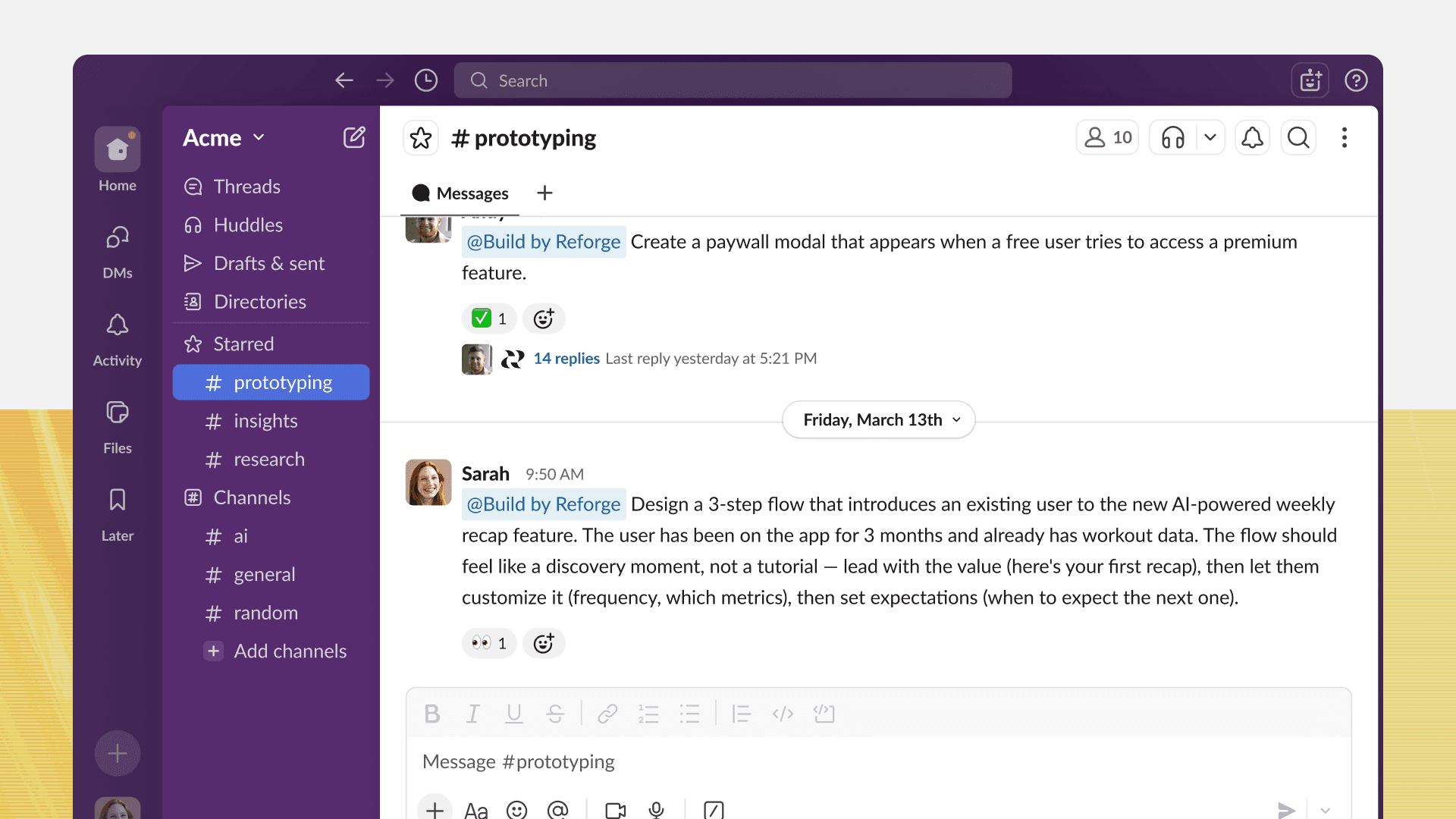
This is where our Slack integration comes into play. It connects Reforge Build directly into the conversations where your team is already working. Just mention the agent in the channel or a thread, and you can kick off a new prototype that automatically captures the context of the conversation.
Here’s how it works and how it can help your team ship better features faster.
Build in Slack: From conversation to prototype in under two minutes
The fastest way to build a prototype is to describe it in plain English, which is exactly how product teams communicate in Slack. Since so many candid conversations happen in Slack channels, we knew that it was the perfect place to kickstart prototypes.
Once installed in Slack, just @mention the bot and it’ll kickstart the process. Describe what you want to build, attach files or screenshots, answer its follow-up questions and encourage your team to add their two cents.
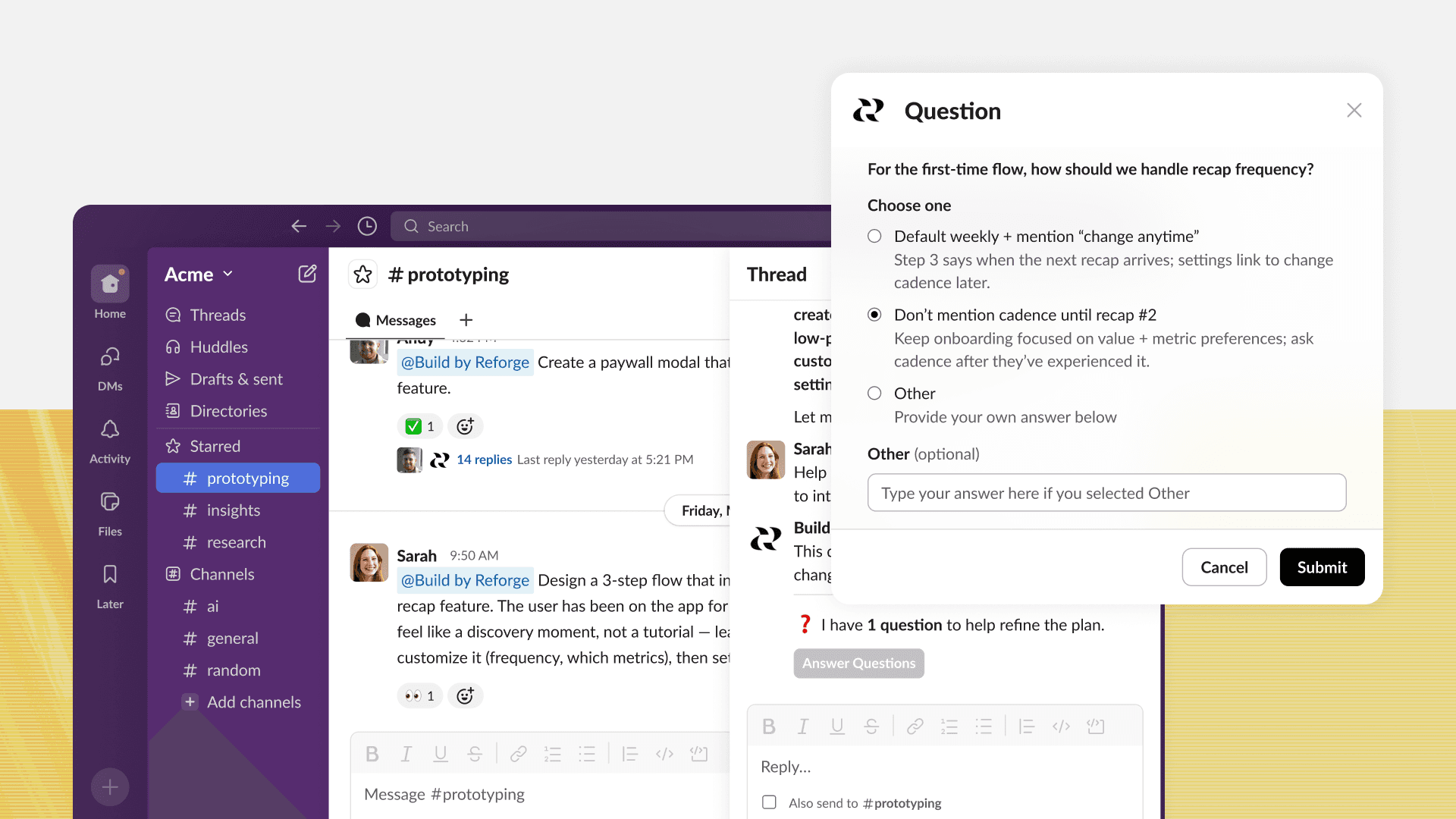
If the conversation is too fuzzy to start building right away, the bot brainstorms first. It surfaces the key design decisions, proposes modules, and asks two or three clarifying questions before committing to a direction. That's discovery behavior, not just code generation. And those questions force you to make decisions that result in better, more useful prototypes.
Once the prototype is posted, the thread becomes the design session. You can type a follow-up — "make the header smaller" or "add a search bar" — and the bot modifies the existing prototype rather than starting over. The whole design history lives in the thread.
You can also turn on channel monitoring, which will keep an eye on threads and suggest moments when a prototype could be useful.
There are six ways to interact with Reforge Build in Slack:
@mention to build — plain-English description, prototype back in the thread in under a minute
Iterate in thread — follow-up messages modify the existing prototype; full history preserved
Create variations — ask for multiple directions; each comes back as a preview to select and expand
Plan mode — for fuzzy briefs, the bot walks through discovery questions and generates wireframes before anything gets built
Channel monitoring — run /monitor and the bot silently watches threads, surfacing a "Plan" or "Build" prompt when a conversation reaches the point where a prototype would help
Link unfurls — paste any Build prototype link into Slack and it automatically expands into a rich card showing the prototype name, thumbnail, and key details. From that card, you can rename the prototype, add it to a project, or move it to a different workspace — without opening Build.
Also, when your organization connects their Slack workspace, anyone in that workspace can @mention the bot and kick off a build. The prototype posts back in the thread, visible to everyone in the channel. Engineers, designers, stakeholders — the whole team can participate in the prototyping conversation without signing up first.
The thread becomes the brief
Here's the mental model that ties everything together.
Product work currently has two layers. There's the conversation layer, where ideas get raised, debated, and refined. And there's the execution layer, where prototypes get built and research gets synthesized. Those layers live in different tools, which means there's always a translation step where you have to re-explain context.
The Reforge Build Agent collapses those two layers into one.
By the time a prototype is ready in the thread, the thread is the spec. The brainstorm is there. The clarifying questions are there. The decisions are there. The output is there. There's no separate document to write. No context to re-gather. No other place to look.
The bottleneck in product discovery has never really been about capability. Teams know how to build prototypes. They know how to gather customer feedback. The bottleneck is the gap between when an idea surfaces and when it gets validated. That gap is mostly made up of context-switching, tool-switching, and re-gathering the same information twice.
The Reforge Build Agent closes that gap.
Start building today
The Reforge Build Agent is available now for Reforge Build users.
Install the Slack integration from your Build settings, connect your workspace, and @mention the bot in any channel to start.
If your team is already having product conversations in Slack (and every team is) Reforge is now part of those conversations.


Every product team we talk to has the same problem. They have the tools. They have the data. They have the instinct to validate ideas before shipping them. What they don't have is time. Or more specifically, the activation energy required to use all of the tools and knowledge at their disposal.
This is why we are so excited to announce that the Reforge Build Agent is now in Slack. Imagine you're in a Slack thread where someone raises a good idea or flags a bug. The conversation is live, the context is fresh, and the team is engaged. Then someone says "let's build a quick prototype" and the moment breaks. You open a new tab. You re-explain everything. By the time the prototype exists, the conversation has moved on.
This is where our Slack integration comes into play. It connects Reforge Build directly into the conversations where your team is already working. Just mention the agent in the channel or a thread, and you can kick off a new prototype that automatically captures the context of the conversation.
Here’s how it works and how it can help your team ship better features faster.
Build in Slack: From conversation to prototype in under two minutes
The fastest way to build a prototype is to describe it in plain English, which is exactly how product teams communicate in Slack. Since so many candid conversations happen in Slack channels, we knew that it was the perfect place to kickstart prototypes.
Once installed in Slack, just @mention the bot and it’ll kickstart the process. Describe what you want to build, attach files or screenshots, answer its follow-up questions and encourage your team to add their two cents.
If the conversation is too fuzzy to start building right away, the bot brainstorms first. It surfaces the key design decisions, proposes modules, and asks two or three clarifying questions before committing to a direction. That's discovery behavior, not just code generation. And those questions force you to make decisions that result in better, more useful prototypes.
Once the prototype is posted, the thread becomes the design session. You can type a follow-up — "make the header smaller" or "add a search bar" — and the bot modifies the existing prototype rather than starting over. The whole design history lives in the thread.
You can also turn on channel monitoring, which will keep an eye on threads and suggest moments when a prototype could be useful.
There are six ways to interact with Reforge Build in Slack:
@mention to build — plain-English description, prototype back in the thread in under a minute
Iterate in thread — follow-up messages modify the existing prototype; full history preserved
Create variations — ask for multiple directions; each comes back as a preview to select and expand
Plan mode — for fuzzy briefs, the bot walks through discovery questions and generates wireframes before anything gets built
Channel monitoring — run /monitor and the bot silently watches threads, surfacing a "Plan" or "Build" prompt when a conversation reaches the point where a prototype would help
Link unfurls — paste any Build prototype link into Slack and it automatically expands into a rich card showing the prototype name, thumbnail, and key details. From that card, you can rename the prototype, add it to a project, or move it to a different workspace — without opening Build.
Also, when your organization connects their Slack workspace, anyone in that workspace can @mention the bot and kick off a build. The prototype posts back in the thread, visible to everyone in the channel. Engineers, designers, stakeholders — the whole team can participate in the prototyping conversation without signing up first.
The thread becomes the brief
Here's the mental model that ties everything together.
Product work currently has two layers. There's the conversation layer, where ideas get raised, debated, and refined. And there's the execution layer, where prototypes get built and research gets synthesized. Those layers live in different tools, which means there's always a translation step where you have to re-explain context.
The Reforge Build Agent collapses those two layers into one.
By the time a prototype is ready in the thread, the thread is the spec. The brainstorm is there. The clarifying questions are there. The decisions are there. The output is there. There's no separate document to write. No context to re-gather. No other place to look.
The bottleneck in product discovery has never really been about capability. Teams know how to build prototypes. They know how to gather customer feedback. The bottleneck is the gap between when an idea surfaces and when it gets validated. That gap is mostly made up of context-switching, tool-switching, and re-gathering the same information twice.
The Reforge Build Agent closes that gap.
Start building today
The Reforge Build Agent is available now for Reforge Build users.
Install the Slack integration from your Build settings, connect your workspace, and @mention the bot in any channel to start.
If your team is already having product conversations in Slack (and every team is) Reforge is now part of those conversations.