
Reforge has joined Miro ↗
All articles
How We Built The Reforge Extension: A Deep Dive into Reforge’s AI Tech Stack with Dan Wolchonok
Jun 20, 2024
Join Dan, VP of New Products at Reforge, as he walks you through the development and features of the Reforge Extension. In this event recording, you'll learn about the tools, processes, and technical details that went into building this extension. Dan starts with a live demo, showcasing how the extension seamlessly integrates into tools like Google Docs, Notion, Confluence, and Coda to help users write PRDs and other documents efficiently. He discusses the journey from initial concept to refined product, including user feedback loops, software development milestones, and optimization techniques. Additionally, discover the considerations around privacy, cost management, and future roadmap plans. Finally, we conclude with a robust Q&A where Dan fields questions about everything from database management to UI tradeoffs.
How We Built The Reforge Extension: A Deep Dive into Reforge’s AI Tech Stack
Introduction: Not Just Another Sales Demo
I'm Dan, VP of New Products at Reforge. Today, I'm excited to walk you through the journey of developing the Reforge extension—a tool designed to integrate seamlessly into your daily workflow and make applying Reforge's expert knowledge easier than ever. This isn't a sales pitch; it's a behind-the-curtain look into the evolution of our technology, the challenges we faced, and the value we aim to deliver.We will delve into the specific tools and roadmap that led us to this point, and explore the future direction of our development process.
What is the Reforge Extension?
Demo: How It Works Today
Let's start with a quick demo to help you understand what the Reforge extension does today.
The extension works in most popular browsers (Chrome, Arc, etc.,) and it integrates into popular work tools like Google Docs, Notion, Confluence, and Coda, among others.
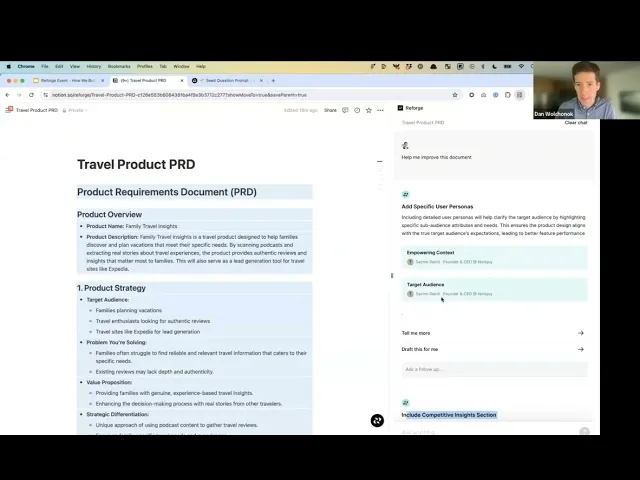
For instance, imagine you're drafting a PRD (Product Requirements Document) in Notion. By clicking the Reforge logo, a side panel pops up, offering you prompts to help outline your document.
The extension can generate a draft PRD, aligning it with Reforge's 4D road mapping process, focusing on elements like strategy, vision, customer focus, and business impact. Furthermore, it can offer suggestions for improvement and showcase how others have tackled similar tasks.
To recap, the extension:
Drafts documents for you using frameworks from Reforge Experts
Gives you feedback on drafted documents from content by Reforge Experts
Shows you how Reforge Experts have created similar documents

Want to try it yourself?
The Roadmap: From Concept to Reality
The Problem We aimed to Solve
People have loved our Reforge courses for years, but it's always been a challenge to regularly apply the extensive content to everyday work. We launched Reforge Artifacts to showcase real work from industry leaders, hoping to bridge this gap. However, feedback indicated that people still struggled to integrate this knowledge into their workflow.
While we understood the end goal, we decided to break our roadmap into small, achievable steps that would build upon each other. This approach was chosen given our small, lean team of initially two, now three, members.
What to build: A Chrome Extension
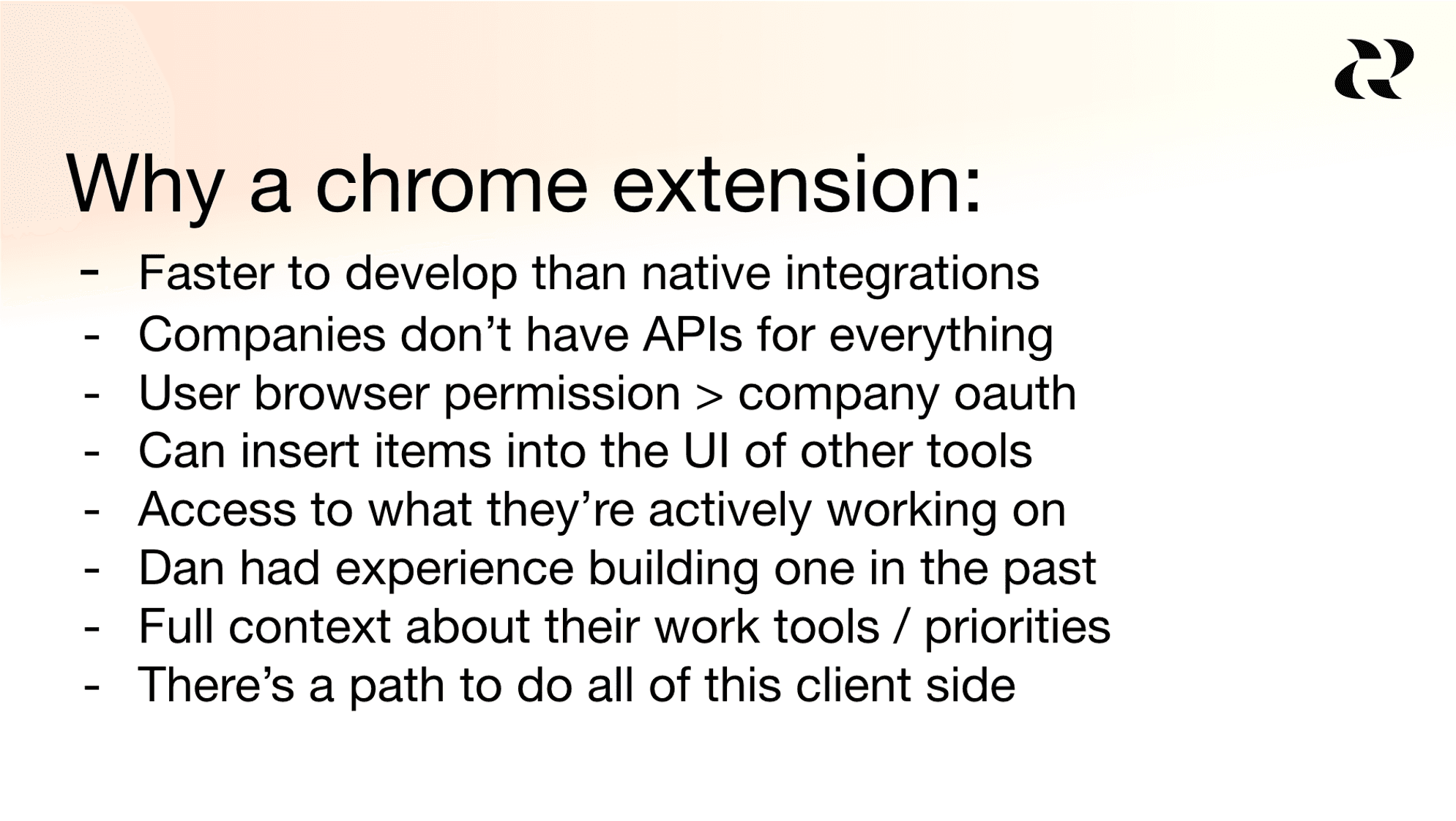
I was excited about building a Chrome extension for several reasons. It's faster to develop, it can be integrated directly into the tools that people already use, and there's potential for it to be fully functional on local computers as AI models improve. There are many other reasons why they decided to build an extension, but these are the main ones.
Initial Steps: Surfacing Relevant Artifacts
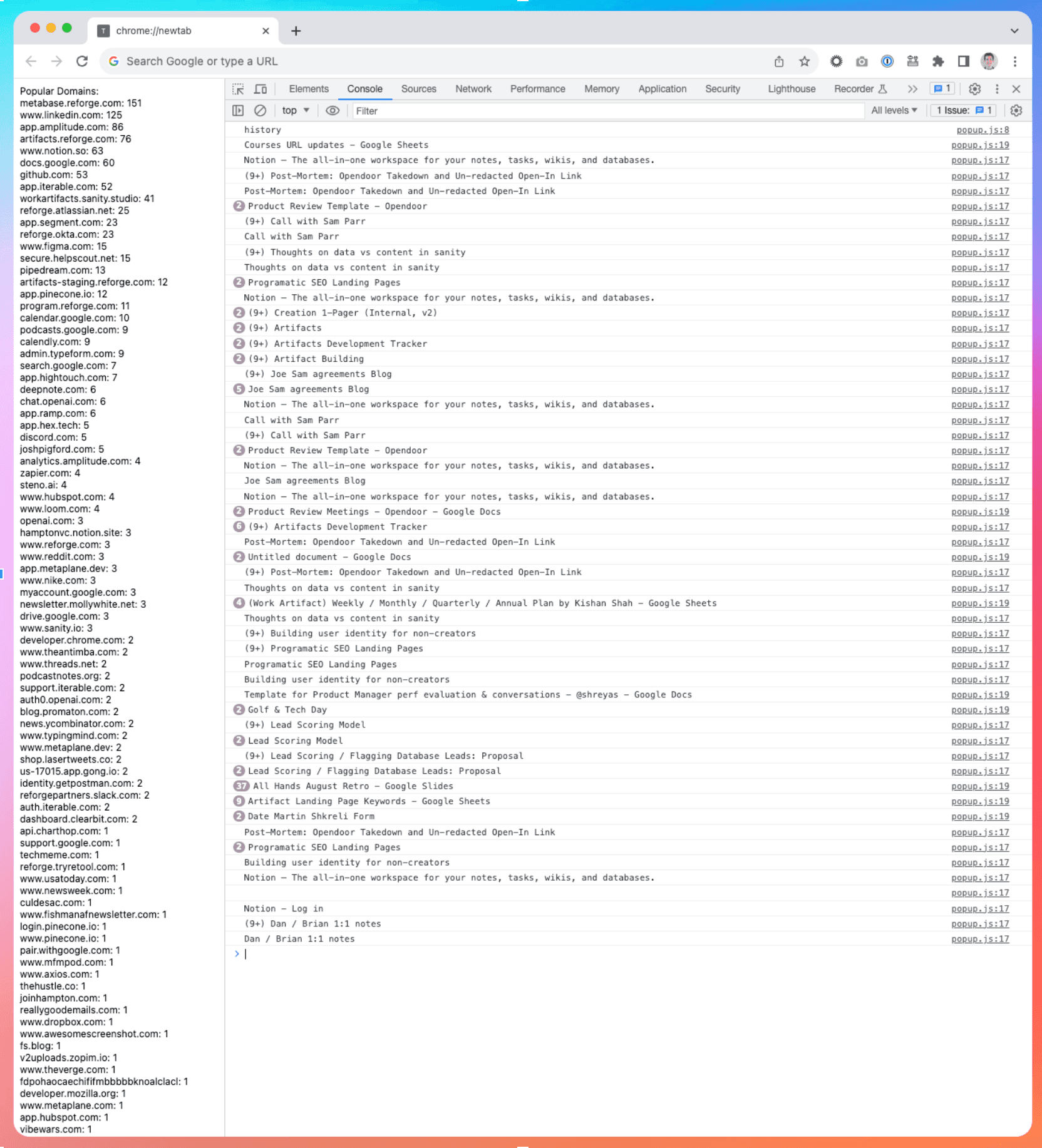
Our journey began with the creation of a Chrome extension that displayed relevant artifacts based on browsing history. The extension examined the domains of websites visited in the past 7 or 28 days, with the aim of understanding the tools people use.
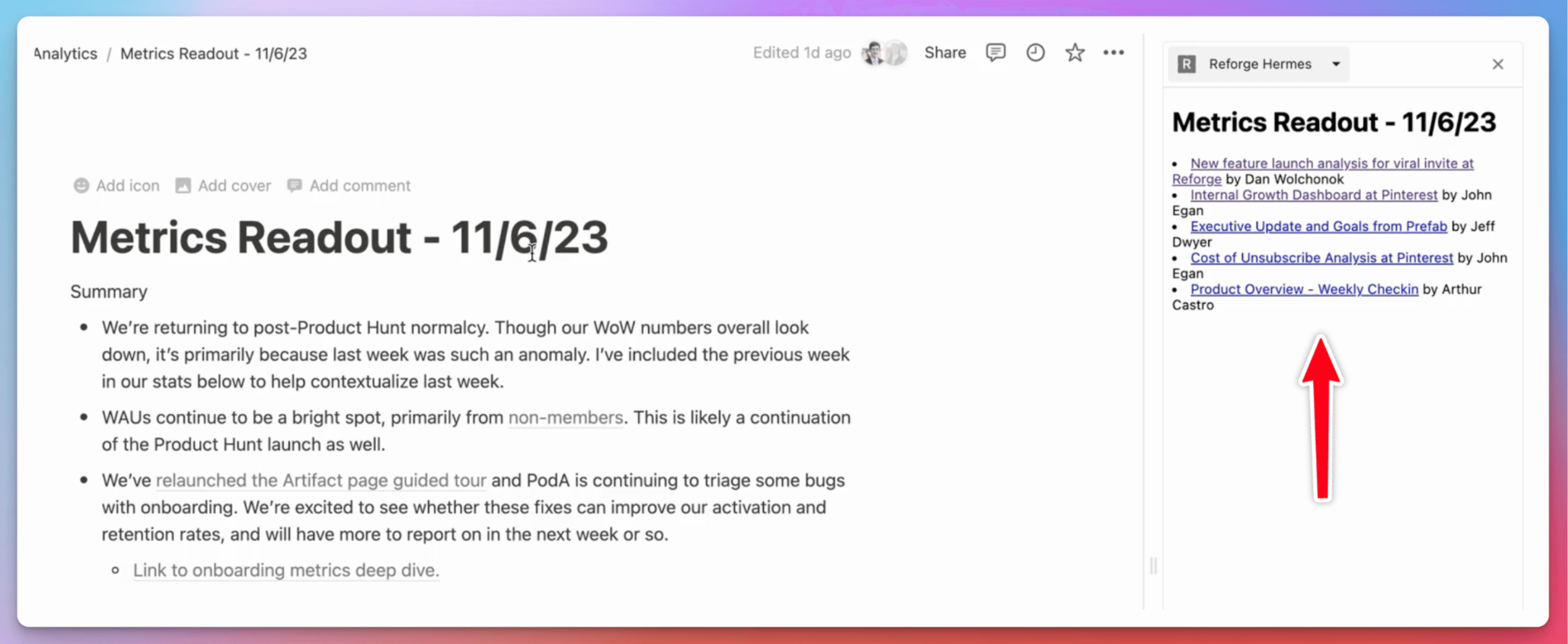
We then implemented a side panel that offered artifacts tailored to the content of the page you were on. Lightbulbs started to go off, but we knew that it had to be more valuable.
First At Bat: Internal Retool Dashboard
I created a retool dashboard that allowed users to input content from their documents. The dashboard would then look up related artifacts.
My goal was to use a LLM to generate the structure of both the user's document and the artifact. By comparing the structure of the documents, I could see if the LLM outputs could help me rethink how to restructure the document to improve and streamline it.
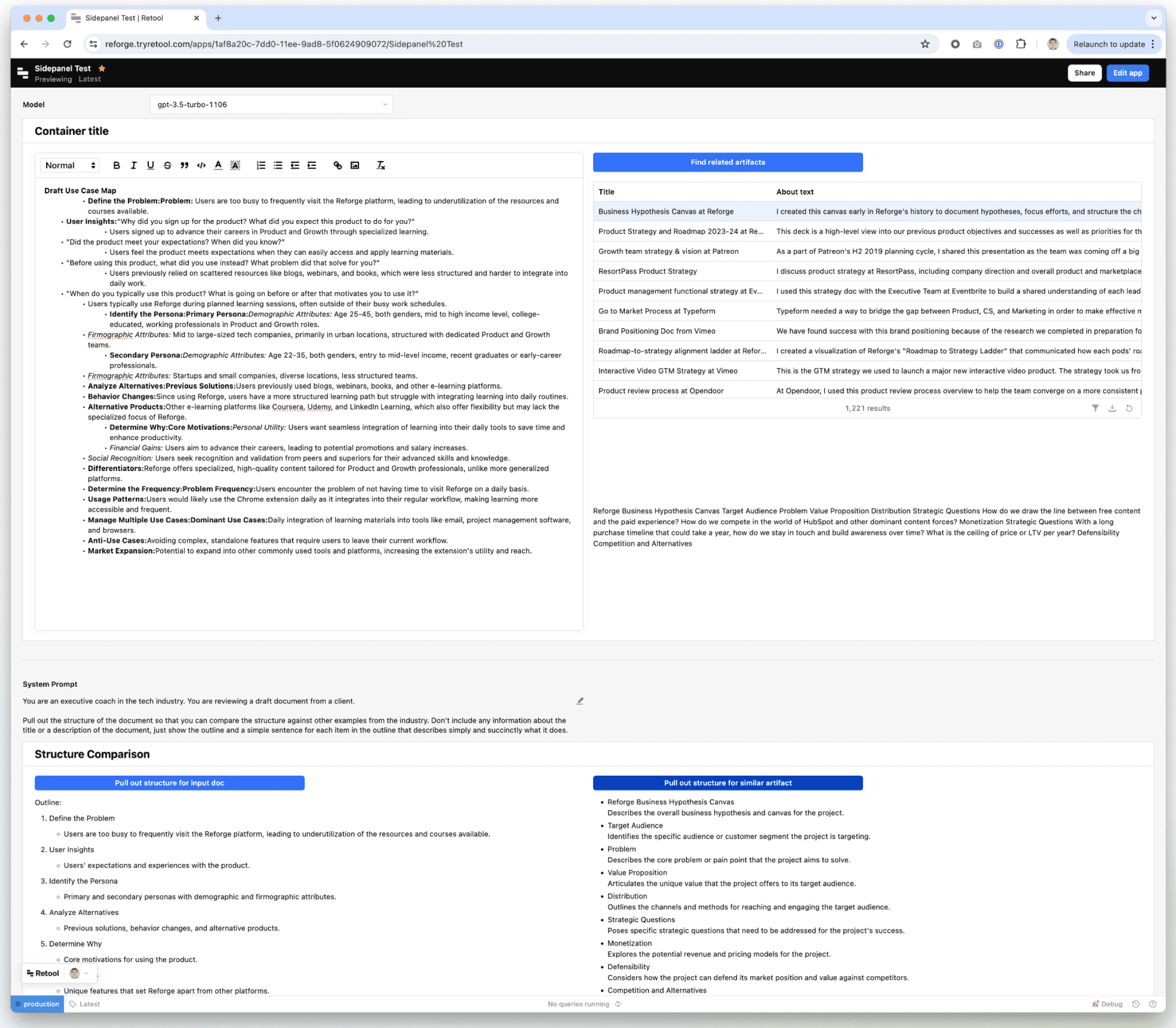
The focus was on rapid prototyping and prioritizing the output rather than how it looked.
We could give people this internal dashboard, but now we needed to put it back in the browser and make it interactive.
Building Momentum: Adding Chat via iFrame
We then iFramed our in-app chat feature, allowing users to input prompts and get suggestions. It was a bit janky, but what we did was we took the LLM prompts and put it in the message box for the user.
The goal of this was just to simulate what it would be like if we had our own chat interface before dedicating the resources to building one ourselves. By doing this, we realized the product could be more than just an accessory to our Artifacts product, but rather a standalone tool to help you do better work.
At this stage, we were experimenting rapidly with minimal resources. Once we added an engineer to the team, we forked the original chat feature, including both the backend and frontend components, and began developing a more sophisticated version.
Green Light: Building the MVP
With a lot of testing under our belt, and a new full-time engineer (Eddie Johnston), it was time to actually build. Our roadmap was as follows.
Forked Reforge chat front end components
Forked Reforge back end chat endpoints
Logging into Reforge accounts
Real development tooling
Google Docs integration
Personalization based on your identity on Reforge
Onboarding
I’m going to pause here, but the roadmap continues in the next section on “How it Works.” Once we built the MVP it was time to give it more capabilities and make it way smarter.
Lessons Learned
The goal wasn't just to apply AI to Reforge. AI is a tool, not a strategy. Instead, we aimed to really understand a core customer problem, and then used this tool to constantly experiment with solutions. Your first idea is rarely your best one. Our journey exemplifies how breaking down the roadmap into achievable goals can lay the groundwork for significant advancements.
How It Works: The Technology Behind the Extension
Towards a Smarter Extension: Simple RAG
Initially, we used a simple RAG (Retrieve and Generate) setup for document content. The flow was:
Document Retrieval and Processing: When the user clicks "Help Me Improve My Document", the contents of their document are retrieved with JavaScript. A request is made to the Reforge backend with the document contents and the type of help the user wants.
Embedding and Search: Embeddings are run on the user's document and their prompt, and a similarity search is performed using these embeddings. Relevant Reforge material is found across artifacts, guides, and lessons.
LLM Integration: Once the relevant documents are found, all associated metadata is retrieved. The relevant Reforge material and system prompt is sent to the Large Language Model (LLM) to generate suggestions.
Streaming Responses: The responses are then streamed to the user's extension for real-time interaction.
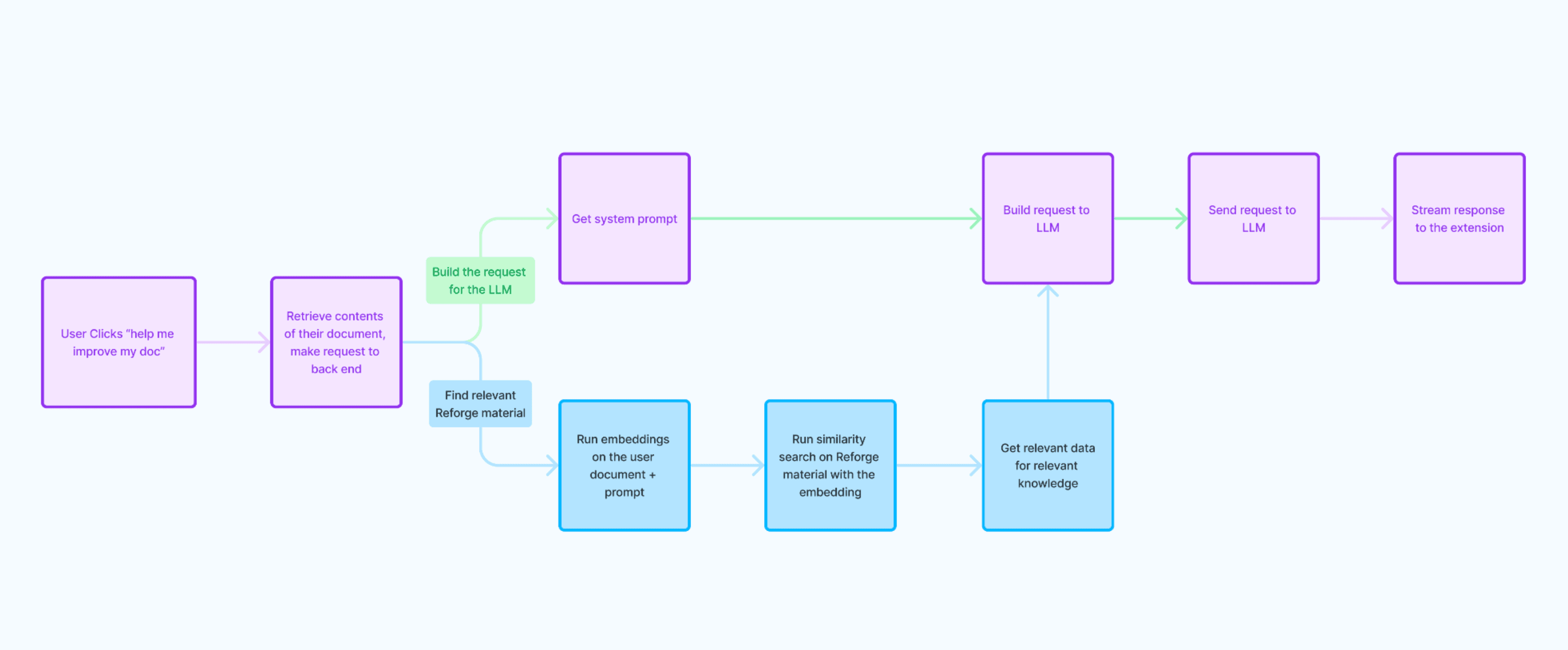
While this process was a good starting point, it did not produce reliable outputs consistently and there was room for improvement. This iterative approach helped us address the core customer problem more effectively, but we knew for this to be successful, we had to drive more value.
Leveling Up: Going from RAG to CoT (Chain of Thought)
The significant shift we made was in the classification of the documents. The suggestions we provide differ greatly depending on the document type, whether it's a job description or a PRD. We received feedback from beta testers indicating that we were giving suggestions for improving a job description while they were working on a PRD, and vice versa.
The LLM was lacking in its ability to accurately determine the document type and adjust its advice accordingly.
Thus, we decided to explicitly add a step to classify the document. This allowed us to direct the LLM along a specific path, asking questions like, "What would an expert suggest for this type of document?" or "How would an expert evaluate this kind of a document?"
We generated three different suggestions for each document.
For every suggestion, we ran embeddings on the suggestion and the document content.
We then filtered the content to match the type of suggestion and the type of document.
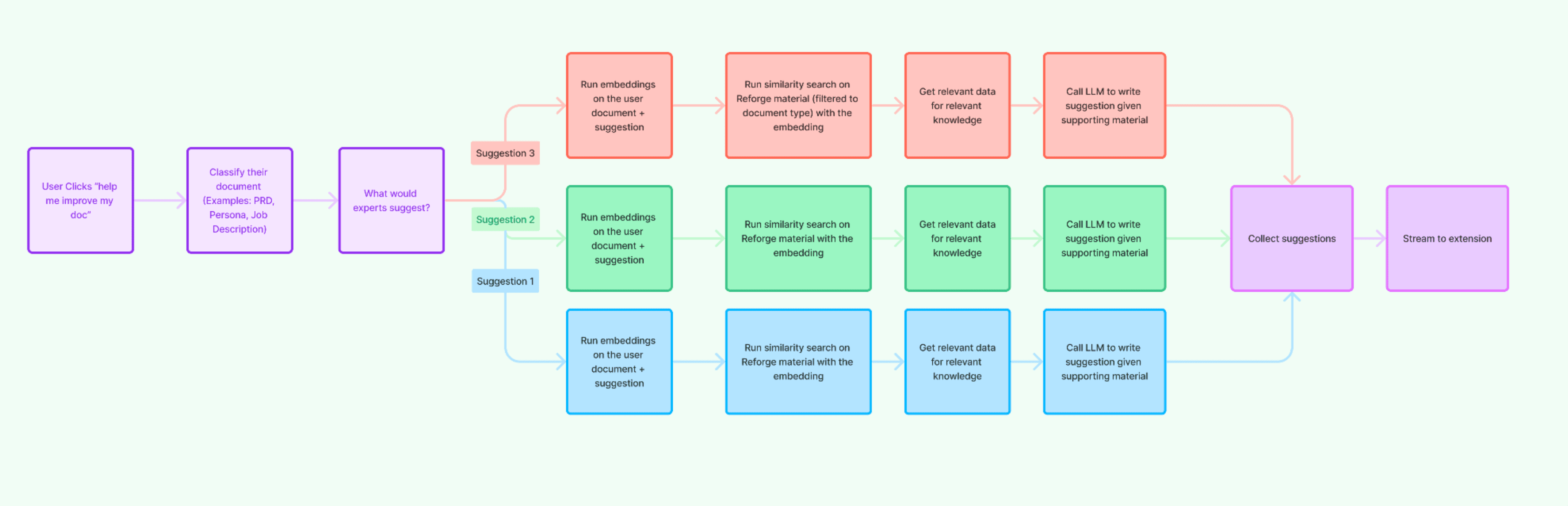
For example, if the document was about marketing technology, we sourced material from our marketing programs. We wanted the suggestions to align with what you'd expect for a document about marketing technology. We put in a lot of effort to determine the document type, map the types of documents and suggestions to that document type, and align the content accordingly.
This was a key upgrade to our system. We asked the LLM in parallel to produce a suggestion given the more specific Reforge content and the specific questions. We then collected all the suggestions and streamed all three of them back to the extension.
Future Roadmap: What’s Next
Further optimizations to make the responses even smarter.
Integrations into Miro and Jira where we know a large percent of our customer-base works.
We're also exploring ways to make suggestions within text editors more seamlessly, similar to Grammarly’s spell-check functions.
… we’ll see!
What’s Inside: A Look At Our Stack
Technical Overview
You can find our full technical stack here, but for the purpose of this product, our core stack consists of:
LLM: Open AI
Embeddings: OpenAI for the embeddings, Pinecone to store the embeddings.
Prompt Storage: LaunchDarkly, Adaline
Analytics: Segment
Testing: Adaline
Key Tradeoffs: Balancing Latency, Cost, and Quality
Latency: Faster responses enhance user experience but can compromise the depth of suggestions.
Cost: Higher-quality models come at a higher cost. We constantly balance model quality versus expense.
Quality: Ensuring the LLM provides relevant and accurate suggestions requires sophisticated input processing and data management.
Challenge: Testing without Data
This provides some real challenges for testing and learning, but we’ve figured out creative ways to iterate and improve the model using the very limited data we do store:
Leveraging Distribution of Course Recommendations to Optimize Relevancy
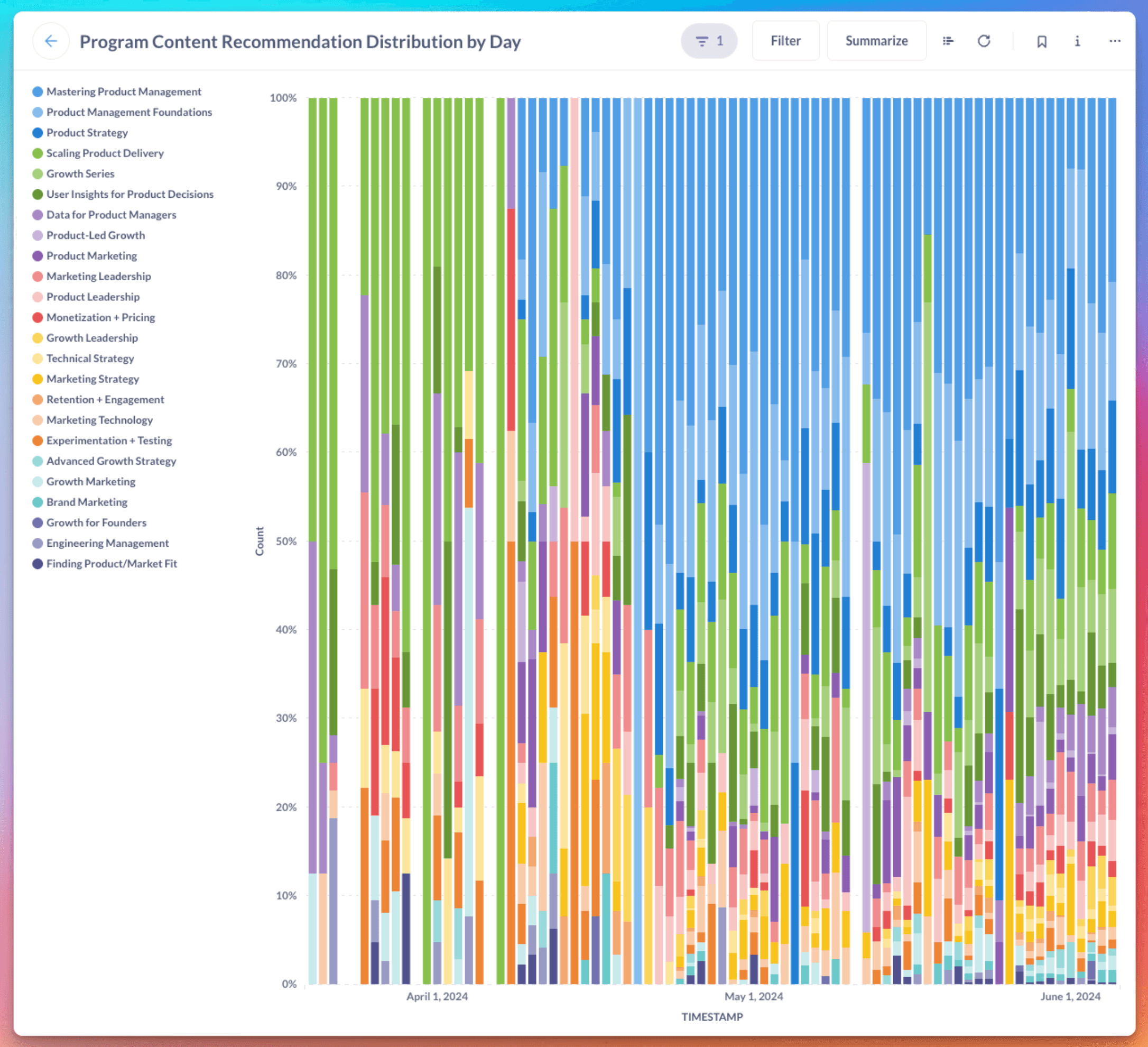
We do store the distribution of course recommendations. When we analyzed the distribution of course recommendations provided by the Reforge extension, initially, we saw that the extension frequently recommended the "Scaling and Product Delivery" course, and while it’s a great course, we can’t imagine it’s relevant to every use-case. This was a great proxy for model intelligence, as a key concern is that we’re recommending relevant content.
Upon switching from a simple to a more sophisticated Retrieve and Generate (RAG) system, the distribution of course recommendations shifted.
The extension began recommending material from "Mastering Product Management" and "Product Management Foundations" more frequently, as these courses were more relevant to documents users were working on, such as Product Requirements Documents (PRDs).
This change was due to the discovery of a bug where not all Reforge program content was stored in their Pinecone Vector Database. As a result, the extension could not search the full Reforge corpus when retrieving reference material.
Once the bug was fixed, the extension could access all the stored information, resulting in a diverse distribution of course recommendations from many more programs.
Leveraging Number of Reforge References to Optimize Trust & Validity
One distinguishing aspect of our extension is the inclusion of specific Reforge references in our responses. It drives trust and domain authority, leaving our users more confident in the quality of our suggestions. It's a key way we differentiate ourselves from other tools in the market.
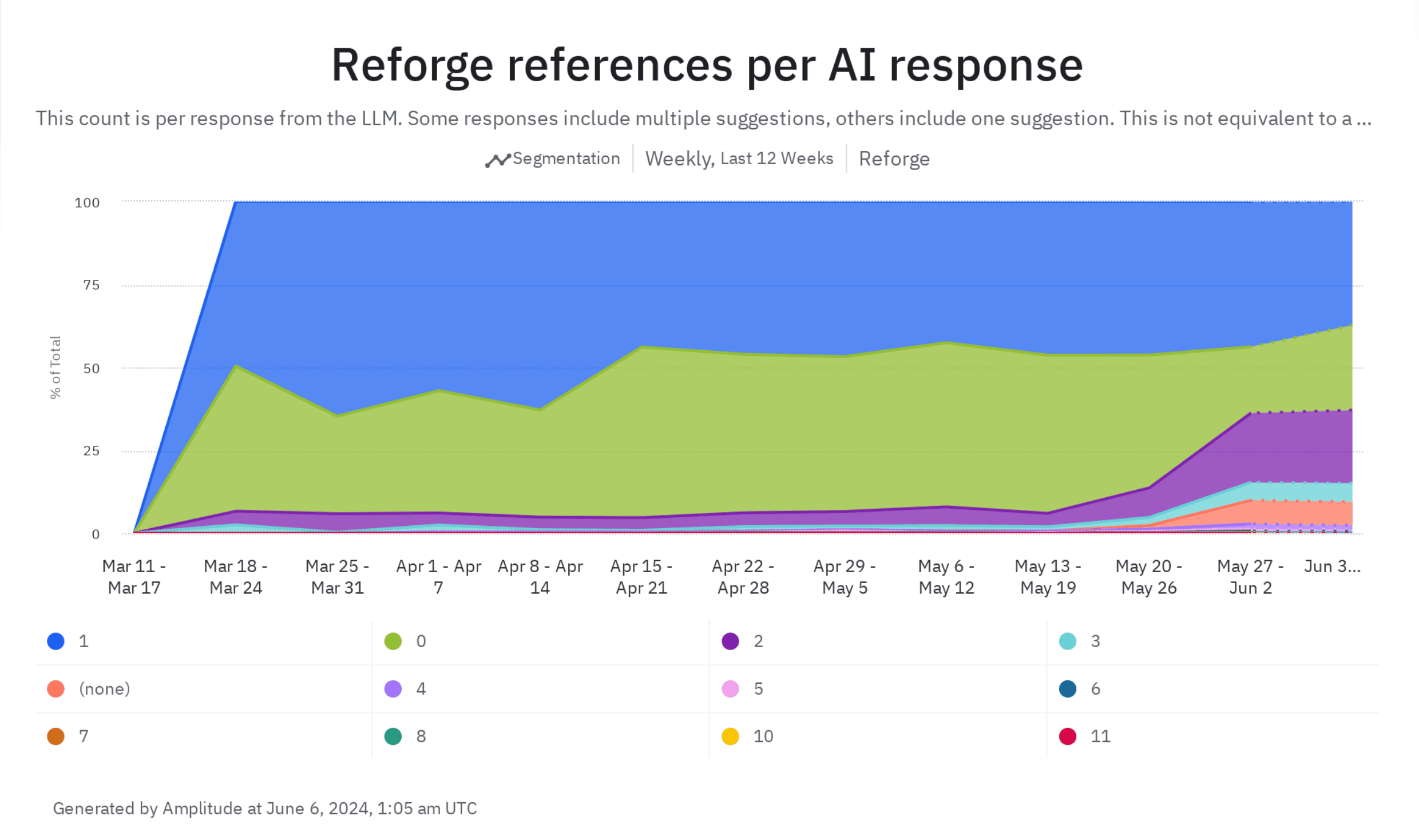
We track the frequency of Reforge material references in our suggestions. Before we implemented significant improvements, I wish we had captured data on this metric. The majority of responses would have likely shown zero references.
However, once we started tracking this, we found that less than 50% of responses contained no Reforge references. Interestingly, when we upgraded to version 4.0, we began to see a significant increase in references.
While an increase in references is generally positive, we recognize the need for balance. For instance, receiving 11 references may be excessive.
It's fascinating to observe how changes to our model or experimenting with different providers can impact key metrics that add value to the product, such as referencing Reforge material. We are committed to ensuring that such changes positively affect our users on a broader scale.
Leveraging Adaline to Help Us Get Smarter!
Adaline is a tool for storing prompts and sending logs, allowing for experimentation and evaluation of the Language Model's (LLM) outputs. It provides better visibility into what's being sent to the LLM and its responses. We can only use this for internal team members, but it gives us far better visibility into how the extension is functioning.
The Adaline demo is in the full video, or you can view a clip of it below:
Q&A Summary
Which LLM Do You Use?
I am not committed to any one specific model. The beauty of these models is their ease of use - I can create a dataset of inputs and check the outputs. For example, I could test it against OpenAI’s 4o, Gemini Pro’s 1.5, and the best model from Anthropic.
I am not tied to any one model; my goal is to use the model that produces the best output without becoming prohibitively expensive. I also have to consider the balance between delivering a great experience for both free and paid users without burning through cash or exceeding the revenue that any individual user brings in.
What Does It Take to be an AI PM?
As someone building AI products, it's crucial to understand the key variables involved. These include latency, which impacts the overall response and time to the first token, cost, which can vary depending on the quality of the model being used, and the quality itself, which can be influenced by what type of product you're building and the scale at which you're operating.
Integrating AI technology into your product effectively can be challenging without a deep understanding of these variables and a technical background. Luckily, my experience with building Chrome extensions and my technical background have helped me navigate these complexities. However, without these, a product manager might struggle to understand the key inputs and how this technology can be integrated into various tools or launched as new products.
For someone trying to break into this, my suggestion is to start building!
Do you remember the first RAG experiment you ran? What is the difference between Simple vs Sophisticated RAG?
A year ago, we conducted our first experiment. I built it in a Jupyter notebook, queried our data warehouse for content elements, and wrote those to a vector database. We then performed embeddings in a Jupyter Notebook, a classic example if you look for any tutorial on how to execute RAG.
Essentially, in a Jupyter Notebook, you run embeddings on a question, query it in a vector database, then send the snippet that came back from the vector database to a LLM with a prompt. However, this often leads to the model hallucinating a lot of irrelevant information. To counter this, you really need to narrow it down so that it addresses the specific context you're sending.
A simple RAG example could be a company storing its documentation in some form. When someone asks a question like, "do you offer monthly or annual plans?" the RAG goes to the company documentation, finds the relevant section that contains this information, and sends that snippet of text to the LLM along with the user's question. The LLM is then instructed to ground the answer in the context sent from the documentation.
A more sophisticated RAG, which we explored in subsequent iterations, involves a chain of thought where we determine what type of document it is, adapt the questions to that specific document, and execute a focused RAG based on limited content and the output from one of the LLM's earlier steps.
Our long-term hope is to have a knowledge graph and expert graph and to focus on the right level of the graph. This is because the type of PRD needed will vary depending on whether you're working in FinTech, B2B, consumer social at a large company, or a small company.
One of our goals is to make the LLM smarter by providing it with the right context. We aim to move beyond simple RAG, where we just find the text most similar to the question, to customizing the context in a sophisticated way to yield the best outcome.
How Different is Reforge from Using ChatGPT?
We are limiting the suggestions to material on Reforge. Unlike ChatGPT, which generates the next most likely token, the Reforge extension keeps suggestions grounded in Reforge material.
This means you can trust the output from the Reforge extension more frequently than you can trust output from something like ChatGPT. We're focused on a particular vertical and draw knowledge from vetted leaders and experts from reputable companies.
We still have a long way to go, but already there's a marked difference between asking ChatGPT for a PRD template versus using the one in the Reforge extension. The Reforge extension should also be more convenient because it's directly integrated into the tools you already use. You don't have to copy and paste or switch tabs; it's right there for many tasks you need to do while working.
What Tools Do You Use for Analytics?
We use MetaBase for BI, Segment for data collection, and Amplitude for analytics. This trifecta helps us visualize and analyze how users interact with the extension, allowing us to make informed decisions. These are all connected to our data warehouse, Snowflake.
You can view our full infrastructure diagram here!
You can see an example Revenue Tracking Dashboard we use here!
How Do You Manage Costs and ROI?
Starting from scratch allowed us to focus on building value before worrying about costs. By modeling user projections and calculating average costs per user, we ensure the extension remains sustainable and valuable for both free and paid members. This is a much bigger problem if you’re at a large-scale company.
I suggest modeling out what the worst case scenario cost per user is, and then multiply that by the edge-case amount of users to get a sense of what the risk is.
Will You Build a Native Desktop Extension?
Given our current resource constraints, a native desktop app is not on the immediate roadmap. Our focus remains on enhancing the extension. We’re also excited. thatChrome said it would be shipping a LLM local to the browser, which would be great because it would prevent data from having to go to the cloud. This would be a nice pathway for people who are more security conscious.
What Kind of Chunking and Ranking Strategies Are You Using in Your Vector Database?
While we haven’t employed highly sophisticated strategies yet, we split documents into manageable chunks and use basic ranking algorithms. There's room for improvement, and this will be a focus area in the coming months. If you want to learn more about Chunking, we’d suggest this YouTube video!
If you're reading this, thank you for your time! I understand that this was a lot of information. Don't hesitate to reach out to me on LinkedIn or Member Slack if you have questions or want to stay updated on our progress.
The Reforge extension is more than just a tool—it's a productivity enhancer aimed at integrating expert knowledge into your daily workflow seamlessly. We’ve come a long way, and with continuous improvements and your valuable feedback, we aim to make it an indispensable part of your toolkit.
Thank you for joining me on this journey. If you have any questions or would like to share feedback, feel free to reach out.
Try out the Reforge Extension for Free
Join Dan, VP of New Products at Reforge, as he walks you through the development and features of the Reforge Extension. In this event recording, you'll learn about the tools, processes, and technical details that went into building this extension. Dan starts with a live demo, showcasing how the extension seamlessly integrates into tools like Google Docs, Notion, Confluence, and Coda to help users write PRDs and other documents efficiently. He discusses the journey from initial concept to refined product, including user feedback loops, software development milestones, and optimization techniques. Additionally, discover the considerations around privacy, cost management, and future roadmap plans. Finally, we conclude with a robust Q&A where Dan fields questions about everything from database management to UI tradeoffs.
How We Built The Reforge Extension: A Deep Dive into Reforge’s AI Tech Stack
Introduction: Not Just Another Sales Demo
I'm Dan, VP of New Products at Reforge. Today, I'm excited to walk you through the journey of developing the Reforge extension—a tool designed to integrate seamlessly into your daily workflow and make applying Reforge's expert knowledge easier than ever. This isn't a sales pitch; it's a behind-the-curtain look into the evolution of our technology, the challenges we faced, and the value we aim to deliver.We will delve into the specific tools and roadmap that led us to this point, and explore the future direction of our development process.
What is the Reforge Extension?
Demo: How It Works Today
Let's start with a quick demo to help you understand what the Reforge extension does today.
The extension works in most popular browsers (Chrome, Arc, etc.,) and it integrates into popular work tools like Google Docs, Notion, Confluence, and Coda, among others.
For instance, imagine you're drafting a PRD (Product Requirements Document) in Notion. By clicking the Reforge logo, a side panel pops up, offering you prompts to help outline your document.
The extension can generate a draft PRD, aligning it with Reforge's 4D road mapping process, focusing on elements like strategy, vision, customer focus, and business impact. Furthermore, it can offer suggestions for improvement and showcase how others have tackled similar tasks.
To recap, the extension:
Drafts documents for you using frameworks from Reforge Experts
Gives you feedback on drafted documents from content by Reforge Experts
Shows you how Reforge Experts have created similar documents
Want to try it yourself?
The Roadmap: From Concept to Reality
The Problem We aimed to Solve
People have loved our Reforge courses for years, but it's always been a challenge to regularly apply the extensive content to everyday work. We launched Reforge Artifacts to showcase real work from industry leaders, hoping to bridge this gap. However, feedback indicated that people still struggled to integrate this knowledge into their workflow.
While we understood the end goal, we decided to break our roadmap into small, achievable steps that would build upon each other. This approach was chosen given our small, lean team of initially two, now three, members.
What to build: A Chrome Extension
I was excited about building a Chrome extension for several reasons. It's faster to develop, it can be integrated directly into the tools that people already use, and there's potential for it to be fully functional on local computers as AI models improve. There are many other reasons why they decided to build an extension, but these are the main ones.
Initial Steps: Surfacing Relevant Artifacts
Our journey began with the creation of a Chrome extension that displayed relevant artifacts based on browsing history. The extension examined the domains of websites visited in the past 7 or 28 days, with the aim of understanding the tools people use.
We then implemented a side panel that offered artifacts tailored to the content of the page you were on. Lightbulbs started to go off, but we knew that it had to be more valuable.
First At Bat: Internal Retool Dashboard
I created a retool dashboard that allowed users to input content from their documents. The dashboard would then look up related artifacts.
My goal was to use a LLM to generate the structure of both the user's document and the artifact. By comparing the structure of the documents, I could see if the LLM outputs could help me rethink how to restructure the document to improve and streamline it.
The focus was on rapid prototyping and prioritizing the output rather than how it looked.
We could give people this internal dashboard, but now we needed to put it back in the browser and make it interactive.
Building Momentum: Adding Chat via iFrame
We then iFramed our in-app chat feature, allowing users to input prompts and get suggestions. It was a bit janky, but what we did was we took the LLM prompts and put it in the message box for the user.
The goal of this was just to simulate what it would be like if we had our own chat interface before dedicating the resources to building one ourselves. By doing this, we realized the product could be more than just an accessory to our Artifacts product, but rather a standalone tool to help you do better work.
At this stage, we were experimenting rapidly with minimal resources. Once we added an engineer to the team, we forked the original chat feature, including both the backend and frontend components, and began developing a more sophisticated version.
Green Light: Building the MVP
With a lot of testing under our belt, and a new full-time engineer (Eddie Johnston), it was time to actually build. Our roadmap was as follows.
Forked Reforge chat front end components
Forked Reforge back end chat endpoints
Logging into Reforge accounts
Real development tooling
Google Docs integration
Personalization based on your identity on Reforge
Onboarding
I’m going to pause here, but the roadmap continues in the next section on “How it Works.” Once we built the MVP it was time to give it more capabilities and make it way smarter.
Lessons Learned
The goal wasn't just to apply AI to Reforge. AI is a tool, not a strategy. Instead, we aimed to really understand a core customer problem, and then used this tool to constantly experiment with solutions. Your first idea is rarely your best one. Our journey exemplifies how breaking down the roadmap into achievable goals can lay the groundwork for significant advancements.
How It Works: The Technology Behind the Extension
Towards a Smarter Extension: Simple RAG
Initially, we used a simple RAG (Retrieve and Generate) setup for document content. The flow was:
Document Retrieval and Processing: When the user clicks "Help Me Improve My Document", the contents of their document are retrieved with JavaScript. A request is made to the Reforge backend with the document contents and the type of help the user wants.
Embedding and Search: Embeddings are run on the user's document and their prompt, and a similarity search is performed using these embeddings. Relevant Reforge material is found across artifacts, guides, and lessons.
LLM Integration: Once the relevant documents are found, all associated metadata is retrieved. The relevant Reforge material and system prompt is sent to the Large Language Model (LLM) to generate suggestions.
Streaming Responses: The responses are then streamed to the user's extension for real-time interaction.
While this process was a good starting point, it did not produce reliable outputs consistently and there was room for improvement. This iterative approach helped us address the core customer problem more effectively, but we knew for this to be successful, we had to drive more value.
Leveling Up: Going from RAG to CoT (Chain of Thought)
The significant shift we made was in the classification of the documents. The suggestions we provide differ greatly depending on the document type, whether it's a job description or a PRD. We received feedback from beta testers indicating that we were giving suggestions for improving a job description while they were working on a PRD, and vice versa.
The LLM was lacking in its ability to accurately determine the document type and adjust its advice accordingly.
Thus, we decided to explicitly add a step to classify the document. This allowed us to direct the LLM along a specific path, asking questions like, "What would an expert suggest for this type of document?" or "How would an expert evaluate this kind of a document?"
We generated three different suggestions for each document.
For every suggestion, we ran embeddings on the suggestion and the document content.
We then filtered the content to match the type of suggestion and the type of document.
For example, if the document was about marketing technology, we sourced material from our marketing programs. We wanted the suggestions to align with what you'd expect for a document about marketing technology. We put in a lot of effort to determine the document type, map the types of documents and suggestions to that document type, and align the content accordingly.
This was a key upgrade to our system. We asked the LLM in parallel to produce a suggestion given the more specific Reforge content and the specific questions. We then collected all the suggestions and streamed all three of them back to the extension.
Future Roadmap: What’s Next
Further optimizations to make the responses even smarter.
Integrations into Miro and Jira where we know a large percent of our customer-base works.
We're also exploring ways to make suggestions within text editors more seamlessly, similar to Grammarly’s spell-check functions.
… we’ll see!
What’s Inside: A Look At Our Stack
Technical Overview
You can find our full technical stack here, but for the purpose of this product, our core stack consists of:
LLM: Open AI
Embeddings: OpenAI for the embeddings, Pinecone to store the embeddings.
Prompt Storage: LaunchDarkly, Adaline
Analytics: Segment
Testing: Adaline
Key Tradeoffs: Balancing Latency, Cost, and Quality
Latency: Faster responses enhance user experience but can compromise the depth of suggestions.
Cost: Higher-quality models come at a higher cost. We constantly balance model quality versus expense.
Quality: Ensuring the LLM provides relevant and accurate suggestions requires sophisticated input processing and data management.
Challenge: Testing without Data
This provides some real challenges for testing and learning, but we’ve figured out creative ways to iterate and improve the model using the very limited data we do store:
Leveraging Distribution of Course Recommendations to Optimize Relevancy
We do store the distribution of course recommendations. When we analyzed the distribution of course recommendations provided by the Reforge extension, initially, we saw that the extension frequently recommended the "Scaling and Product Delivery" course, and while it’s a great course, we can’t imagine it’s relevant to every use-case. This was a great proxy for model intelligence, as a key concern is that we’re recommending relevant content.
Upon switching from a simple to a more sophisticated Retrieve and Generate (RAG) system, the distribution of course recommendations shifted.
The extension began recommending material from "Mastering Product Management" and "Product Management Foundations" more frequently, as these courses were more relevant to documents users were working on, such as Product Requirements Documents (PRDs).
This change was due to the discovery of a bug where not all Reforge program content was stored in their Pinecone Vector Database. As a result, the extension could not search the full Reforge corpus when retrieving reference material.
Once the bug was fixed, the extension could access all the stored information, resulting in a diverse distribution of course recommendations from many more programs.
Leveraging Number of Reforge References to Optimize Trust & Validity
One distinguishing aspect of our extension is the inclusion of specific Reforge references in our responses. It drives trust and domain authority, leaving our users more confident in the quality of our suggestions. It's a key way we differentiate ourselves from other tools in the market.
We track the frequency of Reforge material references in our suggestions. Before we implemented significant improvements, I wish we had captured data on this metric. The majority of responses would have likely shown zero references.
However, once we started tracking this, we found that less than 50% of responses contained no Reforge references. Interestingly, when we upgraded to version 4.0, we began to see a significant increase in references.
While an increase in references is generally positive, we recognize the need for balance. For instance, receiving 11 references may be excessive.
It's fascinating to observe how changes to our model or experimenting with different providers can impact key metrics that add value to the product, such as referencing Reforge material. We are committed to ensuring that such changes positively affect our users on a broader scale.
Leveraging Adaline to Help Us Get Smarter!
Adaline is a tool for storing prompts and sending logs, allowing for experimentation and evaluation of the Language Model's (LLM) outputs. It provides better visibility into what's being sent to the LLM and its responses. We can only use this for internal team members, but it gives us far better visibility into how the extension is functioning.
The Adaline demo is in the full video, or you can view a clip of it below:
Q&A Summary
Which LLM Do You Use?
I am not committed to any one specific model. The beauty of these models is their ease of use - I can create a dataset of inputs and check the outputs. For example, I could test it against OpenAI’s 4o, Gemini Pro’s 1.5, and the best model from Anthropic.
I am not tied to any one model; my goal is to use the model that produces the best output without becoming prohibitively expensive. I also have to consider the balance between delivering a great experience for both free and paid users without burning through cash or exceeding the revenue that any individual user brings in.
What Does It Take to be an AI PM?
As someone building AI products, it's crucial to understand the key variables involved. These include latency, which impacts the overall response and time to the first token, cost, which can vary depending on the quality of the model being used, and the quality itself, which can be influenced by what type of product you're building and the scale at which you're operating.
Integrating AI technology into your product effectively can be challenging without a deep understanding of these variables and a technical background. Luckily, my experience with building Chrome extensions and my technical background have helped me navigate these complexities. However, without these, a product manager might struggle to understand the key inputs and how this technology can be integrated into various tools or launched as new products.
For someone trying to break into this, my suggestion is to start building!
Do you remember the first RAG experiment you ran? What is the difference between Simple vs Sophisticated RAG?
A year ago, we conducted our first experiment. I built it in a Jupyter notebook, queried our data warehouse for content elements, and wrote those to a vector database. We then performed embeddings in a Jupyter Notebook, a classic example if you look for any tutorial on how to execute RAG.
Essentially, in a Jupyter Notebook, you run embeddings on a question, query it in a vector database, then send the snippet that came back from the vector database to a LLM with a prompt. However, this often leads to the model hallucinating a lot of irrelevant information. To counter this, you really need to narrow it down so that it addresses the specific context you're sending.
A simple RAG example could be a company storing its documentation in some form. When someone asks a question like, "do you offer monthly or annual plans?" the RAG goes to the company documentation, finds the relevant section that contains this information, and sends that snippet of text to the LLM along with the user's question. The LLM is then instructed to ground the answer in the context sent from the documentation.
A more sophisticated RAG, which we explored in subsequent iterations, involves a chain of thought where we determine what type of document it is, adapt the questions to that specific document, and execute a focused RAG based on limited content and the output from one of the LLM's earlier steps.
Our long-term hope is to have a knowledge graph and expert graph and to focus on the right level of the graph. This is because the type of PRD needed will vary depending on whether you're working in FinTech, B2B, consumer social at a large company, or a small company.
One of our goals is to make the LLM smarter by providing it with the right context. We aim to move beyond simple RAG, where we just find the text most similar to the question, to customizing the context in a sophisticated way to yield the best outcome.
How Different is Reforge from Using ChatGPT?
We are limiting the suggestions to material on Reforge. Unlike ChatGPT, which generates the next most likely token, the Reforge extension keeps suggestions grounded in Reforge material.
This means you can trust the output from the Reforge extension more frequently than you can trust output from something like ChatGPT. We're focused on a particular vertical and draw knowledge from vetted leaders and experts from reputable companies.
We still have a long way to go, but already there's a marked difference between asking ChatGPT for a PRD template versus using the one in the Reforge extension. The Reforge extension should also be more convenient because it's directly integrated into the tools you already use. You don't have to copy and paste or switch tabs; it's right there for many tasks you need to do while working.
What Tools Do You Use for Analytics?
We use MetaBase for BI, Segment for data collection, and Amplitude for analytics. This trifecta helps us visualize and analyze how users interact with the extension, allowing us to make informed decisions. These are all connected to our data warehouse, Snowflake.
You can view our full infrastructure diagram here!
You can see an example Revenue Tracking Dashboard we use here!
How Do You Manage Costs and ROI?
Starting from scratch allowed us to focus on building value before worrying about costs. By modeling user projections and calculating average costs per user, we ensure the extension remains sustainable and valuable for both free and paid members. This is a much bigger problem if you’re at a large-scale company.
I suggest modeling out what the worst case scenario cost per user is, and then multiply that by the edge-case amount of users to get a sense of what the risk is.
Will You Build a Native Desktop Extension?
Given our current resource constraints, a native desktop app is not on the immediate roadmap. Our focus remains on enhancing the extension. We’re also excited. thatChrome said it would be shipping a LLM local to the browser, which would be great because it would prevent data from having to go to the cloud. This would be a nice pathway for people who are more security conscious.
What Kind of Chunking and Ranking Strategies Are You Using in Your Vector Database?
While we haven’t employed highly sophisticated strategies yet, we split documents into manageable chunks and use basic ranking algorithms. There's room for improvement, and this will be a focus area in the coming months. If you want to learn more about Chunking, we’d suggest this YouTube video!
If you're reading this, thank you for your time! I understand that this was a lot of information. Don't hesitate to reach out to me on LinkedIn or Member Slack if you have questions or want to stay updated on our progress.
The Reforge extension is more than just a tool—it's a productivity enhancer aimed at integrating expert knowledge into your daily workflow seamlessly. We’ve come a long way, and with continuous improvements and your valuable feedback, we aim to make it an indispensable part of your toolkit.
Thank you for joining me on this journey. If you have any questions or would like to share feedback, feel free to reach out.
Try out the Reforge Extension for Free